WG3100-Series GSM VoIP Gateway User Manual
_______________________________________________________________________________
Techroutes Network Pvt. Ltd.
51
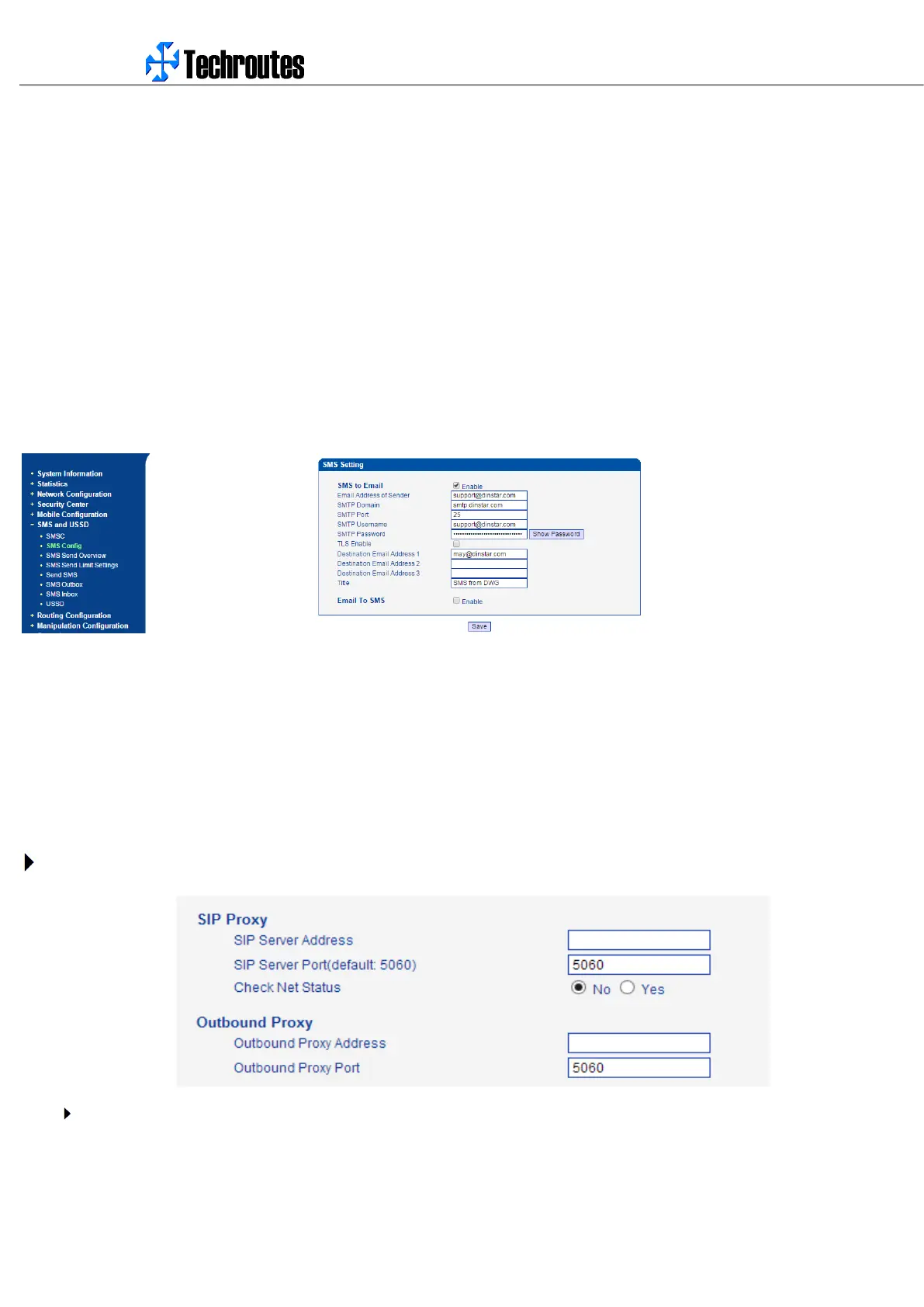
SMTP Domain: Configure the SMTP server domain here, different e-mail address server have different server addresses, please
confirm this with your e-mail provider or search from Internet.
SMTP Port: configure the SMTP port, usually 25, please also confirm this with your e-mail address provider.
SMTP Username: Enter your e-mail address username.
SMTP Password: Enter the password of the e-mail address you configured, please make sure it is correct.
TLS Enable: Enable the TLS or not. If your e-mail address server requires TLS, please enable it.
Destination Email Address 1/2/3: Enter the e-mail address to receive the SMS content.
Title: Configure the title of the e-mail, which will be used as the e-mail title when send the SMS to destination mail.
Here is one example:
4.9 CALL CONFIGURATION
4.9.1 SIP Configuration
This section is describes how to configure SIP server and SIP parameters.
Configure SIP server and Outbound Proxy server
SIP Server Address and Port


 To Next Page
 Loading...