20
ADHB-4 Mounting
ADHB-4 Mounting
Mounting
The ADHB-4 is mounted on or under a surface such as a desk by either placing it on the work surface or using mounting
brackets to fix it in place.
• Ensure there is enough clearance for back and side panel connections.
• Provide space for at least one (1) speaker pair.
NOTE: A dispatch monitor, weighing up to 35 lbs. maximum, can be placed on top of the unit.
ADHB-4 Mounting Brackets
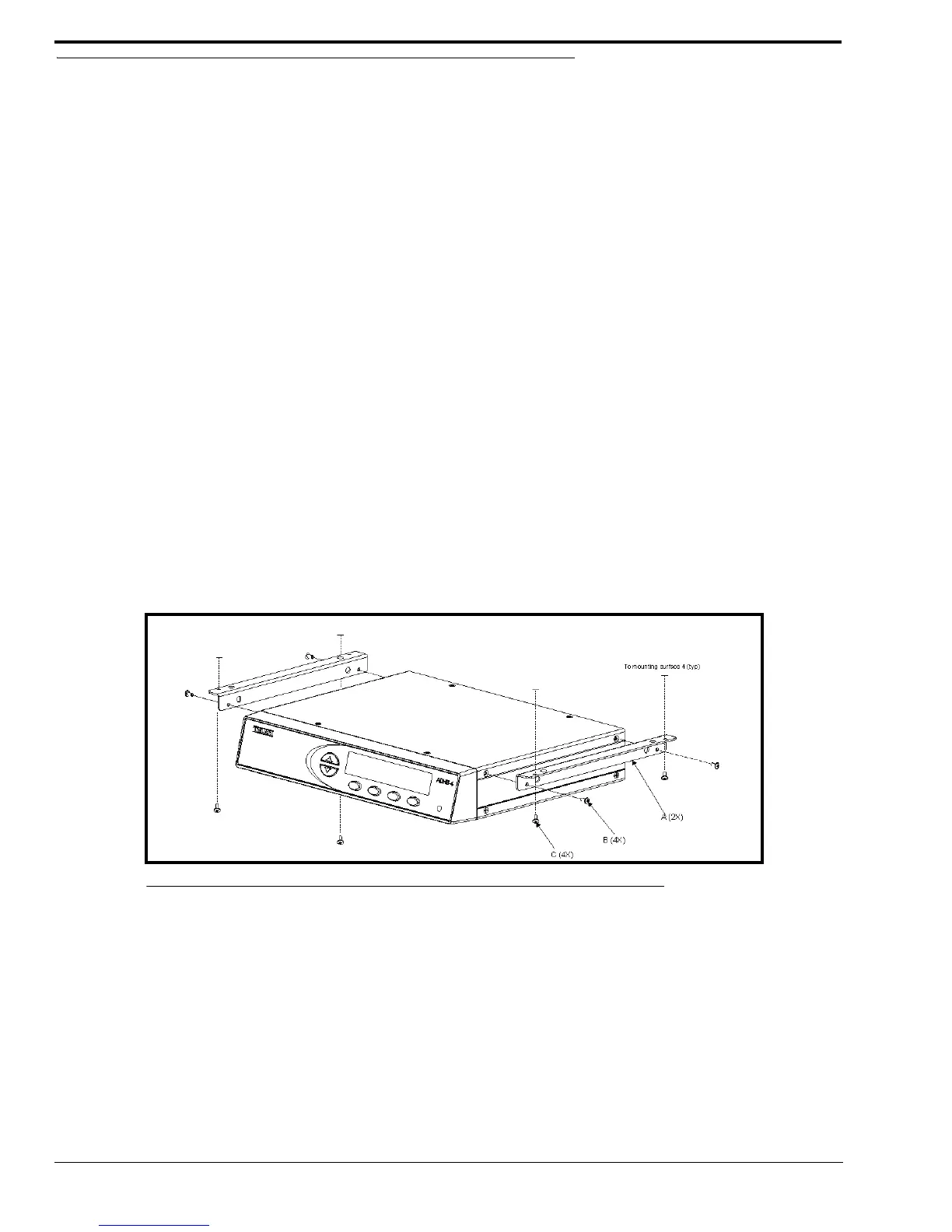
The ADHB-4 can be mounted on the underside or topside of the surface using optional ADHB-4 mounting brackets. For part
number information, see “Optional Hardware” on page 14.
Underside Mounting
To install the ADHB-4 on the desk underside, do the following:
1. Remove the top screws (B), from the sides of the ADHB-4.
2. Using the screws removed in step 1, attach the brackets (A) to the sides of the ADHB-4 as shown in Figure 4.
3. Hold the ADHB-4 in the desired mounting position.
4. Using a pencil, mark hole positions on the mounting surface.
5. Drill holes to accept a #4-40 x 1/4” screw (C).
6. Using the screws (C) supplied with the bracket, attach the ADHB-4 to the mounting surface.
FIGURE 4. ADHB-4 Underside Mounting



 To Next Page