23
Installation
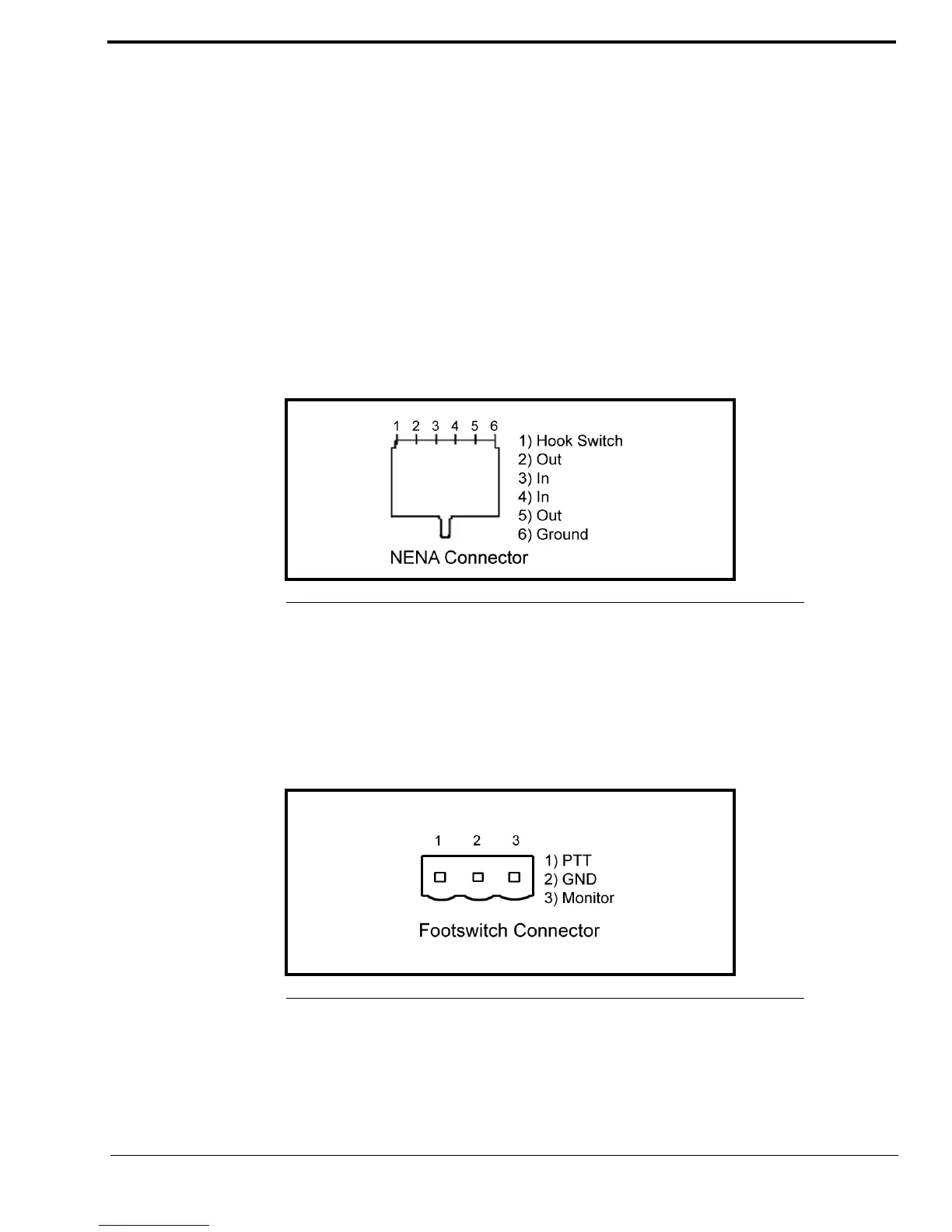
NENA Phone Connector
The NENA Phone connector description:
• ADHB-4 connects to NENA from the RJ-12 connector.
• Balanced 600 Ohm audio in and out to eliminate ground loops.
• Telephone RX audio routed to headset for entire offhook duration.
• Radio RX audio routes to console when telephone goes offhook.
• The hook switch input is diode protected from voltages above 5VDC.
RJ-12 Connector
An RJ-12 connector provides input/output for a NENA port. When the NENA is taken offhook, the input transitions from high
to low and NENA RX audio is routed to the active handset or headset’s earpiece while NENA TX is routed from the active
handset or headset’s microphone.
NOTE: A headset or handset is required for NENA use. A desk mic cannot be used on a NENA.
FOOTSWITCH Jack
The FOOTSWITCH jack accepts a 3-pin connector that has one (1) or two (2) footswitches connected to it. The input for
PTT uses pins 1 and 2. The input for monitor uses pins 2 and 3. The PTT footswitch can control the PTT functions for the
headset, RHB 1 or 2, or the desk mic depending on the configuration.
3-Pin Connector
FIGURE 7. RJ-12 Pin Outs—NENA phone
FIGURE 8. 3-Pin Connector Pin Outs—Footswitch



 To Next Page