V1.1-OCTOBER 2019
| 29
OMNIA MPX NODE MANUAL
Stream Error Correction
μMPX incorporates an advanced error correction scheme which can send error correction
packets along with multiplexed audio. Utilizing error correction requires additional
bandwidth. Settings in this section adjust how frequently these packets are sent, and how
many are sent in each group. Delay Size and Overhead work in conjunction with each
other, and there are combinations of values that should never be used (Overhead packets
should never exceed Delay Size, for example, and the sum of both fields should never
exceed 255). A bandwidth limiter is also available to prevent error correction overhead
from exceeding available bandwidth.
A formula for calculating how much total bandwidth will be consumed is:
((Error correction overhead/Error correction size/delay)*bitrate) +bitrate=maximum
bandwidth utilized.
So in practice, assuming you have a main bitrate of 320 kbps, with Size=64, Overhead=8,
bandwidth would grow by about 12%: 320 + 320 * 8 / 64 = 360 kbps.
Error correction is disabled by default.
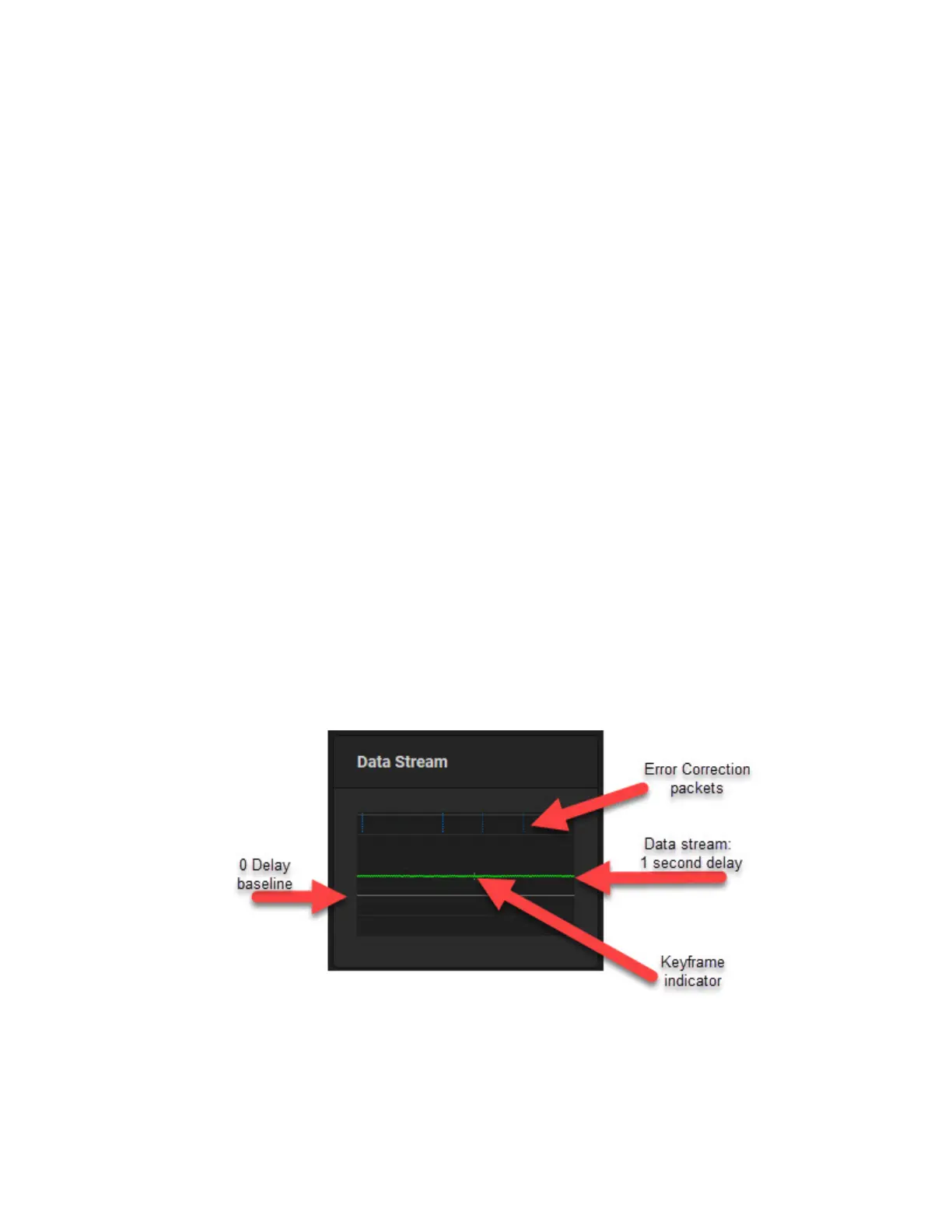
With a solid data connection, error correction may not be necessary. But if you start
noticing drop outs, and see red vertical lines on the Decoder data display, you may need to
enable some error correction at the Encoder, and increase delay at the Decoder in order to
buffer more data at the receiver.
As As you experiment with error correction settings in your Encoder, you can use the
dashboard of your Decoder to observe cause and effect.


 To Next Page