V1.1-OCTOBER 2019
| 40
OMNIA MPX NODE MANUAL
Waveform and MPX displays
Waveform provides a quick visual display of your signal, and differences between silence,
tone, and dense music will be obvious. The MPX display provides a view of the FM signal,
including L+R, 19kHz stereo pilot L-R, and RDS signals. Be aware that these displays are
captured before the Output Level slider control in the Decoder Setup page, and changing
that control will affect your output to the transmitter, but not this graphic of the signal.
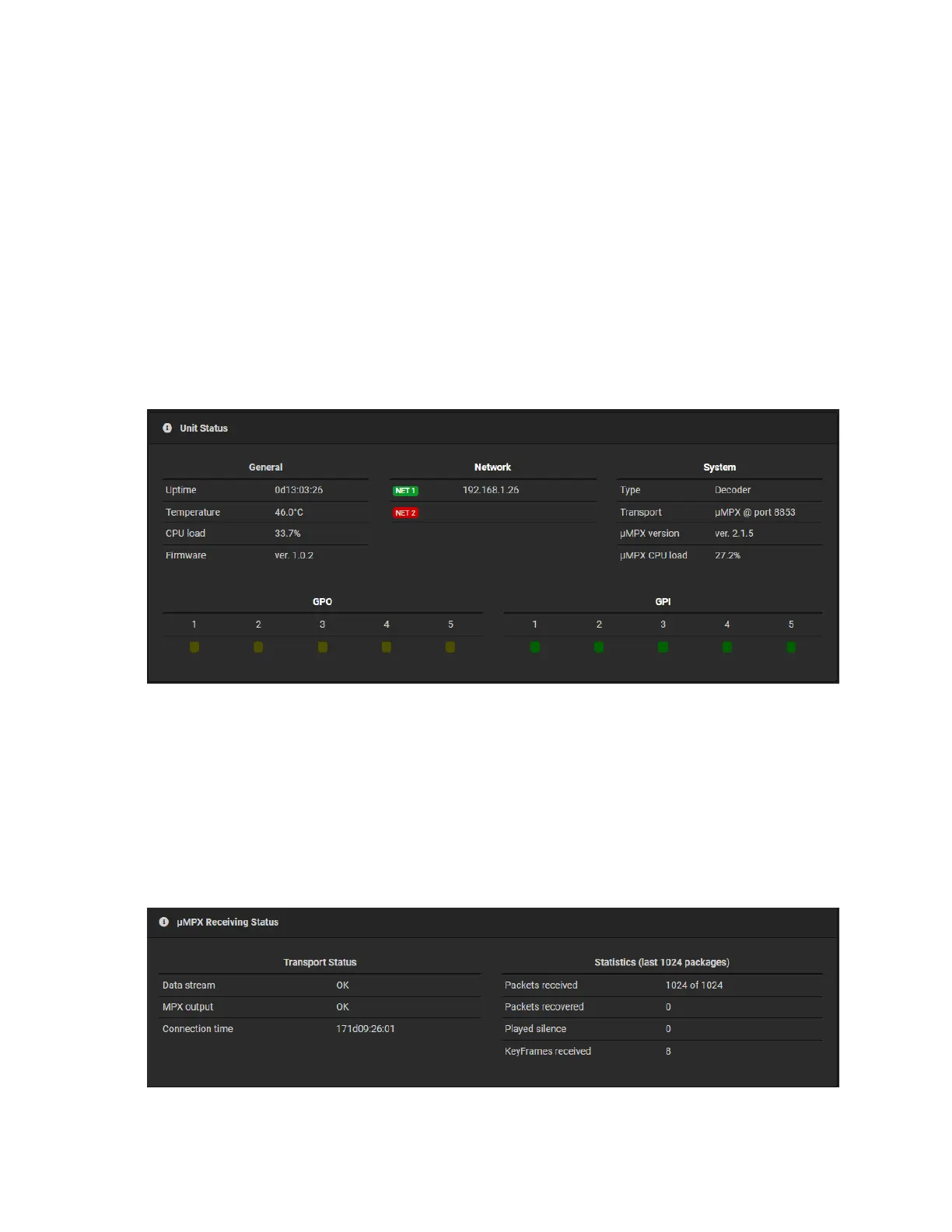
Dashboard: Unit Status
The Unit Status section of the Decoder Dashboard page provides general configuration,
system and network information, and can be useful for checking the status of your unit for
details like, uptime, CPU temperature and load and firmware versions.
GPI and GPO indicators show contact closure status, and can be useful for GPIO testing
and configuration.
Dashboard: μMPX Receiving Status
The Receiving Status section provides indication of transport health and status, including
a connection time read-out, and a short term statistics read-out for the last 1024 packets
received or recovered.


 To Next Page