Emergency Lane Departure Avoidance
Emergency Lane Departure Avoidance automatically applies
steering to avoid a potential collision in situations where:
•
Model Y is departing a lane and may collide with a vehicle
traveling in the same direction in the adjacent lane
(regardless of the status of the turn signal).
• Model Y is departing a lane into an oncoming lane, the
turn signal is off, and an oncoming vehicle is detected.
• Model Y is departing the road and the turn signal is off
(for example, very close to the edge of the road and a
collision may occur).
To turn this feature on or off, touch Controls > Autopilot and
then touch Emergency Lane Departure Avoidance.
When Emergency Lane Departure Avoidance applies
steering, a chime sounds and the
touchscreen displays a
warning and highlights the lane marking in red.
Emergency Lane Departure Avoidance operates when Model
Y is traveling between 30 and 90 mph (48 and 145 km/h) on
a road with clearly visible lane markings, curbs, etc.
WARNING: Emergency Lane Departure Avoidance is
not a substitute for attentive driving and sound
judgment. Keep your eyes on the road when driving
and never depend on Emergency Lane Departure
Avoidance to prevent a collision. Several factors can
reduce or impair performance. Depending on
Emergency Lane Departure Avoidance to prevent a
potential collision can result in serious injury or death.
Blind Spot Assist
Automatic Blind Spot Camera
You can turn it on/off by touching Controls >
SafetyAutomatic Blind Spot Camera on the touchscreen.
Once enabled, when the turn signal is engaged, the
touchscreen displays the image from the corresponding side
repeater camera.
When a vehicle is detected in your blind
spot in an adjacent lane, a vertical red bar appears on the
image to warn you. For example, when the left turn signal is
engaged and a vehicle is detected, a vertical red bar appears
on the left side of the image. You can move the image to a
different location on the touchscreen. To do so, touch and
drag the image to the new location (valid locations are
indicated by shaded areas that display when you touch and
hold the image).
WARNING:
Automatic Blind Spot Camera does not
eliminate the need to drive attentively and manually
perform shoulder checks when changing lanes.
Blind Spot Collision Warning Chime
If you want a chime to sound when a vehicle is in your blind
spot and a possible collision is detected, touch Controls >
Safety > Blind Spot Collision Warning Chime.
WARNING:
Blind Spot Camera does not eliminate the
need to drive attentively and manually perform
shoulder checks when changing lanes.
WARNING:
Blind Spot Collision Warning Chime cannot
detect every collision. It is the driver's responsibility to
remain alert and perform the appropriate shoulder
checks when changing lanes.
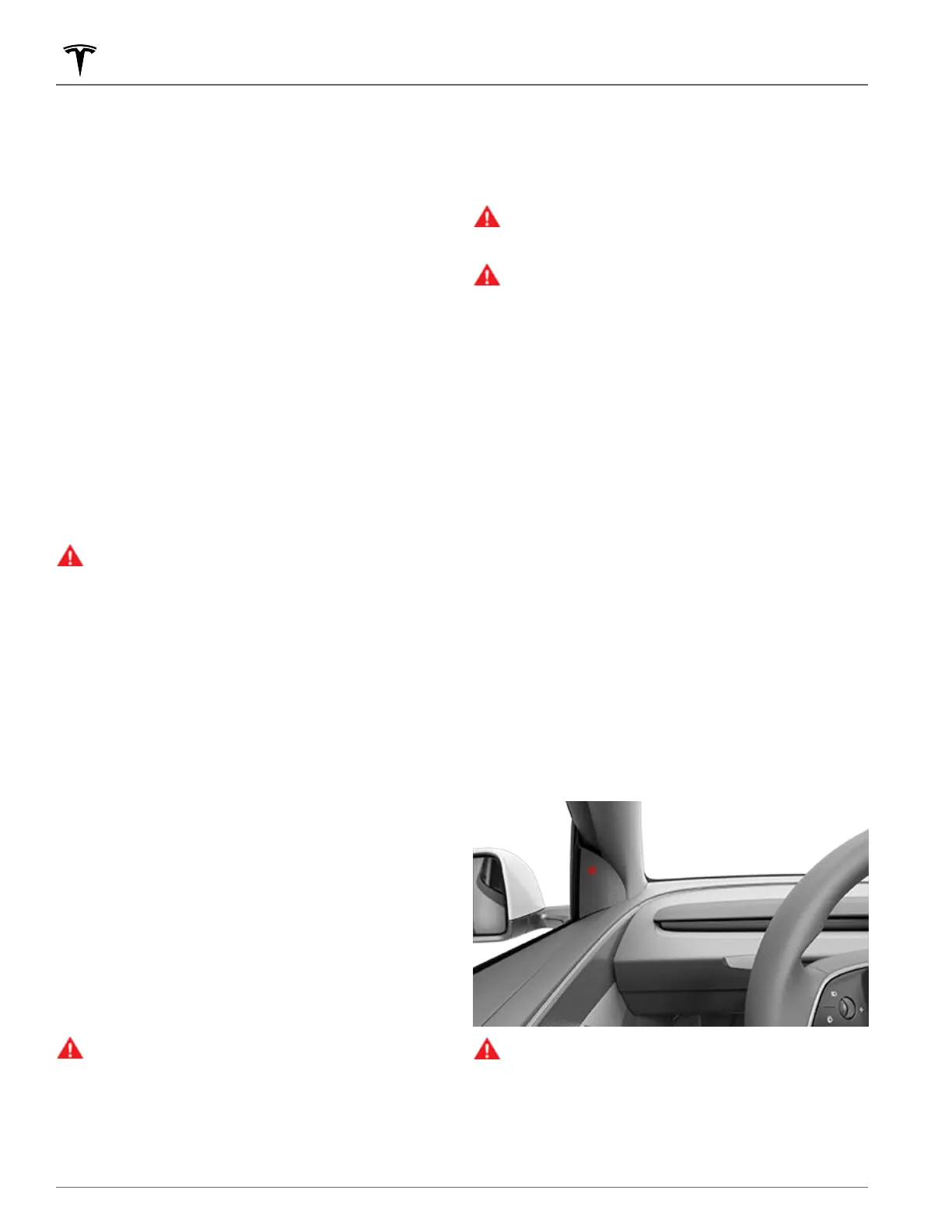
Blind Spot Warning Light
Both front door pillars are equipped with a blind spot warning
light in the upper speaker grille. You can enable or disable the
indicators by touching
Controls > Safety > Blind Spot Warning
Light. When an object is detected in your blind spot in an
adjacent lane a red light appears in the upper speaker grille.
• A solid red light indicates that an object has been
detected in your blind spot.
• A blinking red light indicates that an object is in your blind
spot while the turn signal is indicating your intent to turn
that direction.
• A rapid blinking red light indicates that an object is
detected and immediate corrective action is required to
avoid a collision.
If you attempt to open a door when an approaching object is
detected in your blind spot (for example, if
Model Y is parked
and there is a bicyclist approaching from behind), the blind
spot warning light blinks, an alert displays on the
touchscreen, and your door will not open upon initial button
press. Wait a short time and press the button a second time
to override the alert if the object is still detected.
WARNING: Do not rely on Blind Spot Warning Light to
detect objects in your blind spot. Do not assume that
the door will be locked if there is an approaching
object detected in your blind spot while Model Y is in
Park. Always visually confirm that a lane is free from
obstacles, vehicles, and pedestrians before exiting
your lane or opening a door.
Lane Assist
118 MODEL Y Owner's Manual














 To Next Page