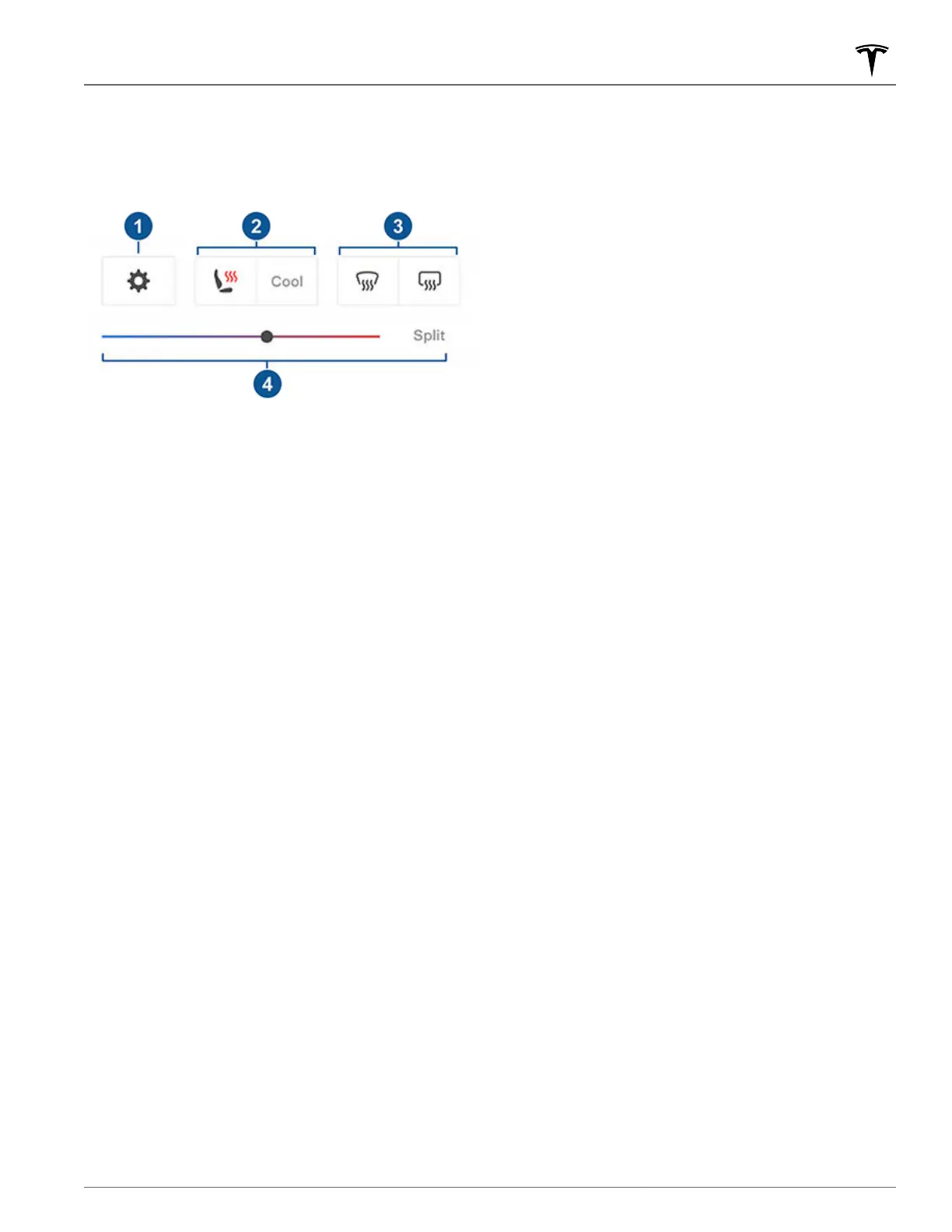
Climate Popup
Touch the temperature arrows on the bottom of the
touchscreen to display a popup for easy access to some of
the most common climate controls:
NOTE: For one-touch access to seat heaters and defrosters,
you can add these controls to My Apps. See Customizing My
Apps on page 7.
1.
Touch to access the main climate controls screen.
2. Enable or disable heated or cooled front seats.
3. Enable or disable the front or rear windshield defrosters.
When the rear defrost is enabled, the exterior side mirrors
will also be heated. Heating for the exterior side mirrors
will automatically turn off based on the ambient
temperature.
4. Modify the cabin temperature by dragging the slider. You
can also enable temperature splitting which allows the
driver and front passenger to customize their own climate
preferences. The front passenger can touch the
temperature icon on the bottom of the touchscreen or the
main climate controls screen to adjust. Touch
Split again
to disable climate splitting.
Keep Climate On, Dog, and Camp
The Keep Climate On, Dog, and Camp settings allow you to
keep the climate control system running when in Park, even
after you've left Model Y or choose to stay inside the vehicle.
These settings are useful when it is important to maintain the
cabin temperature in hot or cold weather conditions. For
example, when leaving groceries in
Model Y on hot days, you
may want to use Keep Climate On to prevent spoilage.
Dog is designed to maintain a comfortable cabin temperature
for your pet while you actively and frequently monitor this
temperature using the mobile app (which requires both your
phone and the vehicle to have cellular connectivity). When in
Dog, the touchscreen displays the current cabin temperature
to inform people passing by that your pet is safe. This setting
is not intended for people, and should only be used for short
periods of time while you stay in close proximity should you
need to return to the vehicle in situations where the
temperature can no longer be maintained.
NOTE: To avoid accidentally pressing the window switch
(such as your dog stepping on it), the windows cannot be
rolled down while Dog is enabled.
NOTE:
If Dog and Sentry are enabled at the same time, Sentry
defaults to Disable Sentry Sounds to protect your pet. See
Sentry Mode on page 130 for more information.
Live Camera view is now available if Sentry Mode or Dog
Mode, or both, are enabled. When Sentry Mode is on, the
cameras show a live view of the vehicle's surroundings. When
Dog Mode is on, the interior cabin camera shows the inside
of the vehicle so you can check on your pet at any time. If
both are enabled, switch the camera views by touching the
gray circles or the interior icon that correspond to different
cameras on the mobile app. See
Sentry Mode on page 130 for
more information.
NOTE: Enabling the interior cabin camera for Dog or Sentry
Mode requires the mobile app version 4.15.0 or higher. This
feature is not supported in vehicles with Autopilot computer
2.0 or 2.5. Touch
Controls > Software and look at Autopilot
Computer to find out which computer your vehicle has.
NOTE: View Live Camera is limited to approximately one hour
(or 15 minutes for some regions) of cumulative usage per day.
Camp allows you to power electronics through the USB ports
and low voltage outlet in addition to maintaining the cabin
temperature. The touchscreen remains on so you can play
music, browse the internet, play games in the arcade, or
watch shows in Tesla Theater. You can also control media and
climate settings from a paired phone. Camp is ideal for
remaining inside your vehicle, such as camping or staying
with a child. While active, Sentry Mode and the vehicle alarm
system are disabled. Walk-Away Door Lock is inactive.
To operate Keep Climate On, Dog, or Camp:
1. Make sure the Battery's charge level is at least 20%.
2. Engage Park. The Keep Climate On, Dog, and Camp
settings are available only when Model Y is in Park.
3. If necessary, adjust the climate settings.
4.
On the climate controls screen, touch Keep Climate On,
Dog, or Camp.
NOTE: You can also control Dog and Camp from the
mobile app, by swiping up from the gray bar on the
Climate screen.
The climate control system attempts to maintain your climate
settings until you shift out of Park or manually turn it off.
Avoid using Keep Climate On, Dog, or Camp when the
Battery's charge level is low.
Dog cannot be enabled if the cabin temperature is too hot, or
if the vehicle detects an issue with the climate control
system. Ensure that the cabin temperature is at a safe and
comfortable level before enabling Dog.
If Keep Climate On, Dog, or Camp are on, the Tesla mobile
app attempts to repeatedly send notifications reminding you
to check on anything that you have left in
Model Y if:
•
The Battery's charge level drops below 20%.
Operating Climate Controls
135Climate














 To Next Page