Statistics 12-17
8312STAT.DOC TI-83 international English Bob Fedorisko Revised: 02/19/01 12:42 PM Printed: 02/19/01 1:37
PM Page 17 of 38
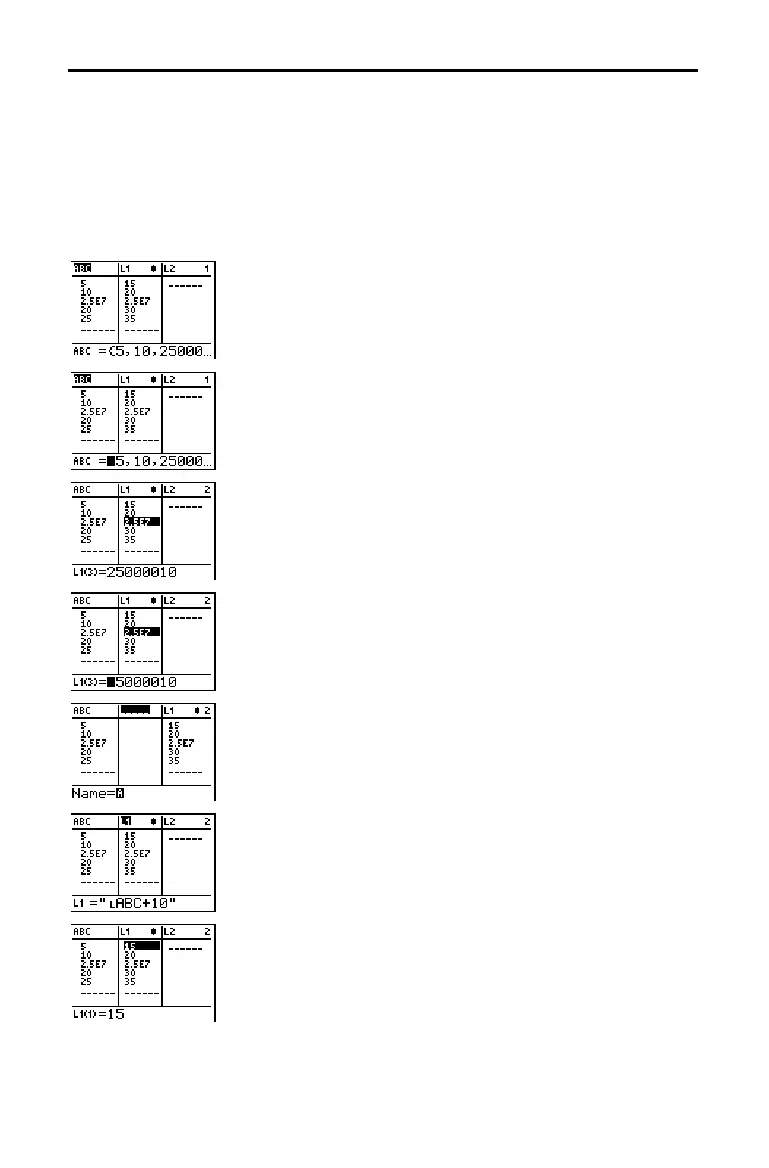
The stat list editor has four contexts.
•
View-elements context
•
Edit-elements context
•
View-names context
•
Enter-name context
The stat list editor is first displayed in view-elements
context. To switch through the four contexts, select
1:Edit
from the
STAT EDIT
menu and follow these steps.
1. Press
}
to move the cursor onto a list name. You are
now in view-names context. Press
~
and
|
to view list
names stored in other stat list editor columns.
2. Press
Í
. You are now in edit-elements context. You
may edit any element in a list. All elements of the
current list are displayed in braces (
{ } )in the entry
line. Press
~
and
|
to view more list elements.
3. Press
Í
again. You are now in view-elements
context. Press
~
,
|
,
†
, and
}
to view other list
elements. The current element’s full value is displayed
in the entry line.
4. Press
Í
again. You are now in edit-elements
context. You may edit the current element in the entry
line.
5. Press
}
until the cursor is on a list name, then press
y
[
INS
]. You are now in enter-name context.
6. Press
‘
. You are now in view-names context.
7. Press
†
. You are now back in view-elements context.
Switching Stat List Editor Contexts
Stat List Editor
Contexts



 To Next Page
 Loading...













