Applications 17-11
8317APPS.DOC TI-83 international English Bob Fedorisko Revised: 02/19/01 1:00 PM Printed: 02/19/01 1:39 PM
Page 11 of 20
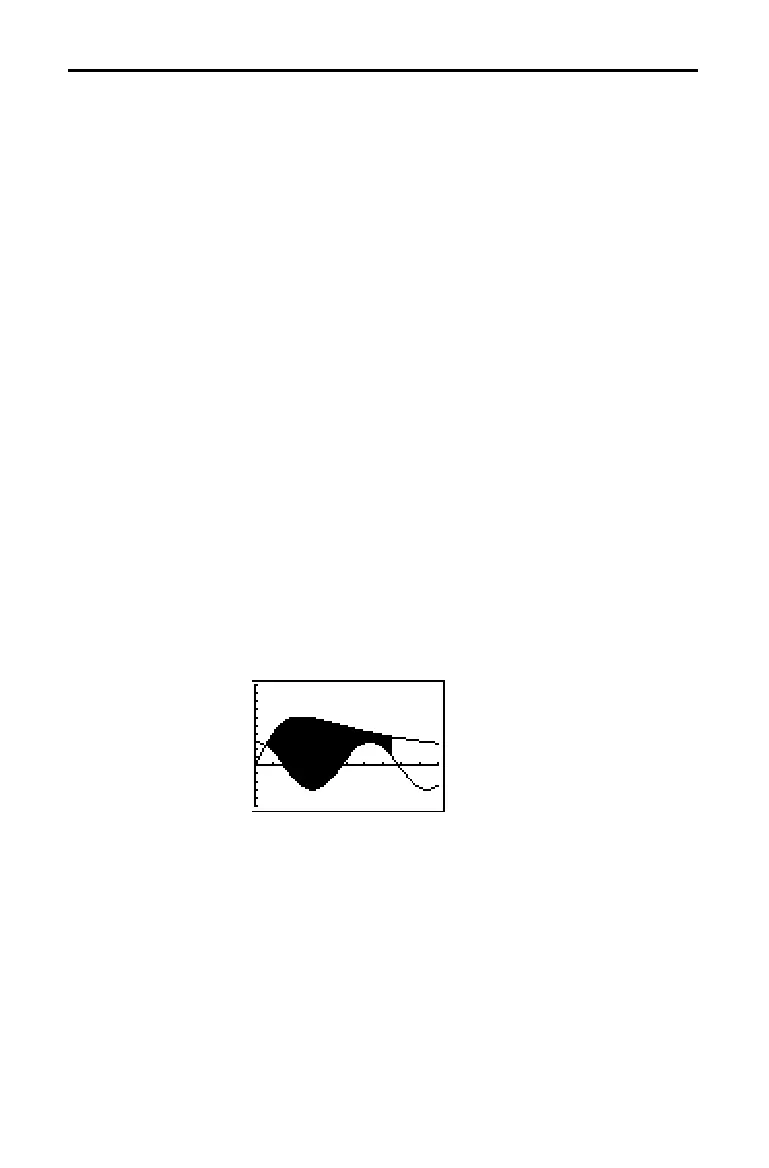
Find the area of the region bounded by
f(x) = 300x / (x
2
+ 625)
g(x) = 3cos(
.
1x)
x = 75
1. Press
z
. Select the default mode settings.
2. Press
p
. Set the viewing window.
Xmin=0 Ymin=
L
5
Xmax=100 Ymax=10
Xscl=10 Yscl=1
Xres=1
3. Press
o
. Turn off all functions and stat plots. Enter the
upper and lower functions.
Y
1
=300X
à
(X
2
+625)
Y
2
=3cos(.1X)
4. Press
y
[
CALC
] 5 to select 5:Intersect. The graph is
displayed. Select a first curve, second curve, and guess
for the intersection toward the left side of the display.
The solution is displayed, and the value of
X at the
intersection, which is the lower limit of the integral, is
stored in
Ans and X.
5. Press
y
[
QUIT
] to go to the home screen. Press
y
[
DRAW
] 7 and use Shade( to see the area graphically.
Shade(Y
2
,Y
1
,Ans,75)
6. Press
y
[
QUIT
] to return to the home screen. Enter the
expression to evaluate the integral for the shaded
region.
fnInt(Y
1
–Y
2
,X,Ans,75)
The area is 325.839962.
Finding the Area between Curves
Problem
Procedure



 To Next Page
 Loading...













