Data/Matrix Editor 508
Deleting a Variable
Because all Data/Matrix Editor variables are saved automatically, you can accumulate
quite a few variables, which take up memory.
To delete a variable, use the VAR-LINK screen (2°). For information about
VAR-LINK, refer to Memory and Variable Management.
Entering and Viewing Cell Values
If you create a new variable, the Data/Matrix Editor is initially blank (for a list or data
variable) or filled with zeros (for a matrix). If you open an existing variable, the values in
that variable are displayed. You can then enter additional values or edit the existing
ones.
The Data/Matrix Editor Screen
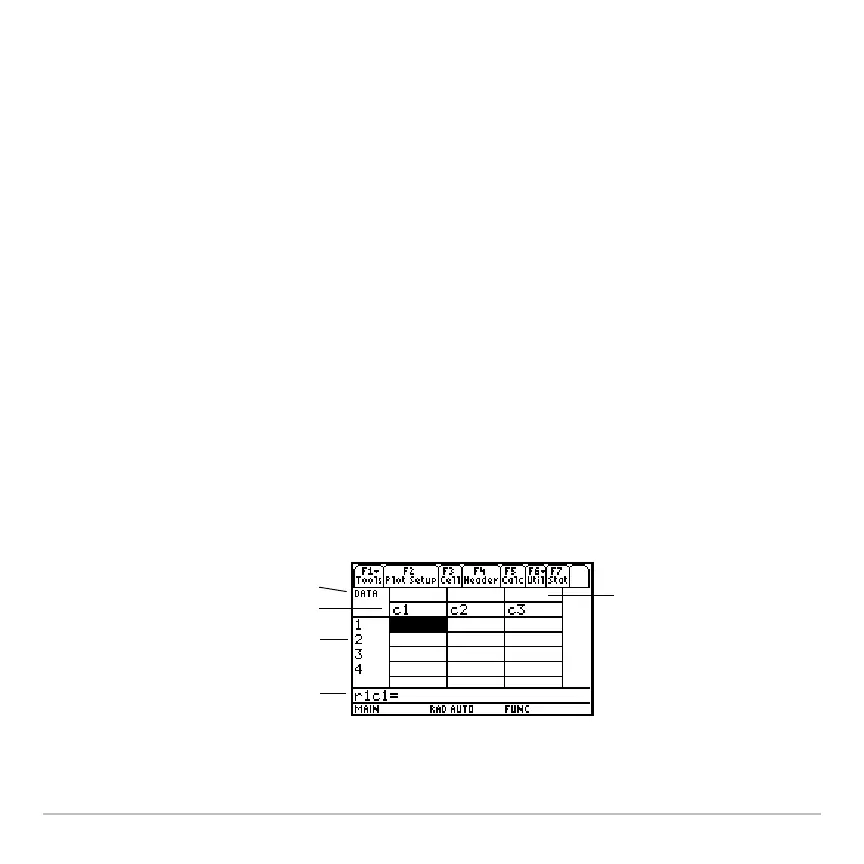
A blank Data/Matrix Editor screen is shown below. When the screen is displayed initially,
the cursor highlights the cell at row 1, column 1.
Ê
Ë
Ì
Í
Î
Ê Variable type
Ë Column headers
Ì Row numbers
Í Row and column number
of highlighted cell
Î Column title cells, used
to type a title for each
column














 To Next Page