POWERMASTER 500, 500P, 350, 350P
4-4
March 17, 2006
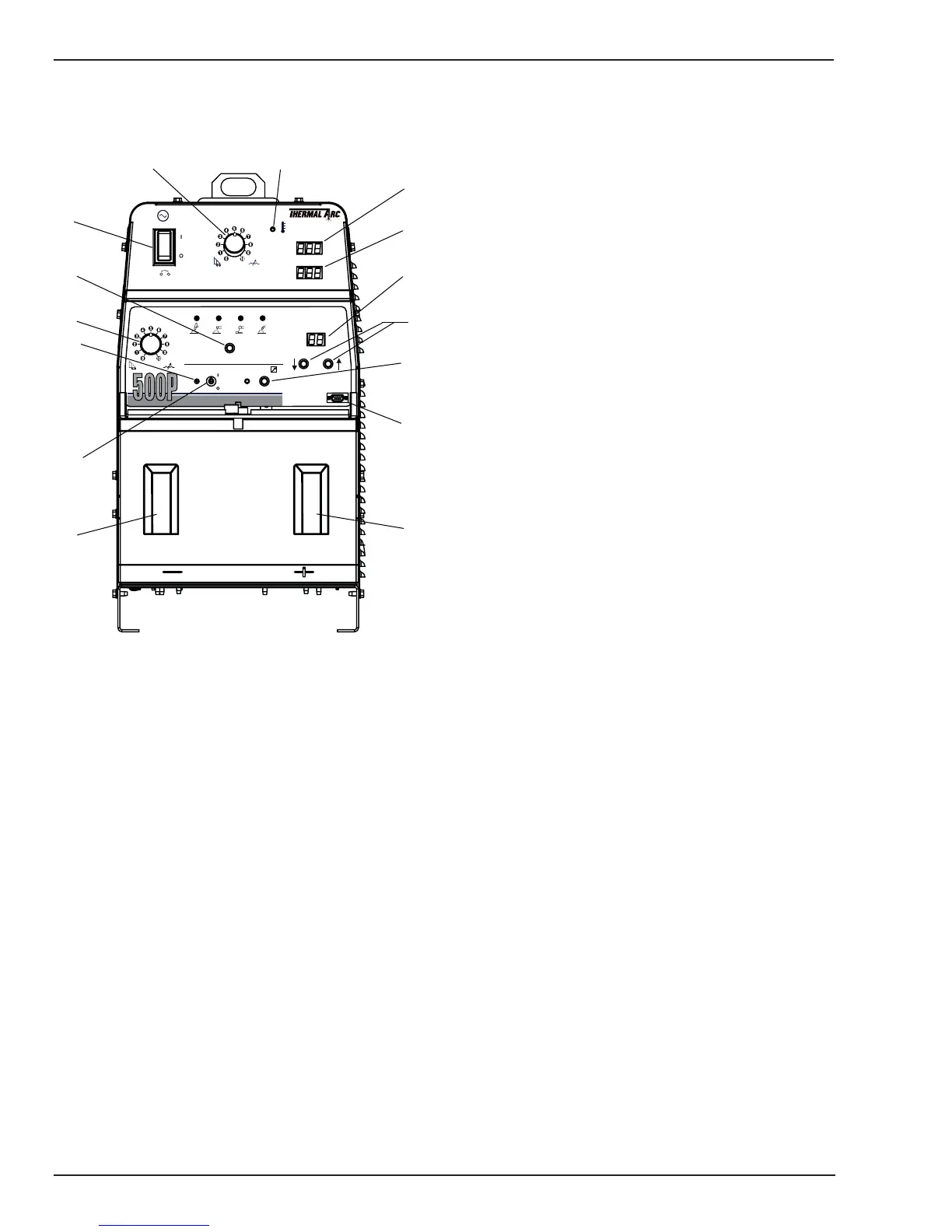
4.03 Power-Master 500P and 350P Controls
POWER
10A
A
V
GTAW SMAW GMAW
PULSED
GMAW
MODE SELECT
CONTACTOR REMOTE ON
PULSE SCHEDULE
PROGRAMMER
POWERMASTERPOWERMASTER
6
8
9
3
4
2
7
12
15
14
10
13
5
1
11
Art # A-06858
Figure 4-2: Power-Master 500P and 350P Front Panel
1. Control Power ON/OFF Switch: This circuit breaker/
switch activates the controls on the power source.
When this switch is in the OFF position, the power
source is in standby mode. Line voltage is still present
internal to the machine, but the controls are not
energized. In the ON position, power is applied to the
control circuit of the power source. Whenever the switch
is in the ON position, the digital meter displays are
activated.
This circuit breaker also protects the auxiliary 24 VAC
and 115 VAC power in case of an overload. If the
circuit breaker trips, determine the cause of the
overload before resetting.
2. Output Control: This control is used to set the output
voltage or amperage depending on the operating mode
of the power source. For GTAW and SMAW modes,
this control is used to preset the amperage. For GMAW
this control presets the welding voltage. For Pulse
GMAW this control sets the pulse reference, which is
similar in function to a voltage control.
This control becomes inactive if REMOTE control is
selected, except for GTAW mode. In GTAW mode this
control is used to set the maximum welding current
available to the remote control.
3. Overtemp Indicator: This indicator light will be on if
the power source has overheated. Whenever this light
is on, the power source will be disabled from welding,
but the fans will continue to run to cool the unit. Once
the power source cools down, this light will
automatically go off and the unit will be ready to weld.
If this light comes on, the cause of the overheating
condition should be investigated and resolved before
continuing.
4. Amps Display: The top display shows preset
amperage for GTAW and SMAW modes when not
welding. This display shows the actual welding current
for all modes while welding. For GMAW and Pulsed-
GMAW modes, the meter will hold the last value at the
end of the weld for up to 5 seconds.
5. Volts Display: The bottom display shows preset
voltage for GMAW, and preset pulse reference for
Pulsed-GMAW, when not welding. The display will
show actual welding voltage for all modes while
welding. For GMAW and Pulsed-GMAW modes, the
meter will hold the last value at the end of the weld for
up to 5 seconds.
6. Mode Select Switch: The mode select switch is used
to select one of the four built in operating modes of
the power source. One of the four indicator lights
located above the switch should be on at all times,
indicating the mode which is currently selected. The
four modes are as follows:
GTAW mode: In this mode the power source
operates in constant current mode. The front panel
control can be used to preset the welding
amperage. If a foot pedal or other remote control
is used, then the front panel control is used to set
the maximum welding current available to the foot
pedal. For GTAW mode the arc force control is not
active.
A lift arc circuit is automatically activated for GTAW
mode, unless disabled internally by jumper
selections on the control board (See installation
chapter for jumper settings). The lift arc circuit
allows the arc to be initiated by momentarily
touching the tungsten to the work and then lifting
or rocking the tungsten off the work. The lift arc
circuit limits the “touch” current to a low value and
then switches to the preset current after the arc is
struck.



 To Next Page