EasyManua.ls Logo

Thermal Arc 500 - User Manual

Thermal Arc 500
100 pages
Print Icon
To Next Page IconTo Next Page
Loading...
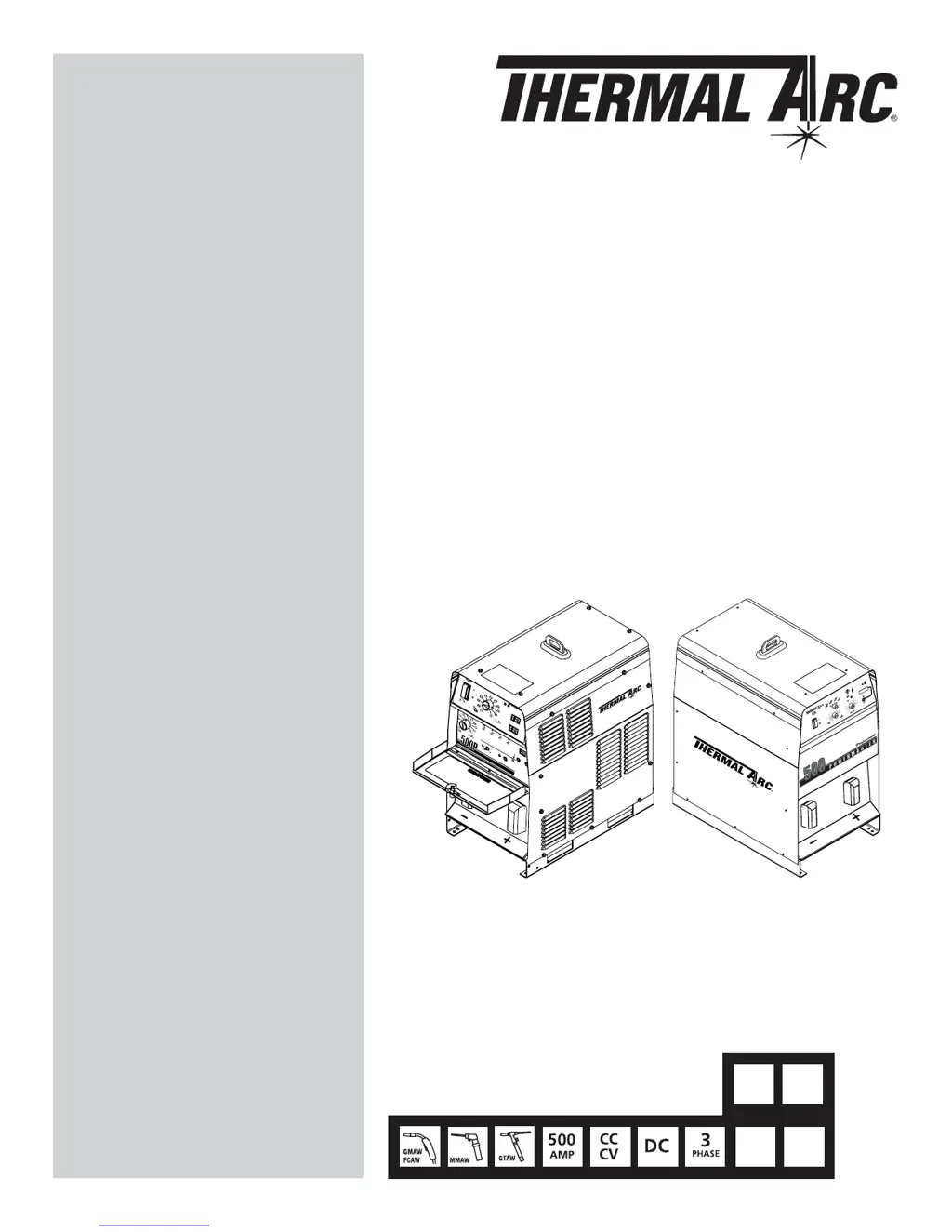
POWERMASTER
W
A
R
N
IN
G
P
O
W
E
R
1
0
A
R
E
M
O
T
E
L
O
C
A
L
C
O
N
T
A
C
T
O
R
P
U
L
S
E
S
C
H
E
D
U
L
E
P
R
O
G
R
A
M
M
E
R
G
T
AW
S
M
A
W
G
M
A
W
P
U
L
S
E
D
G
M
A
W
MODE SELECT
CONTACTOR
REMOTE ON
P O W E R M A S T E R
POWER
10A
A
V
Art # A-07556
400
V
460
V
230
V
208
V
CC/CV POWER SOURCE
500
500P
350
350P
Service
Manual
Version No: AB.01 Issue Date: March 17, 2006 Manual No.: 0-4938B
Operating Features:

Table of Contents

Questions and Answers

  • S
    Susan BensonAug 4, 2025
    What to do if Thermal Arc 500 is completely inoperative?
    • C
      Cole JohnsonAug 4, 2025
      If your Thermal Arc Welding System is completely inoperative, with the digital display and fans off, and no output, here are some things to check: * Start by checking for blown input fuse or fuses. * Make sure the voltage setting on the changeover board is correct. * Check the wiring to the input terminal block and ground screw. * Ensure the front panel CONTROL POWER switch/circuit breaker is ON. * With the CONTROL POWER switch ON and power applied, check for 120 VAC power on the rear duplex. * Inspect all connections to the control boards. * Examine the wiring to the small control transformer mounted underneath the control board. Also, the circuit breaker switch or the main or display control board on the front panel might be defective.
  • D
    Danielle WeaverAug 8, 2025
    What to do if Thermal Arc 500 Welding System blows input fuse as soon as power is applied?
    • P
      Patrick BeardAug 8, 2025
      If your Thermal Arc Welding System blows the input fuse immediately upon applying power, consider the following checks: * Verify the wiring to the input terminal block and ground screw. * Ensure the voltage setting on the changeover board is correct. * Inspect the internal wiring to the terminal block, input rectifier, IGBTs, contactors, and changeover board. Also, the input rectifier module, suppressors, IGBT modules, or capacitor boards might be defective.
  • A
    Anthony JohnsonAug 12, 2025
    What to do if Thermal Arc 500 powers up but fans do not run?
    • V
      vmolinaAug 12, 2025
      If the Thermal Arc Welding System powers up but the fans aren't running, remember that the fans should normally run when the machine is first powered up or whenever the OUTPUT CONTACTOR is ON. Check the following: * Check the wiring to all three fans. * Check the wiring to the main control board – J9. Also, the main control board or the fans themselves might be defective.
  • S
    Samantha SmithAug 16, 2025
    Why does CONTROL POWER circuit breaker trip off on Thermal Arc Welding System?
    • A
      Ann WilsonAug 17, 2025
      If the CONTROL POWER circuit breaker trips off on your Thermal Arc Welding System, investigate these potential issues: * Check for shorts or overload on either rear duplex, 14 pin receptacle or 19 pin receptacle and cables. * Check for an internal short circuit and inspect the wiring to both contactors, all three fans, and to the main control board – J9. * Check the internal wiring to the rear duplex, amphenol board, and small control transformer. Also, the front panel circuit breaker, the small control transformer or the aux. transformer might be defective.
  • L
    Lisa MaxwellAug 21, 2025
    What to do if Thermal Arc Welding System powers up but has no output or incorrect output (Power-Master 500 and 350 only)?
    • W
      washingtondavidAug 21, 2025
      If your Thermal Arc Welding System (Power-Master 500 and 350 only) powers up but has no output or an incorrect output, you can check the following: * Check for open circuit voltage. * Check for shorted output diode. * Check front panel controls. * Check internal wiring to control board and current sensor. Also, the main control board, IGBT or input rectifier module, or the current sensor might be defective.
  • J
    Juan SchneiderAug 25, 2025
    What to do if Thermal Arc 500 Welding System powers up but has no output or incorrect output (Power-Master 500P and 350P only)?
    • D
      Daniel BensonAug 26, 2025
      If your Thermal Arc Welding System (Power-Master 500P and 350P only) powers up but shows no output or an incorrect output, consider these checks: * Check for open circuit voltage. * Check for shorted output diode. * Check front panel controls. * Check internal wiring to control board and current sensor. Also, the main control board, IGBT or input rectifier module, or the current sensor might be defective.
  • J
    jblackAug 29, 2025
    How to fix erratic arc on Thermal Arc 500?
    • J
      Joel AdkinsAug 29, 2025
      To address an erratic arc on your Thermal Arc Welding System, consider the following: * Check for loose or incorrect polarity connection to electrode and work. * Ensure good gas flow and correct mixture. * Check if wire feeding smoothly, including feed rolls, liner, tip, and nozzle. * Check welding wire for excess lubrication or improper cast. * Check voltage and wire speed settings. Also, the electronic inductance and torch to work distance should be checked. The main control board might be defective.

Summary

POWERMASTER 500, 350, 350 P Service Manual

WARNINGS

SECTION 1: SAFETY INSTRUCTIONS AND WARNINGS

1.01 Arc Welding Hazards

Details hazards associated with arc welding, including electrical shock.

1.02 Principal Safety Standards

Lists key safety standards and publications for welding and cutting.

SECTION 2: INTRODUCTION

2.01 How To Use This Manual

Guide on interpreting manual symbols, warnings, and cautions.

2.05 General: Power-Master 500 & 350

Overview of the Power-Master 500/350 inverter DC power sources and their capabilities.

2.06 Power-Master 500 Specifications

Detailed specifications for the Power-Master 500, including input data and dimensions.

SECTION 3: INSTALLATION

3.01 Location

Specifies requirements for unit placement to ensure proper operation and airflow.

3.02 Voltage Changeover

Procedure for setting the voltage changeover board for incoming AC line voltage.

3.05 Grounding

Details grounding requirements for personnel safety and overcurrent protection.

SECTION 4: OPERATION

4.01 General Safety Precautions

Emphasizes using protective clothing and eye safeguards before operating the machine.

4.02 Power-Master 500 and 350 Controls

Explanation of the front panel controls for Power-Master 500 and 350 models.

4.03 Power-Master 500 P and 350 P Controls

Explanation of the front panel controls for Power-Master 500P and 350P models.

4.05 GTAW (Gas Tungsten Arc Welding)

Procedure for operating the machine in GTAW mode.

4.06 SMAW (Shielded Metal Arc Welding)

Procedure for operating the machine in SMAW mode.

4.08 GMAW (Gas Metal Arc Welding)

Procedure for operating the machine in GMAW mode.

SECTION 5: MAINTENANCE

Periodic Cleaning and Inspection

Outlines routine maintenance tasks like cleaning and checking components.

SECTION 6: TROUBLESHOOTING

6.01 General

Overview of troubleshooting purpose and general advice.

6.03 Troubleshooting Guide

Guide for diagnosing malfunctions by checking front panel lights and causes.

6.04 Power-Master 500 and 350 Block Diagram

Visual representation of internal components and interconnections for specific models.

6.05 Power-Master 500 P and 350 P Block Diagram

Visual representation of internal components and interconnections for P models.

6.06 Control Board Connector Signals

Details signals and functions of connectors on the main control board.

6.07 Power Circuit Tests

Procedures for testing rectifiers, IGBTs, and output diodes using a multi-meter.

6.08 Semiconductor Replacement Requirements

Guidelines for safely replacing power semiconductors like diodes and IGBT modules.

6.11 Calibration Procedure

Steps for calibrating voltage and current feedback signals using a load bank.

SECTION 7: REPAIR PROCEDURES

7.01 Output Diode Replacement

Step-by-step guide for replacing failed output diode modules.

7.02 IGBT Module Replacement

Procedure for replacing IGBT modules, including cleaning and thermal compound.

SECTION 8: PARTS LIST

8.01 Equipment Identification

Instructions on how to identify equipment using model and specification numbers.

8.03 External Panels

Lists external panels of the welding machine and their part numbers.

8.04 Base Parts

Lists components and hardware related to the base assembly of the machine.

8.05 Front Panel Parts (Power-Master 500 and 350)

Lists parts specific to the front panel of the 500 and 350 models.

8.06 Front Panel Parts (Power-Master 500 P and 350 P)

Lists parts specific to the front panel of the 500P and 350P models.

8.07 PC Board Parts

Lists various printed circuit boards used in the equipment.

8.08 Rear Panel Parts (Power-Master 500 and 350)

Lists parts located on the rear panel of the 500 and 350 models.

8.09 Rear Panel Parts (Power-Master 500 P and 350 P)

Lists parts located on the rear panel of the 500P and 350P models.

8.10 Center Chassis Parts

Lists components and hardware located in the center chassis assembly.

APPENDIX 1: GENERAL INFORMATION

APPENDIX 2: PM-500;350 SCHEMATIC DIAGRAM

APPENDIX 3: PM500;350 CONNECTION DIAGRAM - 1 OF 2

APPENDIX 4: PM500;350 CONNECTION DIAGRAM - 2 OF 2

APPENDIX 5: PM-500 P;350 P SCHEMATIC DIAGRAM

APPENDIX 6: PM500 P;350 P CONNECTION DIAGRAM - 1 OF 2

APPENDIX 7: PM500 P;350 P CONNECTION DIAGRAM - 2 OF 2

LIMITED WARRANTY

WARRANTY SCHEDULE

GLOBAL CUSTOMER SERVICE CONTACT INFORMATION

Thermal Arc 500 Specifications

General IconGeneral
BrandThermal Arc
Model500
CategoryWelding System
LanguageEnglish

Related product manuals