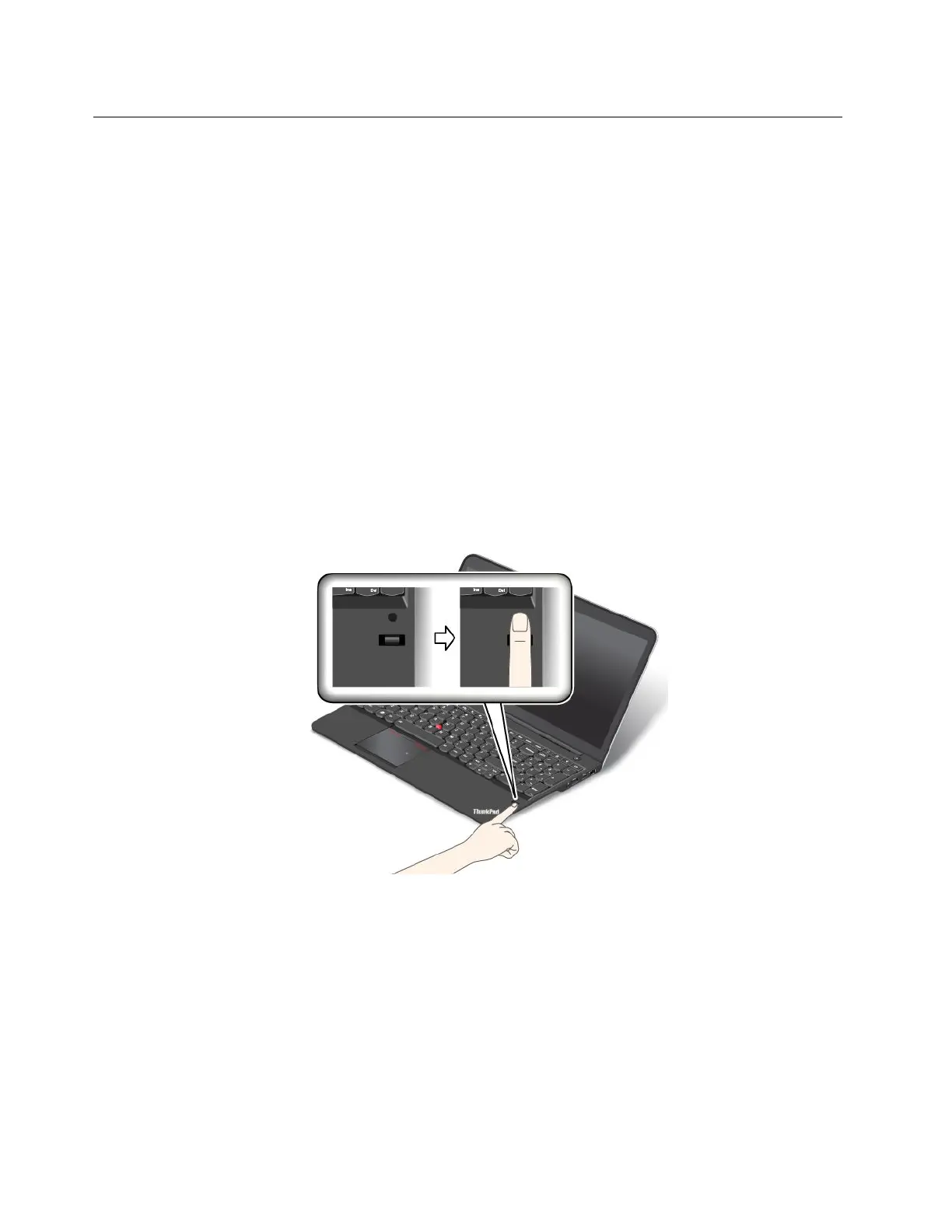
Usingthefingerprintreader
Dependingonthemodel,yourcomputermighthaveafingerprintreader.Fingerprintauthenticationcan
replaceyourWindowspassword.Inthisway,youcanlogontoyourcomputersimplyandsecurely.To
enablefingerprintauthentication,enrollyourfingerprintsfirst.
Enrollingyourfingerprints
Toenrollyourfingerprints,dothefollowing:
1.StarttheLenovoFingerprintManagerprogram.ForinstructionsonhowtostarttheLenovoFingerprint
Managerprogram,see“Lenovoprograms”onpage13
.
2.EntertheWindowspasswordasrequired.
3.Clicktheiconforthefingerthatyouwanttoenroll,andconstantlyswipeyourcorrespondingfinger
acrossthefingerprintreaderuntiltheenrollmentcompletes.
4.ClickFinish.Yourfingerprintisenrolledsuccessfully.
Note:Itisrecommendedthatyouenrollmorethanonefingerprintincaseofanyinjuriestoyourfingers.
Swipingyourfingeroverthefingerprintreader
Toswipeyourfingeroverthefingerprintreader,dothefollowing:
1.Placethetopjointofyourfingeronthesensor.
2.Applylightpressureandswipeyourfingertowardyouacrossthethereaderinonesmoothmotion.
Donotliftyourfingerwhenyouareswipingit.
52UserGuide



 To Next Page