Replacingtheharddiskdrive,solid-statedrive,orhybriddrive
Beforeyoustart,printtheseinstructions.
Attention:Theharddiskdrive,solid-statedrive,orhybriddriveisverysensitive.Incorrecthandlingcan
causedamageandpermanentlossofdata.Observethefollowingguidelines:
•Replacetheharddiskdrive,solid-statedrive,orhybriddriveonlyifyouupgradeitorhaveitrepaired.
Theconnectorsandslotoftheharddiskdrive,solid-statedrive,orhybriddrivearenotdesignedfor
frequentchanges,ordriveswapping.
•Donotdroptheharddiskdrive,solid-statedrive,orhybriddriveorsubjectittophysicalshocks.Put
theharddiskdrive,solid-statedrive,orhybriddriveonamaterial,suchassoftcloth,thatabsorbs
anyphysicalshocks.
•Donotapplypressuretothecoveroftheharddiskdrive,solid-statedrive,orhybriddrive.
•Donottouchtheconnector.
•Beforeremovingtheharddiskdrive,solid-statedrive,orhybriddrive,makeabackupcopyofallthe
informationonit,andthenturnthecomputeroff.
•Neverremovetheharddiskdrive,solid-statedrive,orhybriddrivewhilethecomputerisoperating,in
sleepmode,orinhibernationmode.
Toreplacetheharddiskdrive,solid-statedrive,orhybriddrive,dothefollowing:
Note:Dependingonthemodel,yourharddiskdrive,solid-statedrive,orhybriddrivemightlookslightly
differentfromtheillustrationsinthistopic.
1.Disablethebuilt-inbattery.See“Disablingthebuilt-inbattery”onpage67.
2.Closethecomputerdisplay,andturnthecomputerover.
3.Removethebasecoverassembly.See“Replacingthebasecoverassembly”onpage69.
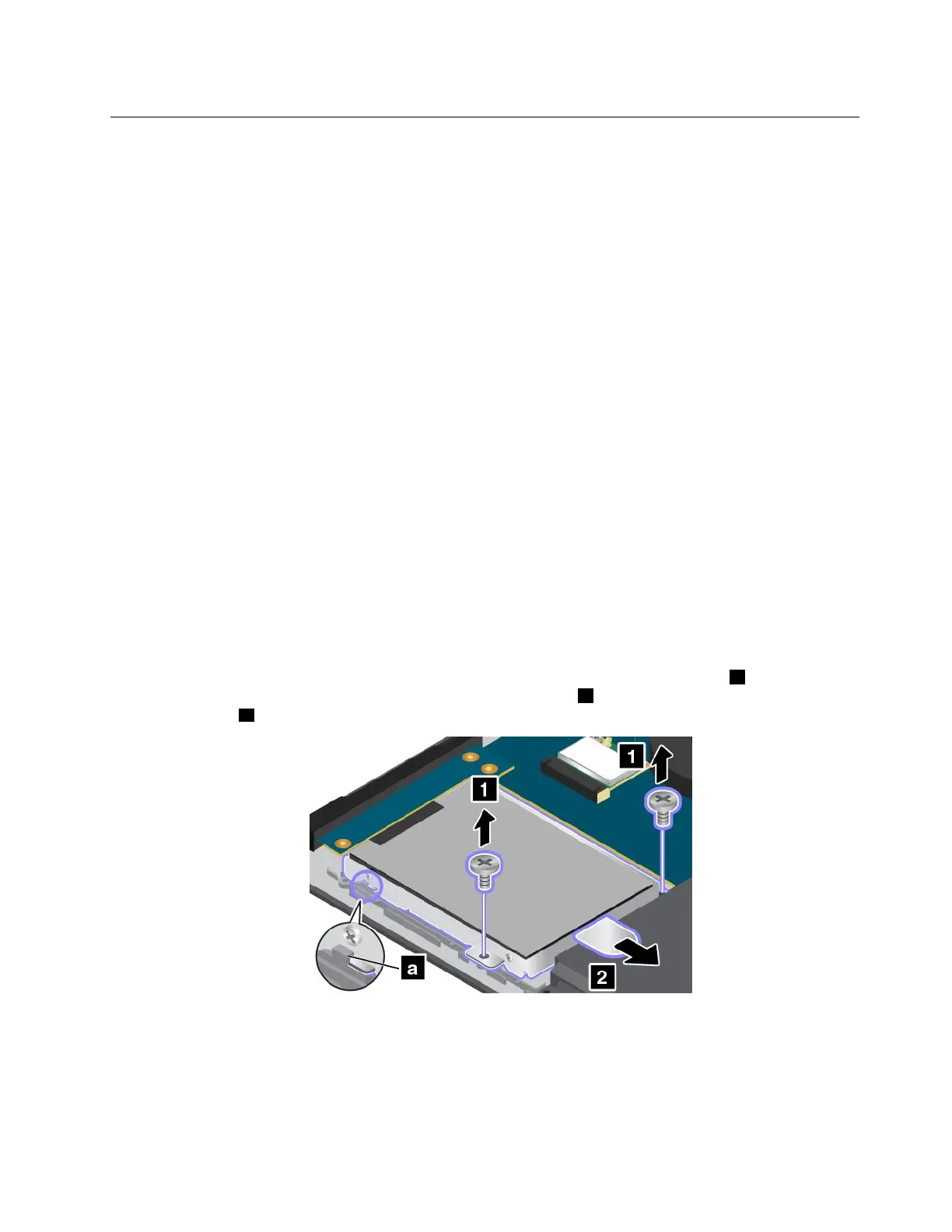
4.Removethescrewsthatsecuretheharddiskdrive,solid-statedrive,orhybriddrive1.Thenslide
theharddiskdrive,solid-statedrive,orhybriddriveasshown2toreleaseitfromtheconnector
andthehooka.
5.Removetheharddiskdrive,solid-statedrive,orhybriddrivebyliftingthetab.
Chapter6.Replacingdevices71



 To Next Page