Beforeyoustart,printtheseinstructions.
SIMcardisasmallplasticcardwithanIntegratedCircuit(IC)chipmountedononesideofthecard.
IfyourcomputersupportswirelessWANconnections,yourcomputermightrequireaSIMcardtoestablish
wirelessWANconnections.Dependingonthecountryorregionofdelivery,youmightneedtopurchasea
SIMcardoraSIMcardmightbepartoftheshippingcontentsthatcomewithyourcomputer.
ToinstallorreplacetheSIMcard,dothefollowing:
1.Disablethebuilt-inbatteries.See“Disablingthebuilt-inbattery”onpage67.
2.Closethecomputerdisplay,andturnthecomputerover.
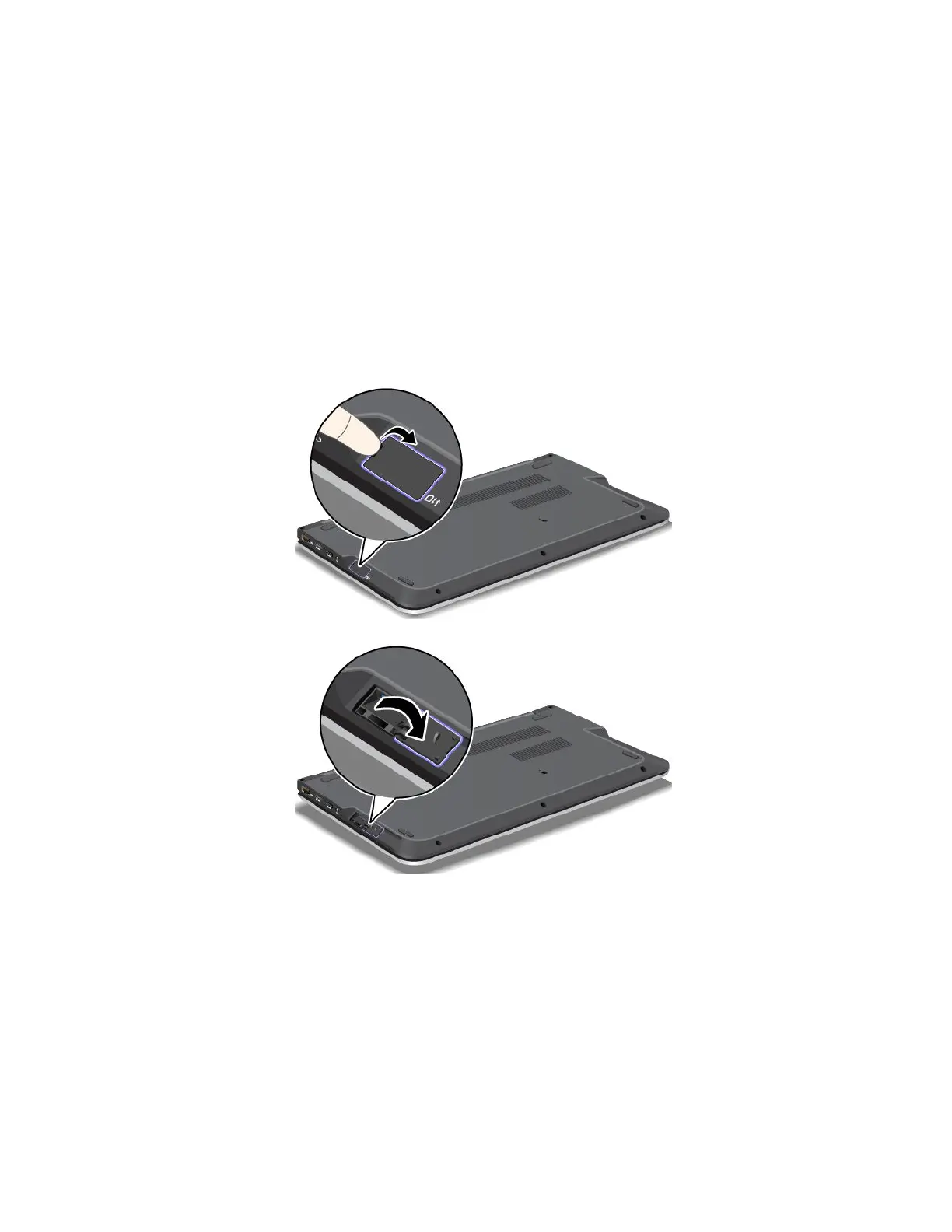
3.LocatetheSIMcarddoorattherightsideofthecomputerfromthebottomview.GentlypivottheSIM
carddoorupwardsandpressittowardstherightside.
ToinstalltheSIMcard,gotostep5.IfyouarereplacingaSIMcard,pleasecontinue.
68UserGuide



 To Next Page