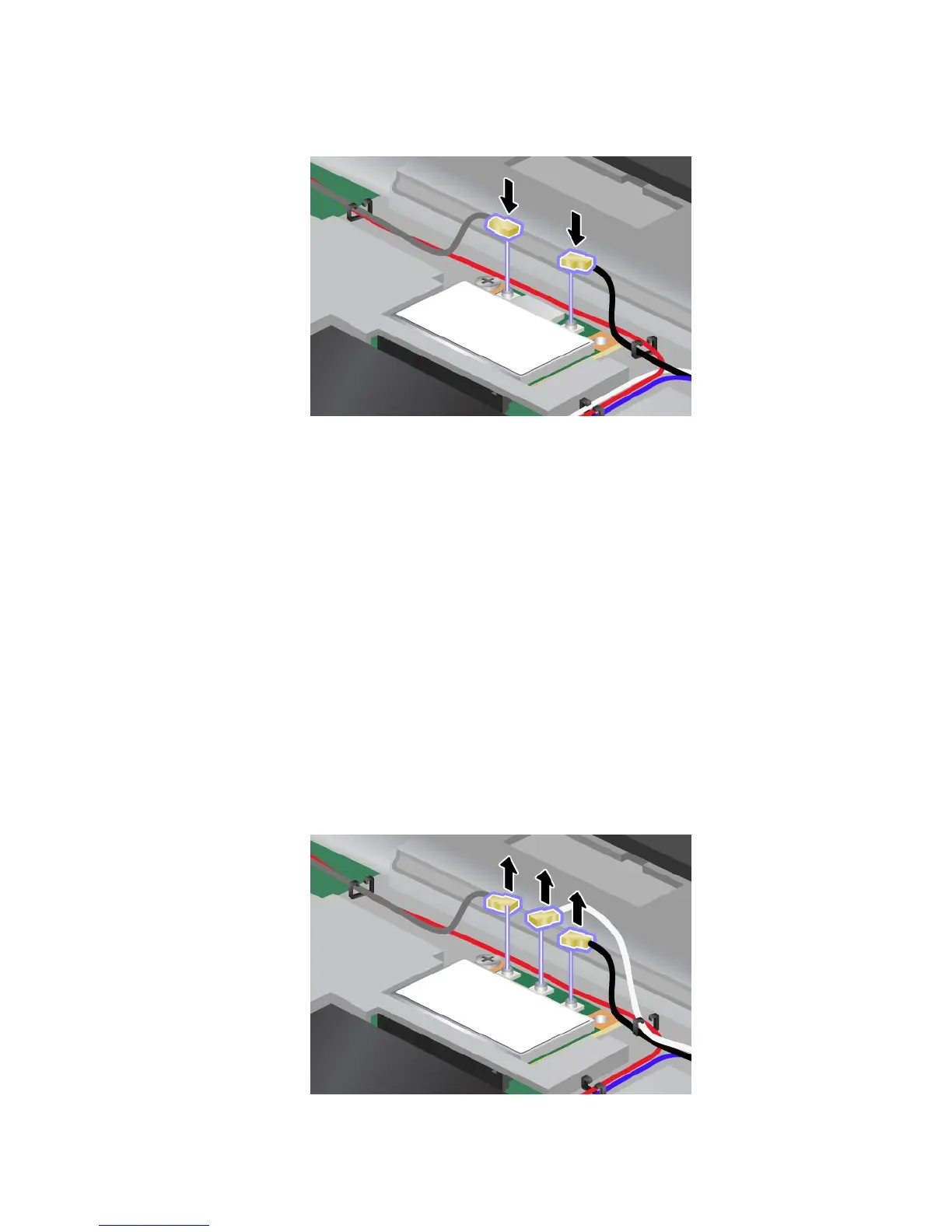
10.ConnectthecablestothenewPCIExpressMiniCard.Besuretoattachthegraycabletotheconnector
marked“MAIN”or“M”onthecard,andtheblackcabletotheconnectormarked“AUX”or“A”.
Note:IfthenewPCIExpressMiniCardhasthreeconnectors,besuretoattachthegraycabletothe
connectormarked“TR1”onthecard,andtheblackcabletotheconnectormarked“TR2”.Ifyouattach
eithercabletothecenterconnector,theconnectionspeedwillbelower.
11.Reinstallthekeyboard.See“Replacingthekeyboard”onpage76.
12.Reinstallthebattery.See“Replacingthebattery”onpage69.
13.Turnthecomputeroveragain.Reconnecttheacpoweradapterandallcables.
ReplacingaPCIExpressMiniCardwiththreeconnectors
IfyourcomputerhasaMultipleInputMultipleOutput(MIMO)feature,aPCIExpressMiniCardthathasthree
connectorscomeswiththecomputer.ToreplacethecardfortheMIMOfeature,dothefollowing:
1.Turnoffthecomputer;thendisconnecttheacpoweradapterandallcablesfromthecomputer.Wait
threetoveminutestoletthecomputercool.
2.Closethecomputerdisplay,andturnthecomputerover.
3.Removethebattery.See“Replacingthebattery”onpage69.
4.Removethekeyboard.See“Replacingthekeyboard”onpage76.
5.Ifatoolforremovingconnectorsisincludedinthepackagewiththenewcard,useittodisconnectthe
cablesfromthecard.Ifnosuchtoolisincluded,disconnectthecablesbypickinguptheconnectors
withyourngersandgentlyunpluggingthem.
Chapter6.Replacingdevices87



 To Next Page