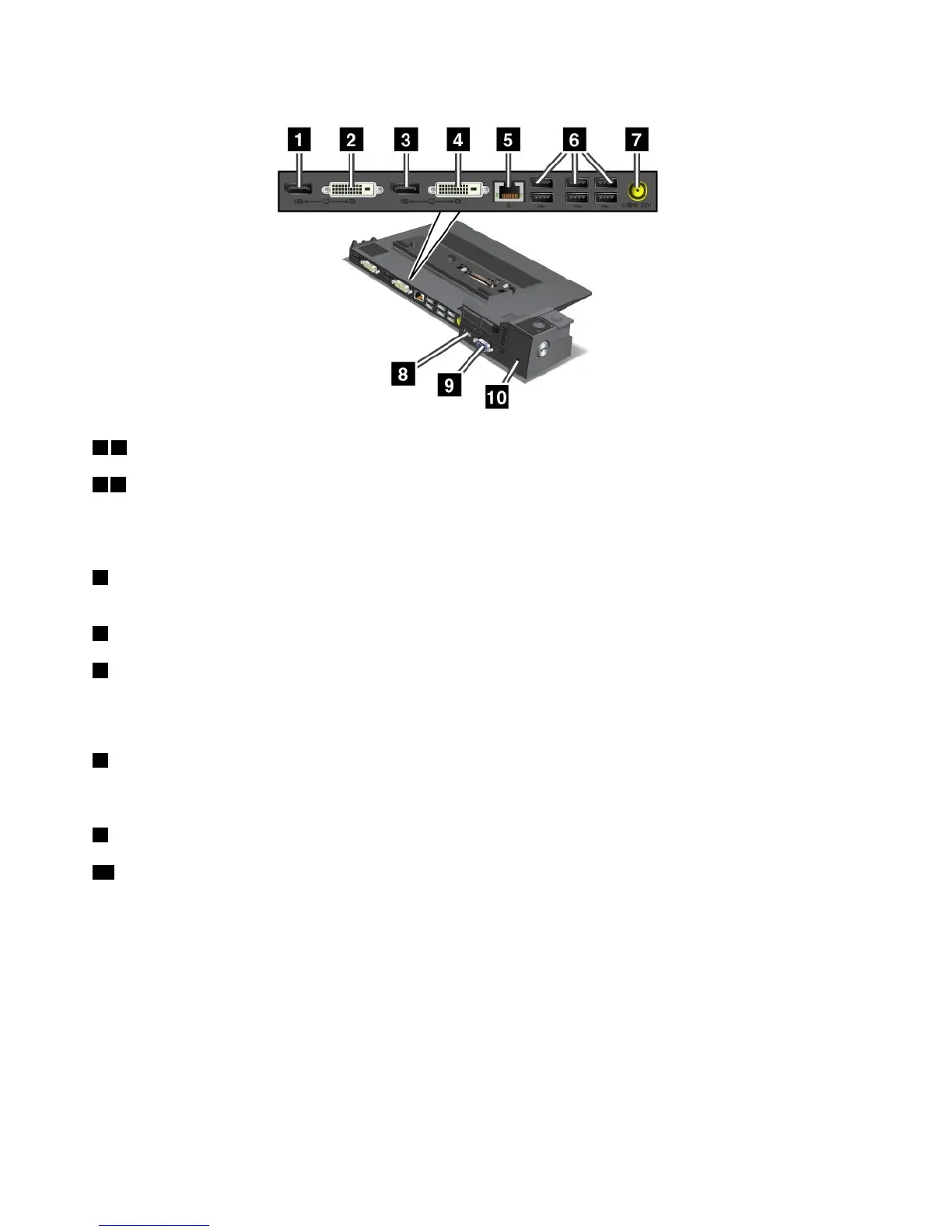
ThinkPadMiniDockPlusSeries3andThinkPadMiniDockPlusSeries3withUSB3.0
13DisplayPortconnector:Connectadisplaydevice.
24DVIconnector:ConnectamonitorthatsupportsSingle-LinkDVI.
Note:TheDVIconnectorprovidesadigitalinterfaceonly.Thisconnectorcanonlybeusedwithacomputer
thatsupportsDVIconnectionestablishedthroughdockingstations.
5Ethernetconnector:ConnecttheportreplicatortoanEthernetLAN.Theindicatorontheconnector
isthesameasthatonthecomputer.
6USB2.0connectors:ConnectUSB2.0compatibledevices.
7Powerjack:Connecttheacpoweradapter.
Note:FortheThinkPadMiniDockPlusSeries3(170W)andThinkPadMiniDockPlusSeries3withUSB
3.0(170W),usetheacpoweradaptershippedwithyourcomputer.
8eSATAconnectororUSB3.0connector:FortheThinkPadMiniDockPlusSeries3,thisisaneSATA
connectorforconnectinganeSATAdevice.FortheThinkPadMiniDockPlusSeries3withUSB3.0,this
isaUSB3.0connectorforconnectingaUSBcompatibledevices.
9Externalmonitorconnector:Connectanexternalmonitor.
10Securitykeyhole:Useasecuritycablelockthattsthiskeyholetolockyourportreplicatortoa
stationaryobjecttoprotectitfromtheft.
Note:IfyouattachyourcomputertoaportreplicatorordockingstationanduseanEthernetconnectoror
anexternalmonitorconnector,usetheEthernetconnectorortheexternalmonitorconnectorontheport
replicatorordockingstation,nottheoneonthecomputer.
AttachingaThinkPadportreplicatorordockingstation
ToattachyourcomputertoasupportedThinkPadportreplicatorordockingstation,dothefollowing:
Notes:
•BeforeyouattachthecomputertoasupportedThinkPadportreplicatorordockingstation,disconnect
theacpoweradapterfromthecomputer.
106UserGuide



 To Next Page