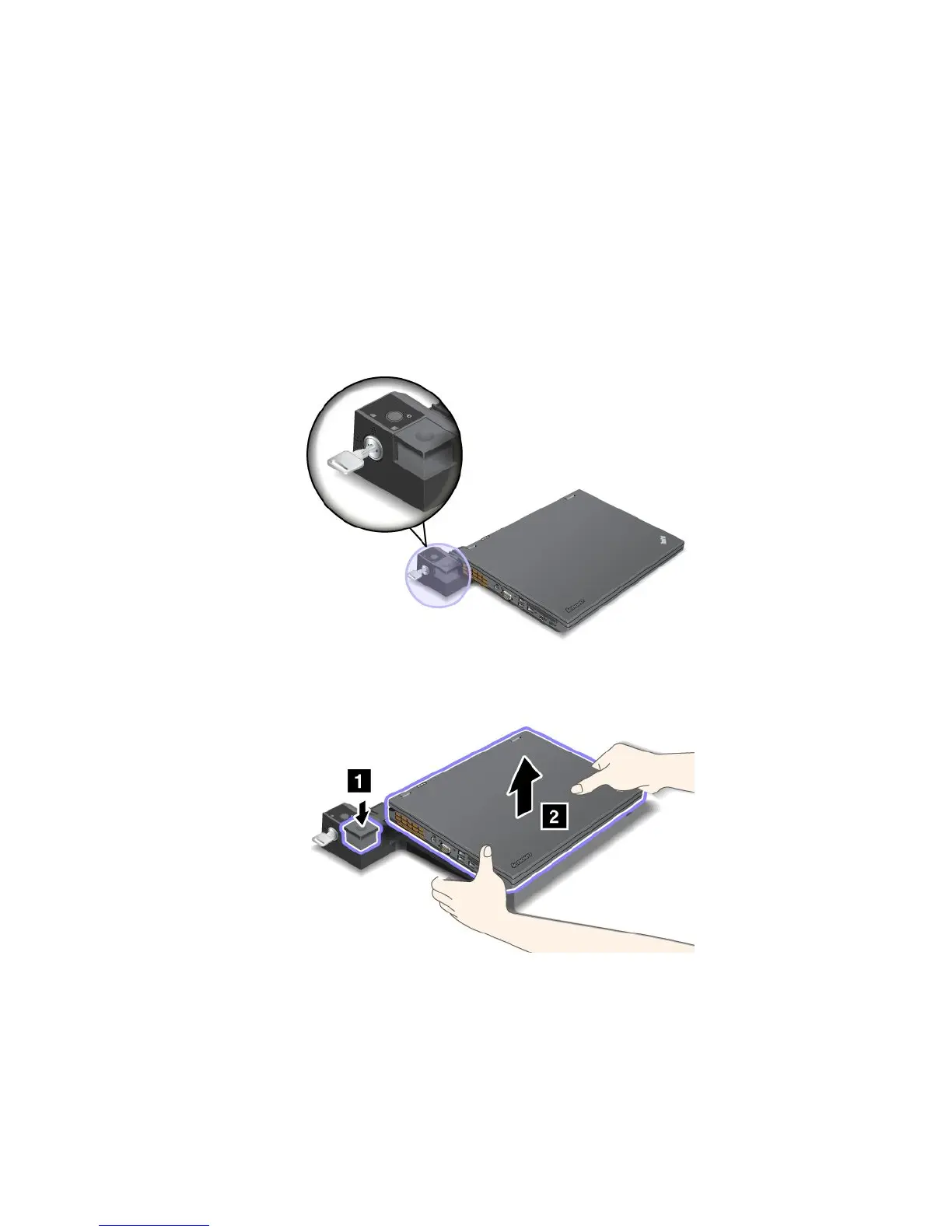
DetachingaThinkPadportreplicatorordockingstation
Todetachyourcomputerfromtheportreplicatorordockingstation,dothefollowing:
1.Ensurethat:
•ThedevicesconnectedtoUSBconnectorsarenotinuse.
•TheconnectiontoanEthernetconnectorhasbeenended.
•Thesystemlockkeyofthedockingstationisinplaceandintheunlocked(horizontal)positionfor:
–ThinkPadMiniDockSeries3
–ThinkPadMiniDockSeries3withUSB3.0
–ThinkPadMiniDockPlusSeries3
–ThinkPadMiniDockPlusSeries3withUSB3.0
2.Presstheejectbuttonuntilthecomputermovesup.Then,graspbothsides,andremovethecomputer.
Securityfeature
UsethesecuritykeyholeontheThinkPadportreplicatorordockingstationtoattachamechanicallock.By
attachingamechanicallock,youcansecuretheportreplicatorordockingstationtoastationaryobject,
suchasadesk,toprotectyourportreplicatorordockingstationfromtheft.Mechanicallocksindifferent
sizesareavailablefromLenovoasoptions.
Chapter7.Enhancingyourcomputer109



 To Next Page