1Powerbutton:Pressthepowerbuttontoturnthecomputeronoroff.
2Keylockindicator:Thisindicatorlightswhenthesystemlockkeyisinthelockedposition.Whenthe
systemlockkeyisinthelockedposition,theejectbuttonofthedockingstationislocked;youcannot
attachorremoveyourcomputer.
3Dockingstationindicator:Thisindicatorlightswhenyourcomputerisdocked.
4Ejectbutton:Presstheejectbuttontoreleasethecomputerfromthedockingstation.
5Slidingadjuster:Usetheslidingadjusterasaguidetoalignthedockingstationconnectoronyour
computerasyouattachthedockingstation.
6Dockingstationconnector:Thisiswhereyouattachyourcomputer.
7Systemlockkey:Usethesystemlockkeytolocktheejectbutton.Whentheejectbuttonislocked,you
cannotattachorremoveyourcomputer.
8Microphonejack:1/8inch(3.5mm)indiameter.Useittoconnectanexternalmicrophone.
9Headphonejack:1/8inch(3.5mm)indiameter.Useittoconnectanexternalheadphone.
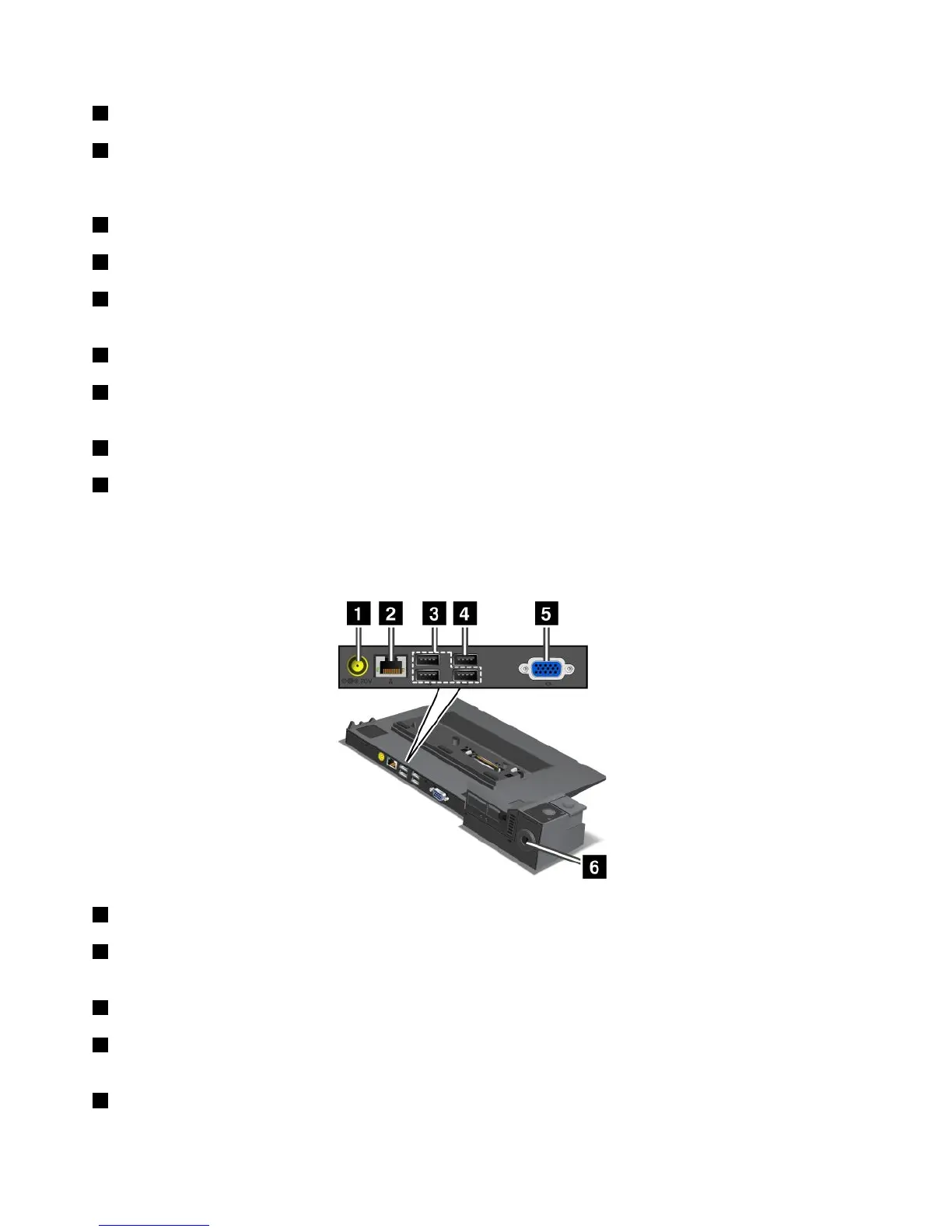
Rearview
ThinkPadPortReplicatorSeries3andThinkPadPortReplicatorSeries3withUSB3.0
1Powerjack:Connecttheacpoweradapter.
2Ethernetconnector:ConnecttheportreplicatortoanEthernetLAN.Theindicatorontheconnector
isthesameasthatonthecomputer.
3USB2.0connectors:ConnectUSB2.0compatibledevices.
4USB2.0connector(ontheThinkPadPortReplicatorSeries3)orUSB3.0connector(ontheThinkPad
PortReplicatorSeries3withUSB3.0):ConnectcompatibleUSBdevices.
5Externalmonitorconnector:Connectanexternalmonitor.
104UserGuide



 To Next Page