
 Need help?
Do you have a question about the THORLABS DC2200 and is the answer not in the manual?
Details safety precautions and warnings for operating the DC2200 unit.
Lists product codes for the DC2200 controller and its accessories.
Specifies hardware and software requirements for PC-based remote operation.
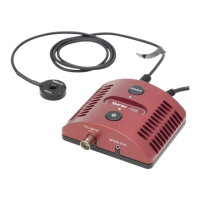
Lists the items included in the DC2200 package.
Identifies and describes the front panel buttons and indicators of the DC2200.
Provides step-by-step instructions for initial setup and powering on the DC2200.
Explains how to select the output terminal and configure LED parameters.
Details various system settings like display brightness, feedback, and safety modes.
Guides on setting and adjusting the constant current for the LED.
Explains how to set and adjust the LED brightness level.
Details Pulse Width Modulation settings: frequency, duty cycle, and counts.
Describes Pulse Mode settings: ON/OFF time, brightness, and counts.
Explains internal modulation modes: waveforms, frequency, and current limits.
Details how to use external signals to modulate the LED current.
Explains TTL level modulation for controlling LED current.
Displays information about the DC2200's system and remote control software versions.
Outlines methods for operating the DC2200 remotely via USB.
Step-by-step guide for installing the DC2200 control software and drivers.
Guides on connecting and using the DC2200 graphical user interface.
Lists required drivers and file locations for 32-bit Windows systems.
Lists required drivers and file locations for 64-bit Windows systems.
Lists and explains common IEEE488.2 commands for device control.
Details SCPI commands for controlling the SYSTem, DISPlay, and STATus subsystems.
Explains the device's status reporting structure and registers.
Lists error codes and their corresponding descriptive messages.
Displays information about the DC2200's system and remote control software versions.
Step-by-step instructions for updating the DC2200 firmware using the DFU Wizard.
Lists indicators and text messages displayed by the DC2200, with reasons and troubleshooting.
Provides detailed technical specifications for Constant Current, PWM, and Pulse Modes.
Shows physical dimensions of the DC2200 unit with diagrams.
Explains the function and connection of the hardware interlock circuit.
Guides on connecting custom high-power LEDs using the CAB-DC2200 cable.
Outlines the procedure and conditions for returning the device for service.
Provides contact details for Thorlabs GmbH in Europe and EU importer address.
Lists EU Directives and standards the DC2200 conforms to.
Details the warranty period, terms, and conditions for the DC2200.
States copyright, liability limitations, and usage rights for the document.
Provides definitions for common acronyms used in the manual.
Lists worldwide contact information and Thorlabs' WEEE policy for end-of-life equipment.
 General
| Model | DC2200 |
|---|---|
| Category | Controller |
| Output Current | 0-2 A |
| Communication Interface | USB, RS-232 |
| Input Voltage | 100-240 VAC |
| Output Voltage | 0-12 V |
| Bandwidth | 1 MHz |
| Temperature Range | 0 to 40 °C |













 To Next Page