28
02 Getting started
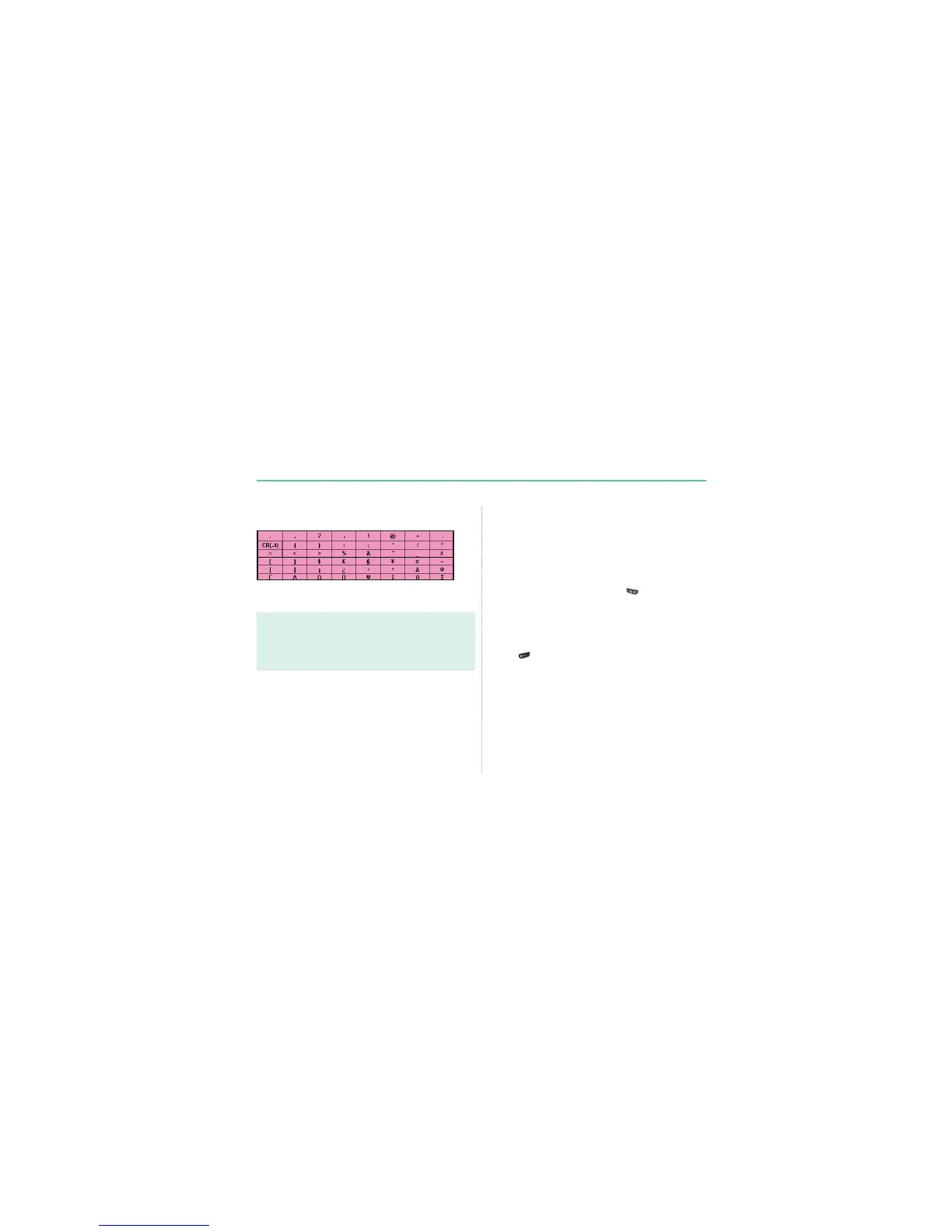
The complete lists of available symbols are shown below.
Note
Ɣ
Differentiating capital and small character is supported only with
Latin languages.
Ɣ
When using eZiText capital/small character status is not shown.
Ɣ
To switch eZiText on or off press (for a few seconds).
Predictive text input
You can enter any letter with a single keypress by using predictive
text input (eZiText).
eZiText is based on a built-in dictionary to which you can also add
new words.
You can add up to 60 new words to the dictionary.
Ɣ
7RDFWLYDWHSUHGLFWLYHWH[WLQSXWSUHVV and hold.
Ɣ
7RZULWHWKHGHVLUHGZRUGSUHVVWKHNH\V±3UHVVHDFK
NH\RQO\RQFHIRURQHOHWWHU)RUH[DPSOHWRZULWH³3KRQH´
SUHVVIRU3IRUKIRURIRUQDQGIRUH
The word suggestion changes after each keypress.
The suggested word can be changed to upper or lower case by
pressing
.



 To Next Page