17
Factory pre-set / programmable parameters
8. Select the desired
mode by or .
9. Press .
10. Select the desired
mode by or .
11. Press .
12. Set the desired date by
or .
13. Press .
14. Set the desired week
day by or .
15. Press .
16. Set the desired time by
or .
17. Press .
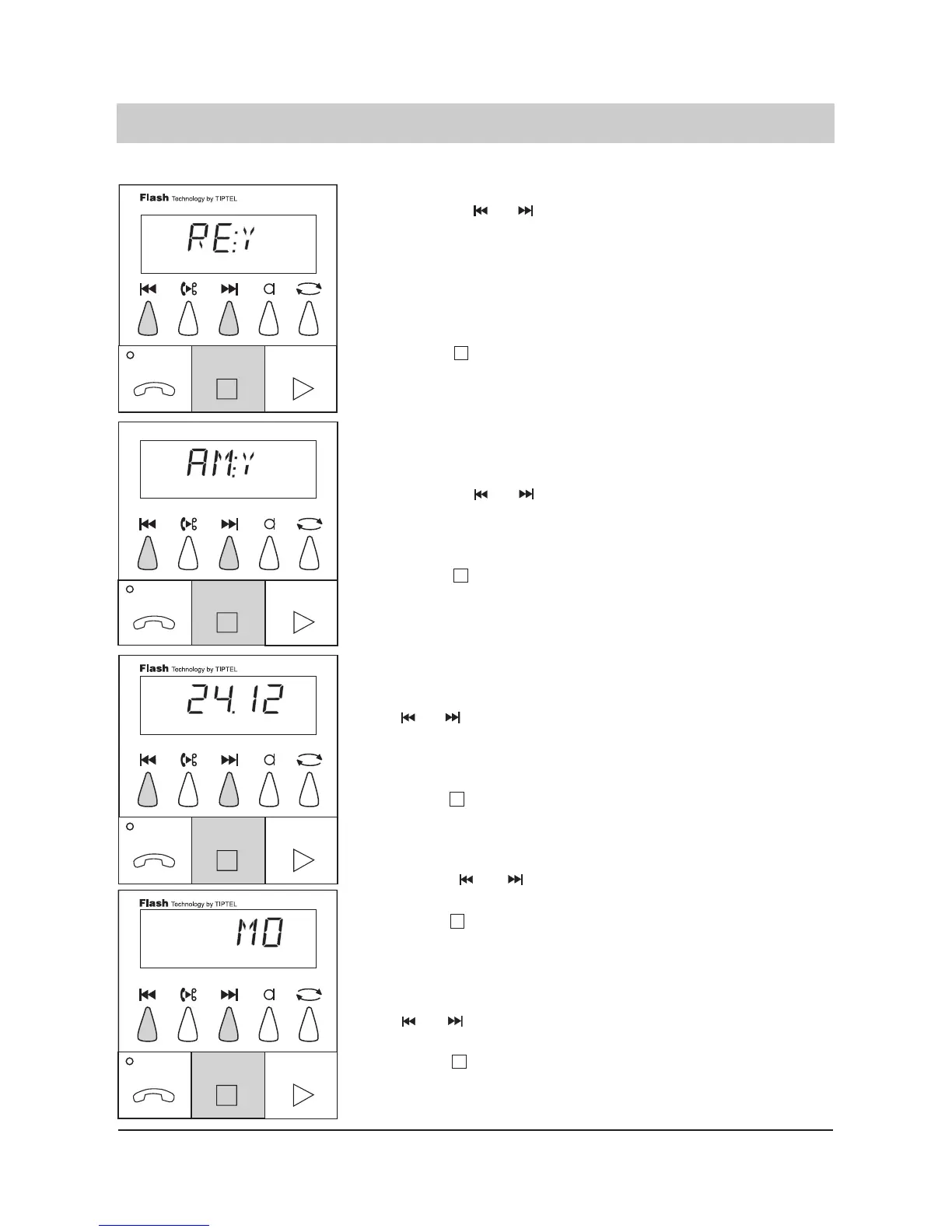
The display shows whether
remote erase is possible (see
remote beeper). The display
switches between "RE:Y"
(remote erase possible) and
"RE:NO" (remote erase not
possible).
The last entry is programmed.
The display shows whether
the room monitoring function is
admitted. (see remote operati-
on).
The display switches between
RM:Y (room monitoring possi-
ble) and "RM:NO" (room moni-
toring not possible).
The last entry is programmed.
The display now shows the set
date, e. g. 24.12. (day/month).
The display counts the date up
or down.
The last date entered is pro-
grammed. The display shows
the programmed weekday, e.
g. "MO" (Monday).
The display counts the week-
days up or down.
The last weekday is program-
med.
The display shows the pro-
grammed time, e. g. 19:35
(hour:minute).
The display counts the time up
or down. The last displayed
time is programmed.
The display stops blinking and
the time is shown.
The programming is finished.



 To Next Page