48
CHART FUNCTIONS UNIQUE TO THE MC-4S
File format
The following table shows the conditions of the files that can be displayed and played as user customi-
zable contents.
How to add the user customizable contents
To use the user customizable contents files, save these files in the USB memory and connect it with
the CV-5000 system.
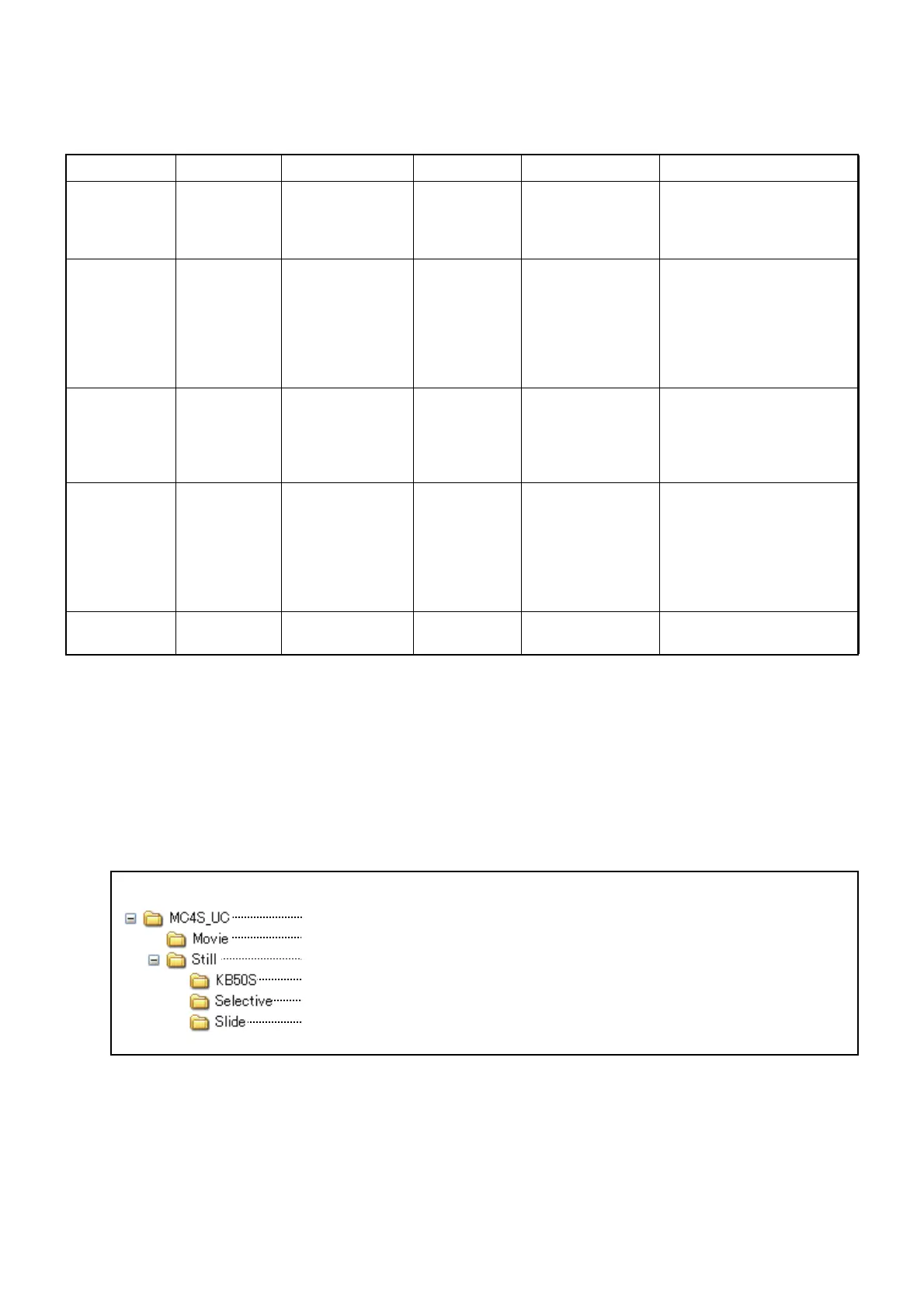
Folder configuration of the USB memory
Arrange the folders under USB memory in the following configuration and add the file.
Type Format Size File quantity Filename Remarks
2D
still image
JPEG Optional 20 files when
combined
with 3D still
images
01.jpg - 20.jpg When using a number for
the filename, do not use
the same number as the
3D still image.
3D
still image
JPEG Optional 20 files when
combined
with 2D still
images
For right eye:
01R.jpg - 20R.jpg
For left eye:
01L.jpg - 20L.jpg
The image size for the
right eye must be the
same as the left eye.
When using a number for
the filename, do not use
the same number as the
2D still image.
Still image to
be displayed
on the test
screen
JPEG 800 × 600 20 files 01.jpg - 20.jpg This still image is related
to the 2D/3D still image
having the same number
as the number in the file-
name of this image.
Movie WMV file
encoded by
CODEC
Windows
Media Video
7 - 8
Max. vertical
and horizontal
size: 1280×1024
Max. bit rate:
4Mbps or less
Max. frame rate:
30fps
2 files 01.wmv/02.wmv The playback of the movie
is not smooth in some
movie files.
Still image
for slideshow
JPEG Optional 20 files 01.jpg - 20.jpg
USB memory
This folder contains all of the user customizable contents.
This folder contains the movie files.
This folder contains the still image files. Three folders are included in it.
This folder contains the still images which are displayed on the test screen.
This folder contains the 2D/3D still images which are displayed on the MC-4S.
This folder contains the still images for the slideshow that are displayed on the
MC-4S.



 To Next Page