28
Key Stroke
Key Stroke
Action
Action
KEY_LEFT
KEY_RIGHT
KEY_OK
KEY_RECALL
KEY_EXIT
KEY_MENU
KEY_MEDIA
KEY_DOWN
KEY_UP
Highlights the previous Item
inlelist.Ifitpassestherst
item, the last item will be
highlighted.
Highlights the next Item in the
lelist.Ifitpassesthelast
item,therstitemwillbe
highlighted.
Ifthecurrentlehasaparent
folder, pressing this key will
return from the current list to
the parent folder.
If current highlighted item is a
folder, it enters the folder.
If the highlighted item is a
folder, pressing KEY_OK
entersthefolder.Ifitisale
then pressing the key will play
the selected video.
If the highlighted item is in
thelelist,pressingKEY_
RECALLreturnstothelter
selection mode. If it is playing
a video, pressing the key
returns to the previous layout .
Inthelelist,pressing
KEY_EXITreturnsfromthele
listtothemedialterselection
mode.
Thelebrowsermenu
disappears and the main menu
is shown, OR, vice-versa.
Enters / Exits Media menu
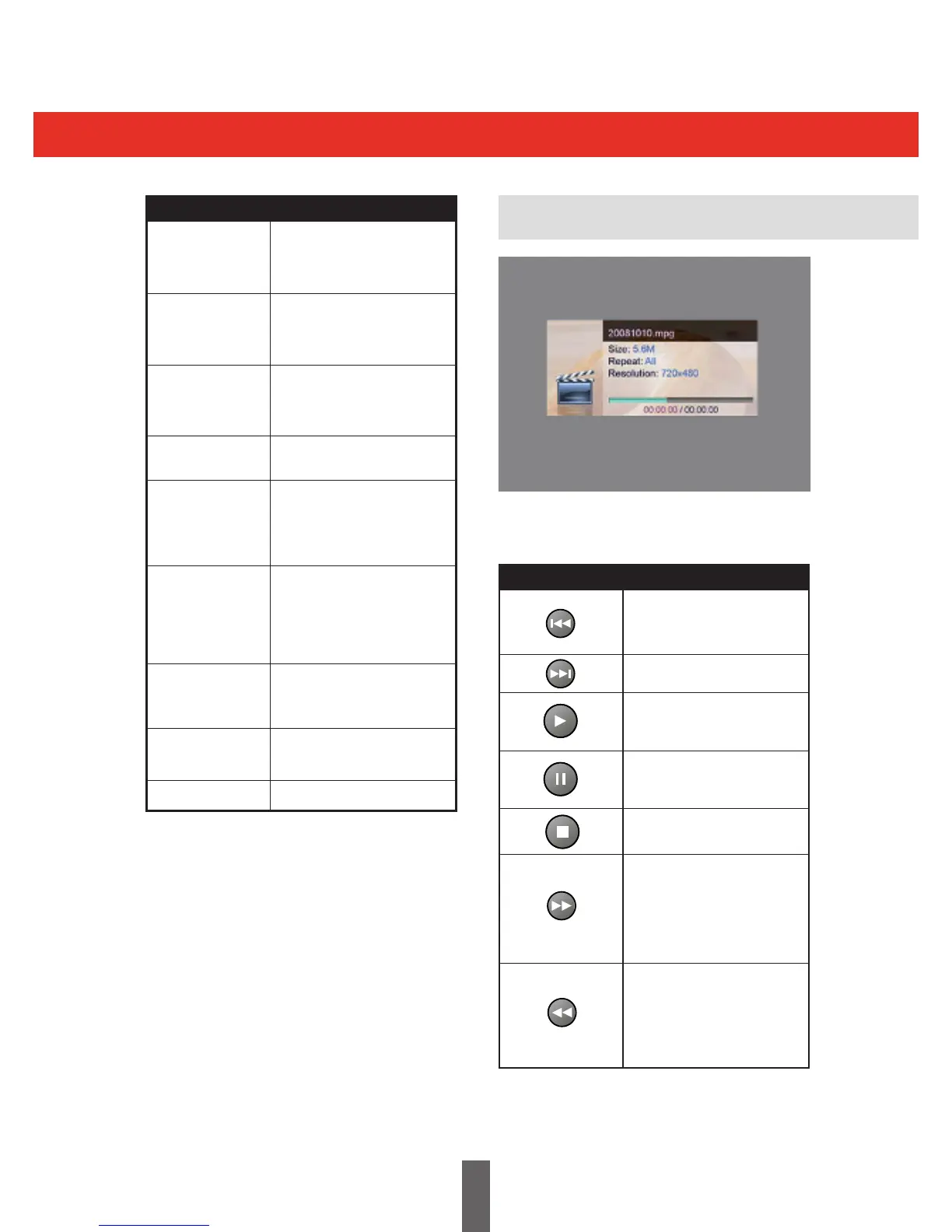
Movie Playback
Stops the current movie and
plays the previous movie in
the list.
Stops the current movie and
plays the next movie in the list.
If the movie is paused, FF, FB,
SF or SB, it will change to play
and show play icon.
If playing, this key will pause
the movie and show pause
icon.
Stops the movie.
Fast forwards the movie. It
cycles through the sequence
2x->4x->8x->16x->32x,
and the playback mode is
displayed in the upper left
corner.
Fast reverses the movie. It can
cycle through the sequence
2x->4x->8x->16x->32x,
and the playback mode is
displayed in the upper left
corner.
The keys for this menu are shown in the table.
Settings are saved when they are changed.



 To Next Page