A system should also be designed to cycle power on the gimbal by either switching the gimbal
power on and off, or interfacing to a power enable pin, see section below for details.
10.2.4 Power Enable Pin
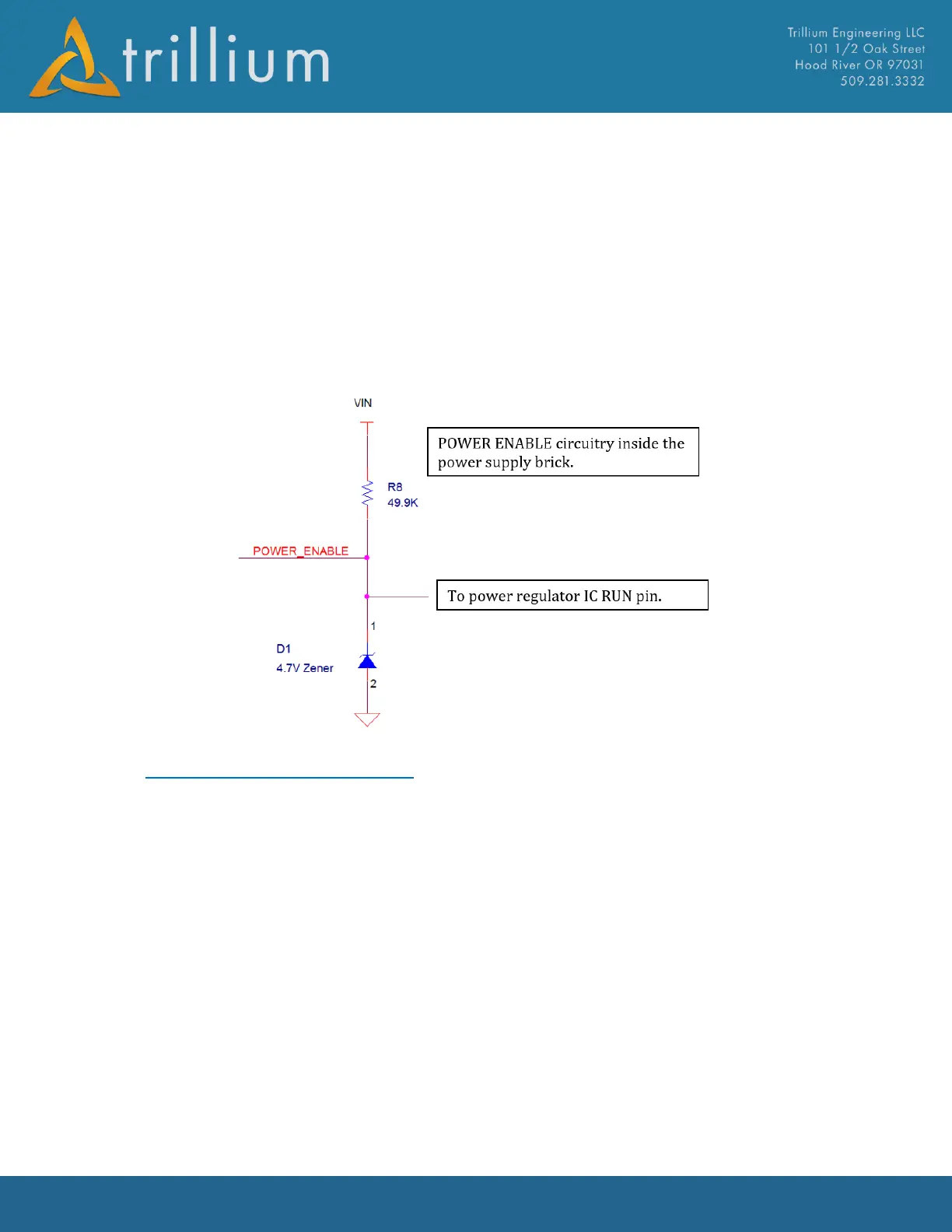
The HD50, the HD80, and the external voltage regulator for the HD25, HD40, and HD45 all have a
power enable pin. The Power Enable pin has an internal pull-up resistor to the VIN power rail and a
4.7V Zener diode, limiting the upper value applied to the Power IC inside the brick. To disable
power, pull the enable pin to ground. To enable power, leave the power enable pin floating. The
power enable pin can also be connected to a 3.3V or 5V GPIO.
10.3 Gimbal Control & Video
All Orion gimbals can be controlled over Ethernet, a TTL level serial port, or an RS-232 level serial
port. Digital video is available over Ethernet and analog video is available over RS-170; note that
only standard definition video is available on RS-170. In virtually all integrations, a single IP link
between the gimbal and the ground is used to transmit video and control the gimbal. A bandwidth
of 1Mbps to 5Mbps is typically required with higher bandwidths allowing for the transmission of
higher quality video.



 To Next Page