LASER ENGRAVING&CUTTING CONTROLLER AWC608
、
7
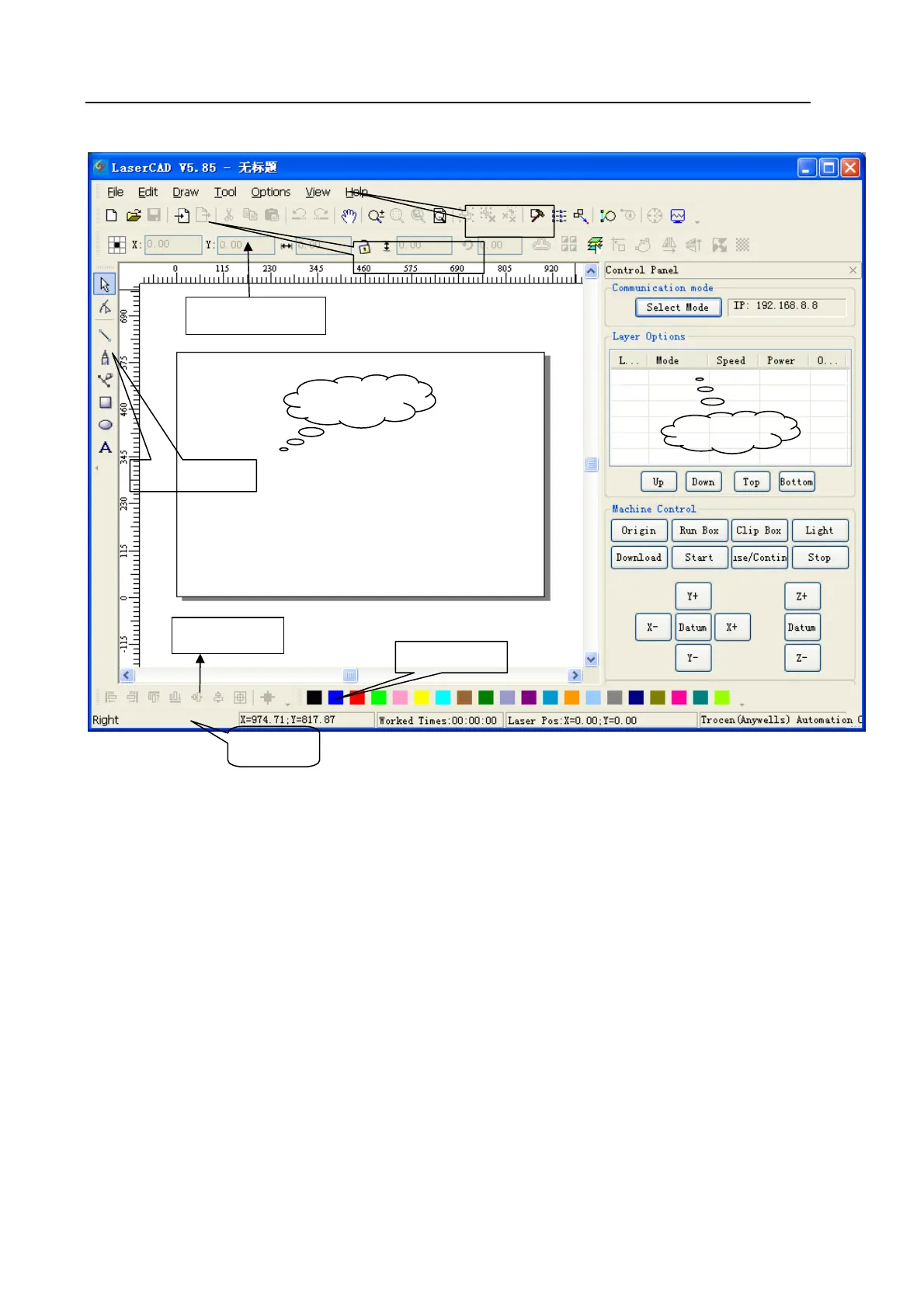
【Menu bar】:Main function is to execute commend options in menu bar. Executing commend
options is the basic operation; Menu bar includes 7 functions like file, edit, draw,
tool, options, view and help.
【Tool bar】:There are some functions completed by commend buttons in tool bar. Most of these
functions are sorted from menu bar.
【Object bar】:Provide selecting object during operation and relevant properties during using tool.
It can control the change of object by setting relevant properties in property bar.
【Draw bar】:It’s on the left of working area. With draw tool in draw bar, it makes operation more
flexible and convenient.
【Align bar】:Make align multi objects to perfect the layout of page.
【Color bar】:Alter the color of selected object
【Control panel】:Use control panel to finish several tasks of laser machining, including setting
communication IP, setting layer parameter, loading graphic and so on.
3.2 Select Communication Mode
Computer can communicate with AWC608 control panel by USB and network to operate the laser
Align bar
Menu ba
toolbar
Object bar
View zone
Draw ba
Control panel
Color ba
Status bar


 To Next Page