LASER ENGRAVING&CUTTING CONTROLLER AWC608
、
94
8.6 Files system
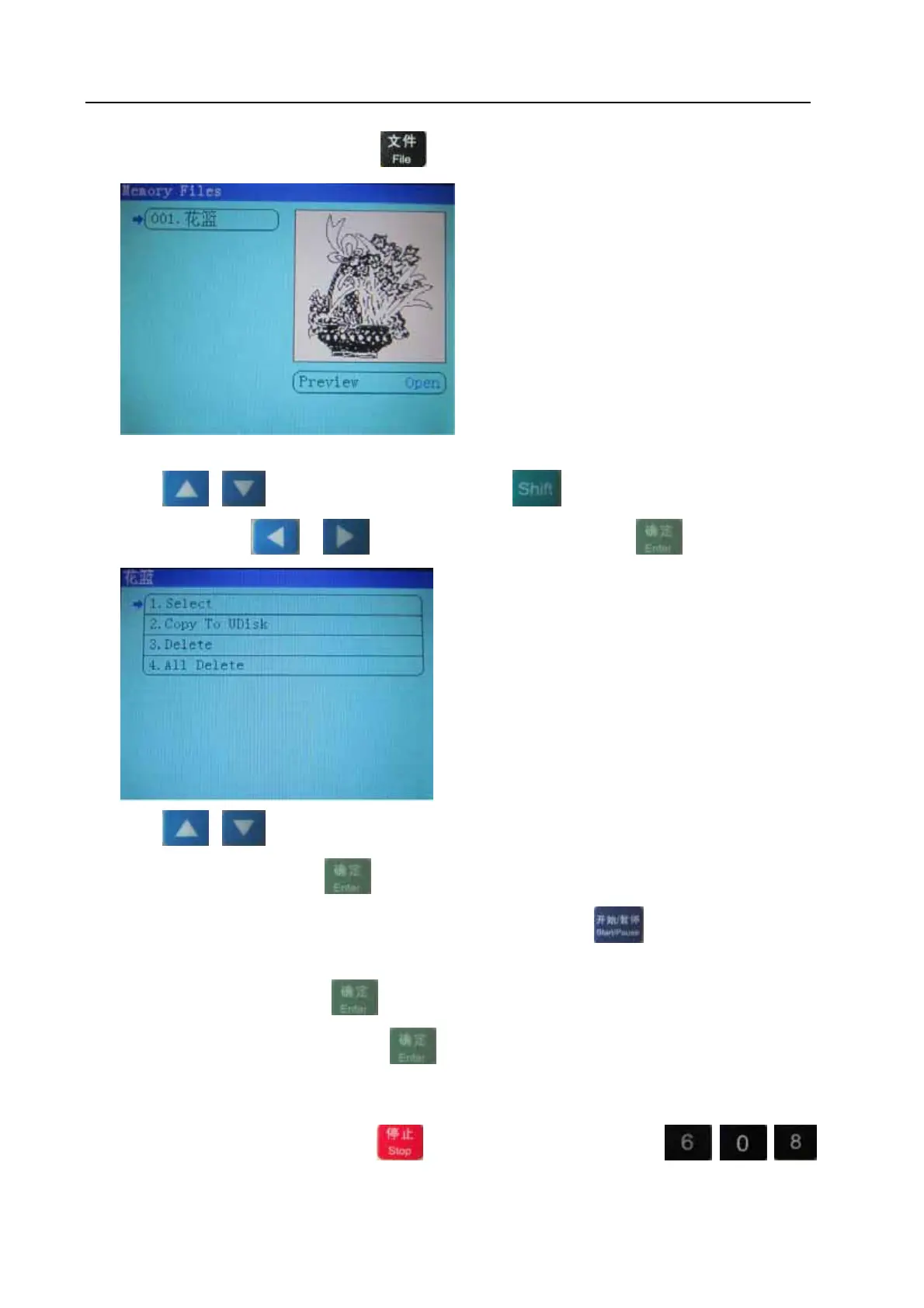
Under the main interface, press to enter into 【file】interface:
In【file】interface, it will show all working files saved in the memory of control board.
Press or to move cursor on one item ,press to move cursor on 【Preview】(the
right)and then press
or to select “open” or close, Press
Press
or to move cursor to select one item
Select【select】, and press
, system will select files and go back to main interface. In main
interface, the file sequence number will be shown in【file】; Press
in main interface will start
files output.
Select【delete】, and press
, then files will be deleted.
Select【copy to UDisk】, and press
, then files will be copied to UDisk(UDisk only support
FAT32).
8.7 Manufacturer params settings
Under the main interface, Hold down the key, then press the number keys , , ,,
to enter into 【manufacturer params settings】interface:


 To Next Page