EasyManua.ls Logo

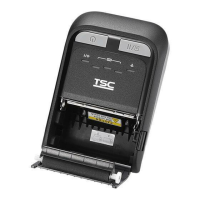
TSC TDM-20 - User Manual

TSC TDM-20
60 pages
Print Icon
To Next Page IconTo Next Page
Loading...
i
USERS
MANUAL
TDM-20
Direct Thermal Portable Printer

Other manuals for TSC TDM-20

Questions and Answers

  • D
    David AndersonSep 2, 2025
    Why does my TSC TDM-20 status say 'Out of Paper'?
    • J
      Jennifer StewartSep 2, 2025
      The printer status from DiagTool shows “Out of Paper” because you are running out of media roll. Supply a new media roll to solve this problem. The media may also be installed incorrectly, please refer to the section 3.4 on User’s manual to reinstall the media roll. Finally, calibrate the black mark sensor.
  • R
    Ryan WilliamsAug 31, 2025
    What to do if my TSC Printer status shows 'Paper Jam'?
    • M
      Michael ClarkAug 31, 2025
      If the printer status from DiagTool shows “Paper Jam”, calibrate the black mark sensor. Also, ensure that the media size is set correctly. If the issue persists, media may be stuck inside the printer mechanism, so clean the printer mechanism.
  • D
    Derrick TownsendAug 29, 2025
    Why is the print quality poor on my TSC TDM-20?
    • V
      Vickie GuerreroAug 29, 2025
      Poor print quality can occur if the media cover isn't fully latched. Ensure both the right and left sides of the media cover are securely latched. Also, dust or adhesive on the print head can cause this issue, so clean the print head. Adjusting the print density and print speed may also improve the quality. If the print head element is damaged, run a printer self-test to check the print head test pattern for missing dots. Finally, ensure you are using the correct media roll.
  • R
    Ryan CarterAug 27, 2025
    What to do if my TSC TDM-20 Printer status from DiagTool shows “Head Open”?
    • C
      Curtis AndersonAug 28, 2025
      If the DiagTool shows a “Head Open” status for your TSC Printer, the media cover is likely open. Please close the media cover.
  • J
    Jonathan CookAug 26, 2025
    How to fix missing printing on the left or right side of TSC Printer label?
    • A
      Alexander TannerAug 26, 2025
      If your TSC Printer is missing printing on the left or right side of the label, it is likely due to a wrong label size setup. Set the correct label size.
  • A
    Amy BarnettAug 25, 2025
    What to do if my TSC Printer status from DiagTool shows “Out of Paper”?
    • L
      Lawrence MitchellAug 25, 2025
      If the DiagTool shows an “Out of Paper” status for your TSC Printer, here are a few possible reasons: * You might be running out of media roll, so supply a new media roll. * The media might be installed incorrectly. Please refer to the steps on section 3.4 to reinstall the media roll. * The black mark sensor may not be calibrated, so calibrate the black mark sensor.
  • M
    Mr. David Munoz Jr.Aug 22, 2025
    What to do if my TSC TDM-20 status from DiagTool shows “Paper Jam”?
    • R
      Reginald HaneyAug 22, 2025
      If your TSC Printer status from DiagTool indicates a “Paper Jam,” it could be due to several factors: * The black mark sensor might not be properly calibrated, so calibrate it. * The media size might not be set properly, so ensure you set the correct media size. * Media might be stuck inside the printer mechanism, so clean the printer mechanism.

TSC TDM-20 Specifications

General IconGeneral
BrandTSC
ModelTDM-20
CategoryPrinter
LanguageEnglish

Related product manuals