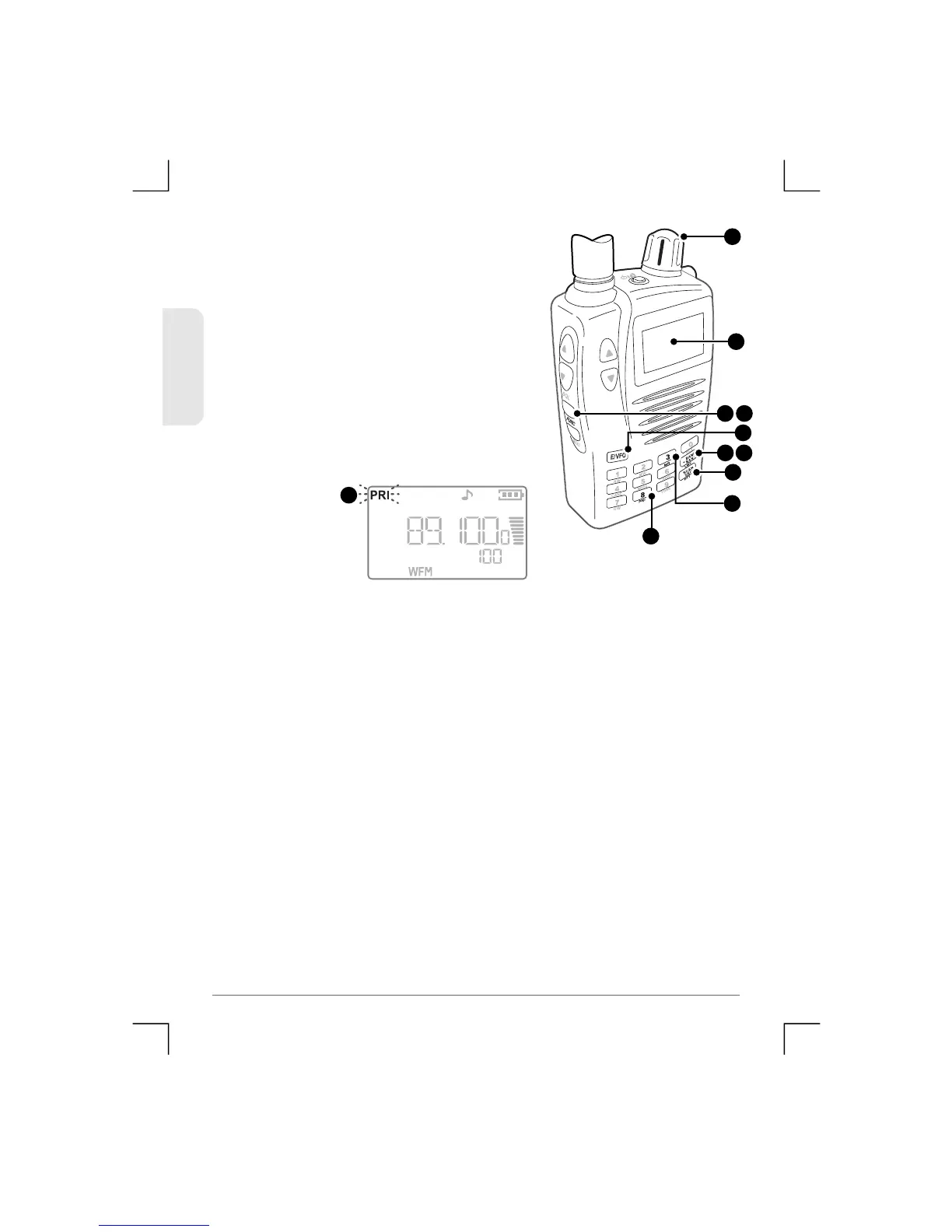
To perform a Priority Search using a
stored channel as the Priority ch a n n e l:
1) P ress Func MR to select the Memory
Read m ode.
2) Press Bank/Band to select the
required memory bank.
3) Rotate the Control Knob to select the
required channel.
4) Press Func PRI. The selected
channel is no w the Priority Channel.
5) Press the E/VFO key to select VFO m o d e .
6) Press Band/Bank to select the required frequency band you
wish to searc h.
7) Press Scan/S rc. The receiver will beg in sea rching the selec ted
Band and will swi tch to the Priority channel at an interval set by
the ‘Priority Time’ setting in the setup menu.
Notes:
• If a signal is received, the receiver will rem ain on the a ctive
frequency for th e duration of the ‘Busy Timer’ setting in the
Menu setup. If the ‘Busy timer’ is s et to Busy the receiver wi ll
stay on the active channel for as long as the signal is
present.
• To change the frequency band whil e searching, briefly pres s
Band/Bank key.
• To change the search direction while searching, rotate the
control knob clockwise or counter cloc k w i s e .
1 4
1
4
2
3
2 6
7
5
4
29
TSC-3000R
ENGLISH


 To Next Page