The memories stored in your receiver can be transferred to or from
another TSC-3000R receiver. To perform this function you will
need a TCC-1010 cloning cable (available separately).
Cloning is performed as follows:
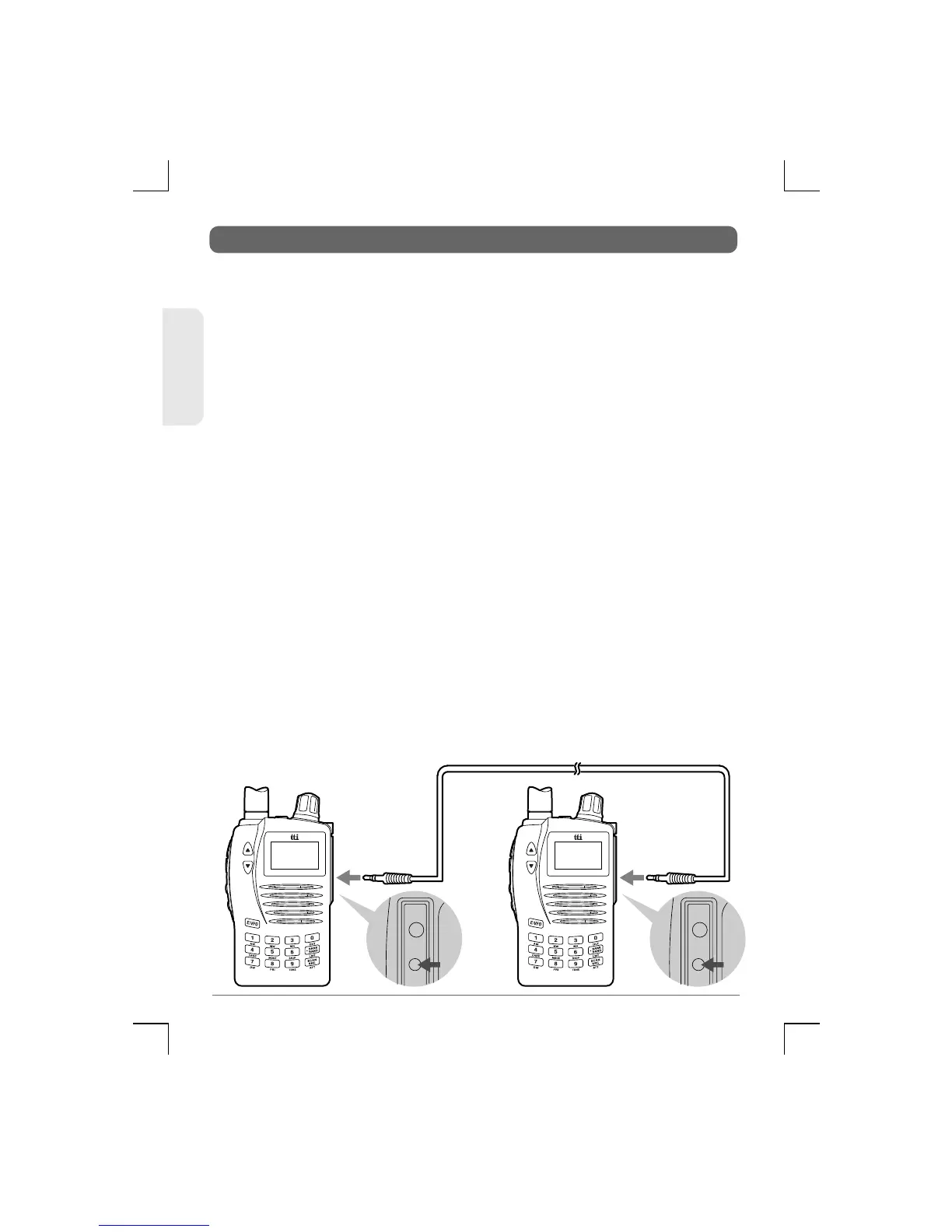
1) Place the two radios side by side and connect the cloning cable
as shown in the diagram below.
2) Switch on the radio whose memories you are copying from
(Master) pressing and holding Func MODE. "CLON TX" appears
on the display.
3) Switch on the radio whose memories you are copying to (Slave)
pressing and holding Func MODE. "CLON TX" appears on the
display. Rotate the Control Knob to select "CLON RX".
4) Press E/VFO on the Master radio and on the Slave radio. Both
radios will emit a confirmation beep and "CONNECT" appears
on the displays.
5) "dATA TX" and "dATA RX" appears on each display of the
Master radio and the Slave radio.
6) "CLON OK" appears on the displays of both radios.
Once cloning has completed successfully, switch both radios on
and remove the cloning cable. You can now access the
frequencies you have transferred
CLONING STORED MEMORIES WITH ANOTHER UNIT
55
TSC-3000R
ENGLISH


 To Next Page