4) To stop the Search, press th e SCAN SRC key again.
• During the Search , press the BAN K BAND key to move to
the next Band.
• To change the Search direction rotate the Control knob
clockwise or counter c l o c k w i s e.
• The recei ver will stay on an active channel according to the
Scan Timer settings in the VFO Menu. If the Scan Timer is
set to ‘5 seconds’, the receiver will continue Sear ching af ter
5 s econds e ven if the channel i s still busy. If the Scan Timer
is set to ‘Busy’, the receiver will remain on the busy
frequency for as long as it stays busy, then resume
searching when th e signal disappears.
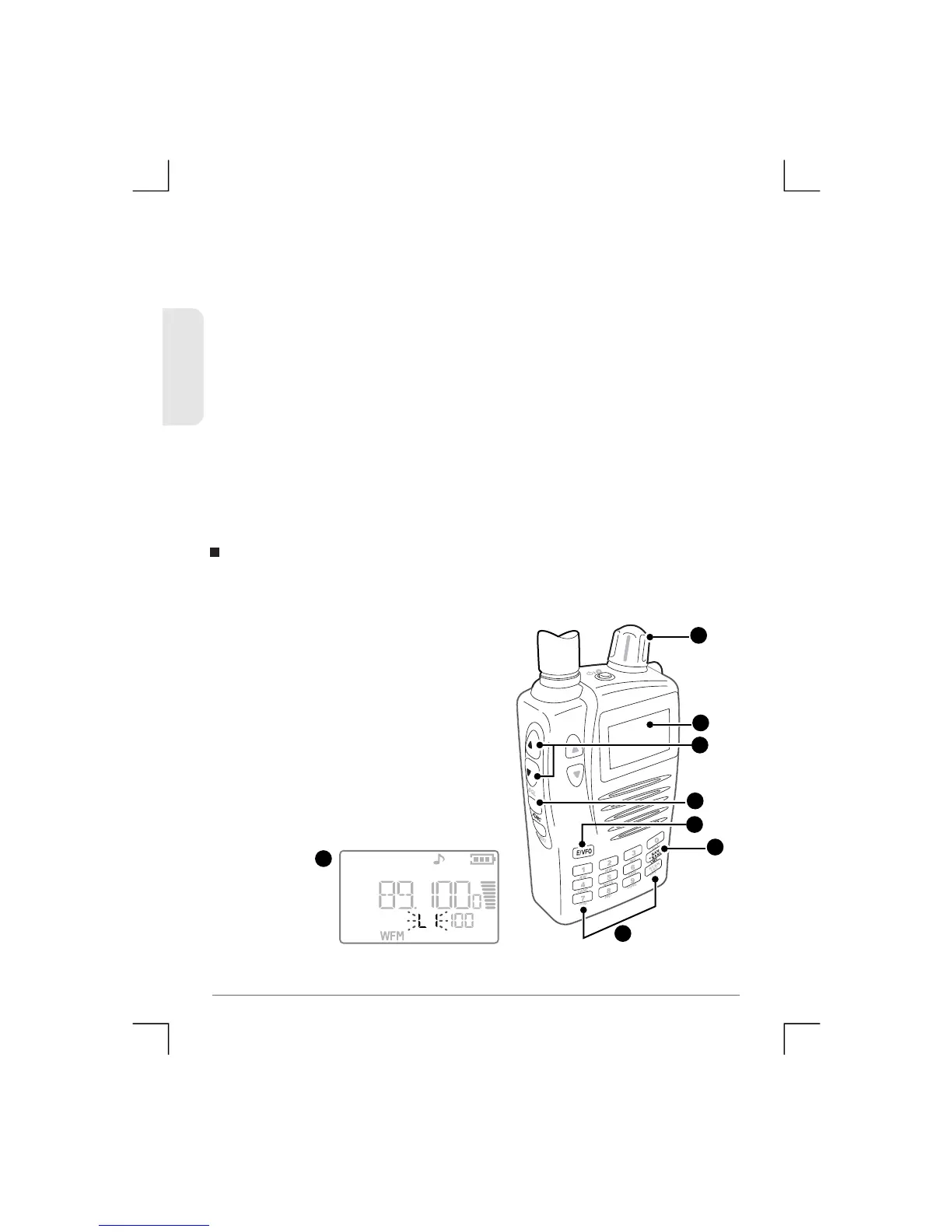
1) Press the E/VFO key to select
VFO Mode. (Note: the receiver
automatically selects the VFO
mode when it is turned on).
2) Set the Squelch level using the
Squelch or keys so that the
noise just disappears.
3) Press Func followed by the LMT
key. [L1] is displayed.
4) Enter the First frequency using the keypad or the Control knob.
You can limit the search between two user-selectable frequency
limits.
Limited Search
3
3
3
4 or
3
1
2
4
25
TSC-3000R
ENGLISH


 To Next Page