40
IGNITION SWITCH AND METER PANEL (cont’d)
OPTIONAL MULTI-FUNCTION LCD DISPLAY (cont'd)
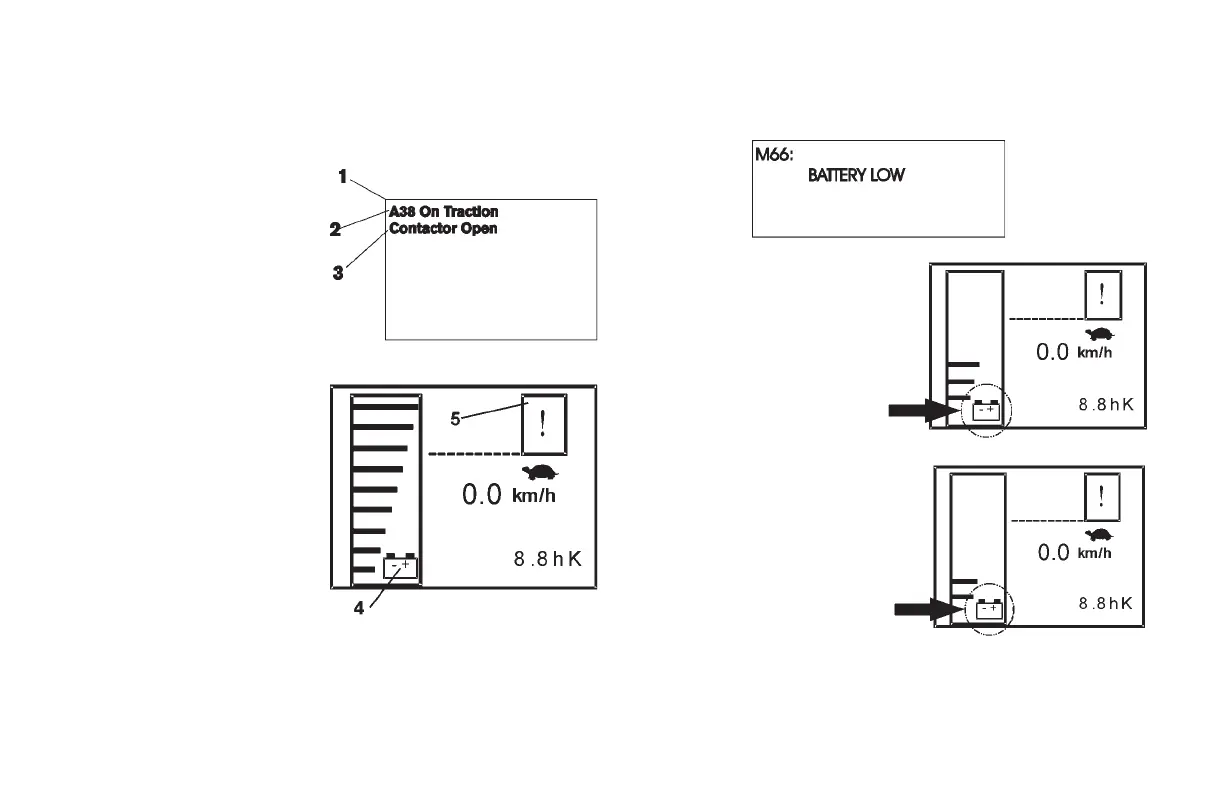
Malfunctions and Warning Indications
1. LCD (Liquid Crystal Display)
2. Error Code
3. Malfunction Message
4. Battery Warning Mark
5. Exclamation Point
PUSH PB5
If any malfunction occurs when the ignition switch is in the "ON"
position, the LCD will display a message explaining the details of the
malfunction.
OPERATING CONTROLS AND FUNCTIONS
Note: During forklift operation, periodically check the battery capacity.
Make every effort to recharge the battery before the battery low
message appears.
Battery Warning Mark
Pump Cut Warning: The bar
display will start to ash when the
battery capacity meter's remaining
capacity indication changes from
4 bars to 3 bars.
Press PB5
When the battery capacity meter
display changes from 3 bars to
2 bars the pump cut/battery low
message will be displayed (see
above illustration).
When function key PB4 is pressed
the display will switch. The battery
capacity meter will now show 2
bars and the battery warning mark
will ash. The exclamation point will
appear in the top right corner and lift/tilt function will be inoperable. The
unit may be operated during pump cut. However, move the unit to a
safe location and promptly charge the battery.


 To Next Page