EasyManua.ls Logo

US Robotics COURIER - Page 172

US Robotics COURIER
216 pages
Print Icon
To Next Page IconTo Next Page
To Previous Page IconTo Previous Page
Loading...
-
-
I
.-
-
-
COURIER HIGH SPEED MODEMS
4.
Gently
pry
off
the
plastic
volume
slide-switch cover.
5.
Raise
the
back
end
of
the
case
bottom
until
it is
at
about
a
60
°
angle; lift it
away
from
inside
the
front
of
the
modem.
Put
the
case
bottom
aside.
6.
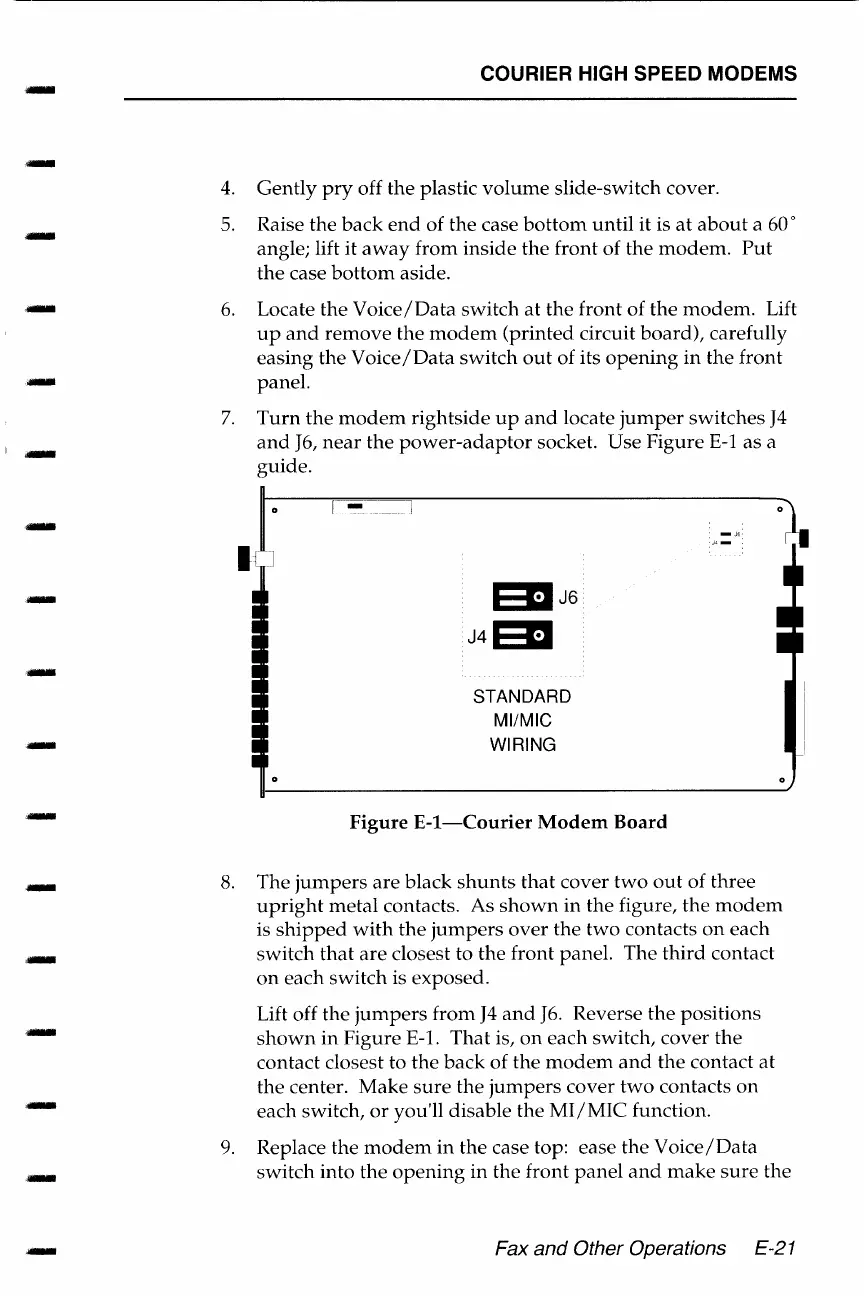
7.
Locate
the
Voice/Data
switch
at
the
front
of
the
modem.
Lift
up
and
remove
the
modem
(printed
circuit
board),
carefully
easing
the
Voice/Data
switch
out
of its
opening
in
the
front
panel.
Turn
the
modem
rightside
up
and
locate
jumper
switches
J4
and
J6,
near
the
power-adaptor
socket. Use
Figure
E-1
as
a
guide
.
t
1
...
-
---
1
EllJ6
J4Ell
STANDARD
Ml/MIC
WIRING
Figure
E-1-Courier
Modem
Board
-J6.
J4-:
8.
The
jumpers
are
black
shunts
that
cover
two
out
of
three
upright
metal
contacts. As
shown
in
the
figure,
the
modem
is
shipped
with
the
jumpers
over
the
two
contacts
on
each
switch
that
are
closest to
the
front
panel.
The
third
contact
on
each
switch
is exposed.
Lift off
the
jumpers
from
J4
and
J6.
Reverse
the
positions
shown
in
Figure
E-1.
That
is,
on
each
switch,
cover
the
contact closest to
the
back
of
the
modem
and
the
contact
at
the
center.
Make
sure
the
jumpers
cover
two
contacts
on
each switch,
or
you'll disable
the
MI/MIC
function.
9.
Replace
the
modem
in
the
case top: ease
the
Voice/Data
switch
into
the
opening
in
the
front
panel
and
make
sure
the
Fax and Other Operations
E-21

Table of Contents

Related product manuals