ENGLISH
34
SLOWING DOWN, BLINKER AND
WARNING LIGHT
To set the slowing down, the blinker and the warning light
p
rocede as follow:
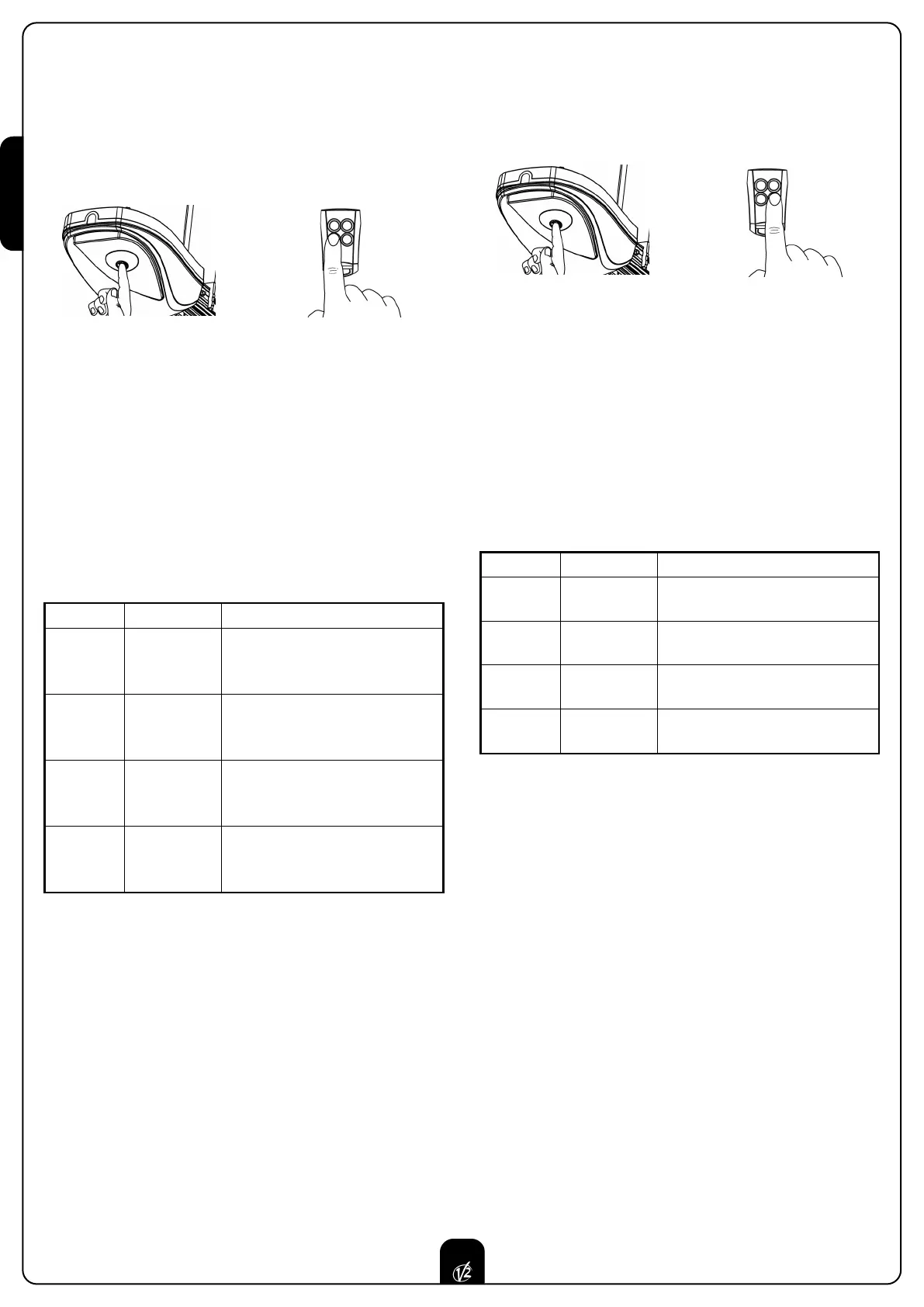
1. Press and keep pressed the key P1 for 5sec (courtesy light
ON) and at the same time transmit with the key 3 of the
t
ransmitter (the transmission must last 3 sec).
2. When the courtesy light switch off, stop the transmission
and release P1 key.
3. After 2 sec. the courtesy light visualizes the setted level with
the relative number of flashes. SEE CHART.
4. The courtesy light switch off for 2 sec. Then it goes on again
for 5 sec. waiting for a transmission.
5. Transmit (within 5sec) with the ideal key according to the
CHART.
6. The courtesy light switch off for 2 sec and therefore it
visualizes the new level setted with the relative number of
flashes. SEE CHART.
To correct any one of the parameters, restart from point 1.
BLINKER
The blinker blinks during the door movement as well as during
the whole automatic cycle OPEN-PAUSE-CLOSE.
WARNING LIGHT
The warning light shows in real time the state of the garage door:
STOP light off
IN PAUSE light always on
DURING OPENING the light flashes slowly (2 Hz)
DURING CLOSING the light flashes quickly (4 Hz)
+
K
ey 3
5
sec.
PRE-FLASHING AND PHOTOCELL TEST
T
o set the pre-flashing and the photocell test procede as follow:
1. Press and keep pressed the key P1 for 5sec (courtesy light
ON) and at the same time transmit with the key 4 of the
t
ransmitter (the transmission must last 3 sec).
2. When the courtesy light switch off, stop the transmission
and release P1 key.
3. After 2 sec. the courtesy light visualizes the setted level with
the relative number of flashes. SEE CHART.
4. The courtesy light switch off for 2 sec. Then it goes on again
for 5 sec. waiting for a transmission.
5. Transmit (within 5sec) with the ideal key according to the
CHART.
6. The courtesy light switch off for 2 sec and therefore it
visualizes the new level setted with the relative number of
flashes. SEE CHART.
WARNING: The control unit carries out a test to check
if there is the photocell as well as its correct operation
before each movement.
To correct any one of the parameters, restart from point 1.
+
Tasto 4
5 sec.
TX KEY FLASHING N° DESCRIPTION
Key 1 1
Slowing down OFF
Blinker OFF
Warning light OFF
Key 2 2
Slowing down ON
Blinker OFF
Warning light OFF
Key 3 3
Slowing down OFF
Blinker ON
Warning light ON
Key 4 4
Slowing down ON
Blinker ON
Warning light ON
TX KEY FLASHING N° DESCRIPTION
Key 1 1
Pre-flashing OFF
Photocell Test OFF
Key 2 2
Pre-flashing OFF
Photocell Test ON
Key 3 3
Pre-flashing ON
Photocell Test OFF
Key 4 4
Pre-flashing ON
Photocell Test ON


 To Next Page