8 Operating
Valmet OC is operated from the local
user interface TCU.
Basic functionality is available for
field communicators or control sys-
tems capable of HART
®
communica-
tion.
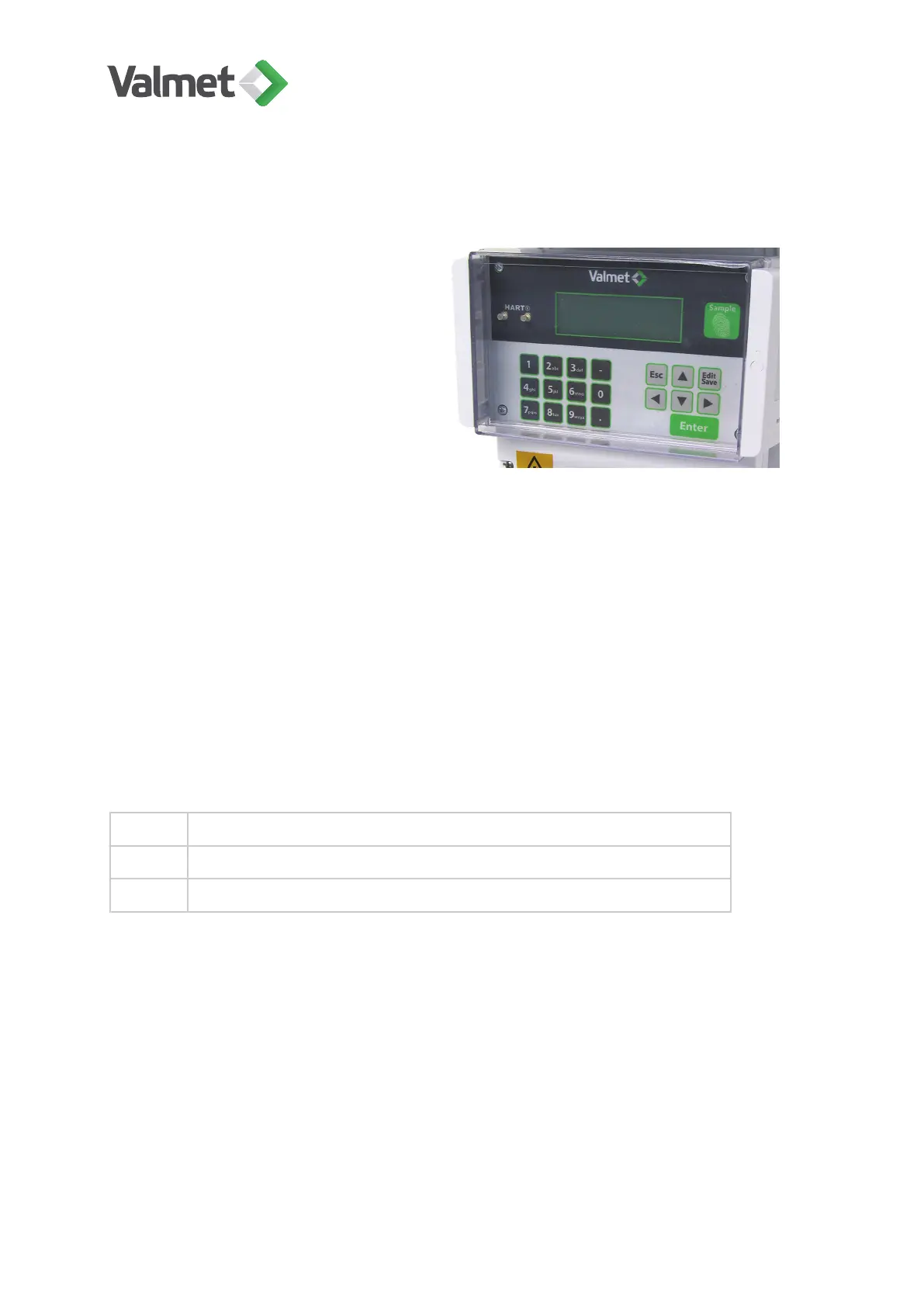
The display and keypad controls of
the TCU user interface:
• Number keys: enter numerical data, letters and select menu options.
• LCD display: 20 columns, 4 rows.
• Sample: start and stop sampling at calibration.
• Esc: exit the edit mode without saving data; move backwards in the menu structure;
toggle between result display and main menu.
• Edit/Save: go to edit mode, save data after editing.
• Arrows: move the cursor, move in menus.
• Enter: move between result displays; in edit mode, jump to the next value to edit.
Table 3: Display symbols.
≡ value is editable
: value is read only
= measured value, or entering the next submenu
Example of an editing instruction:
• Press Edit/Save to start editing, a cursor starts to blink.
• Use number keys to feed in the value.
• Press Enter to move to the next value.
• Press arrow keys to scroll between fixed values (Alarm curr.).
• Press Edit/Save to save and exit from the edit mode.
• Press Esc to leave the page.
Operating | 25 (48)
K20798 V1.1 EN - 1 - 12/2019



 To Next Page