11.5 Current output
In Diagnostics menu press 5 Current output.
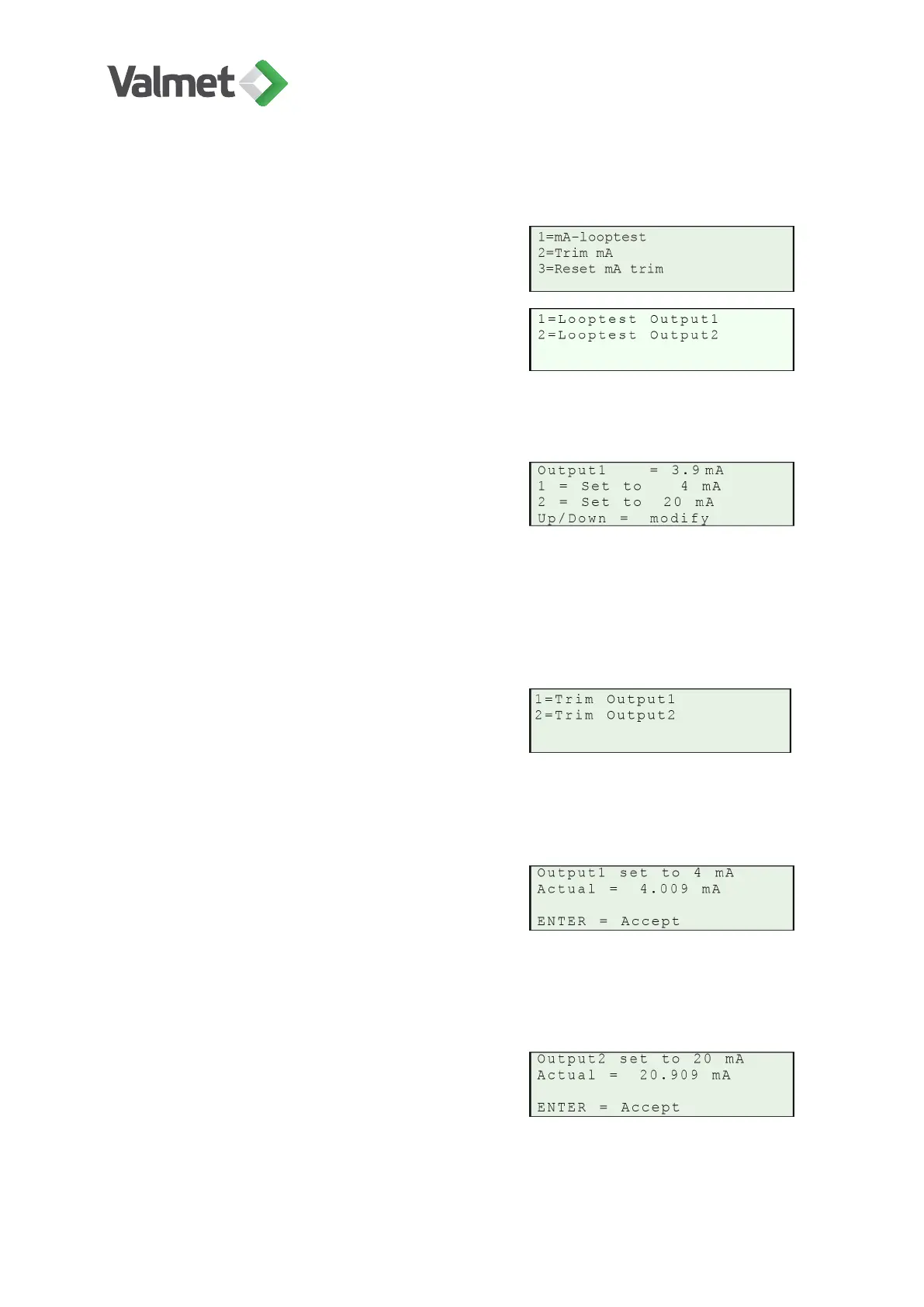
mA-looptest: 1, 2: Select Looptest Output1/
Output2.
Looptest locks the output signal to 4 mA, 20 mA, hold (present) value, or some other
user-defined value. It can be used to check the cabling and current output circuits.
• Output1/2: When this display is activated,
the analog output is frozen to its present
value, shown here.
• 1: Set the analog output1/2 to 4 mA.
• 2: Set the analog output1/2 to 20 mA.
• Up/Down: Increase/decrease the analog
output value with the Up/Down keys.
Trim mA: 1, 2: Select "Trim Output1/Output2".
This function requires that you connect an ammeter to the analog output. The device
will first send a 4 mA signal to the analog output. Measure the actual current value and
enter it to the device by changing the "Actual" value.
•
Output1/2: The analog output is frozen to
its present value, shown here.
• Actual: Enter the measured value in the
Edit mode.
• Enter: Accept the value.
The device then sends a 20 mA signal to the
analog output. Measure the actual current val-
ue and change it in the same way as for the 4
mA signal.
Diagnostics | 43 (48)
K20798 V1.1 EN - 1 - 12/2019



 To Next Page