10.7 Calibrating
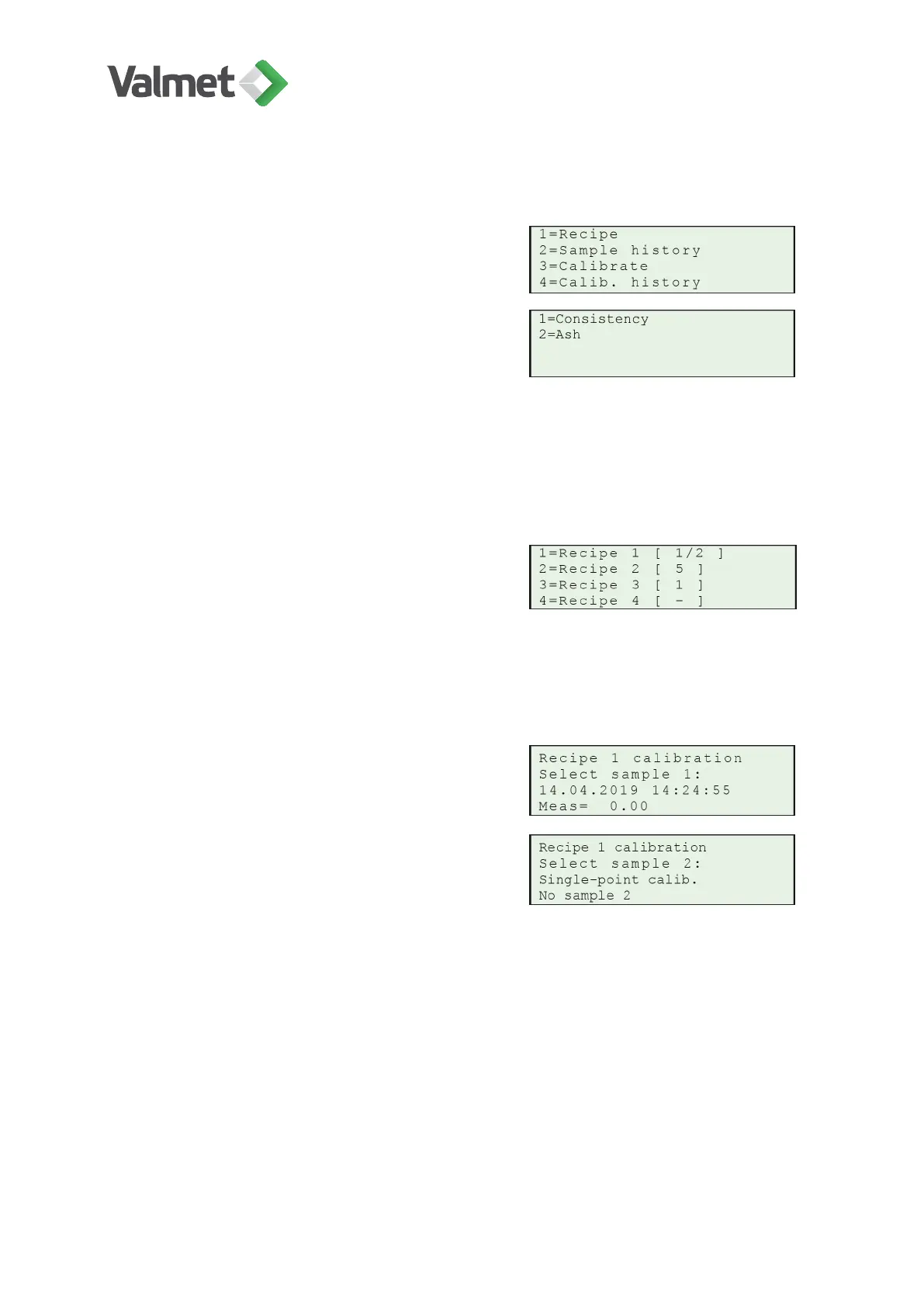
Press 3 Calibrate in the calibration menu.
Choose the required mode:
1 = total consistency calibration
2= ash consistency calibration
• [1/2] indicates that both single-point and two-point calibration can be done.
• [ 1 ] means that only single-point calibration is possible.
• [ 5 ] or greater means that multi-point calibration is possible.
Select the recipe to be calibrated.
Single-point calibration requires at least one stored measurement result and the
corresponding laboratory value. Two-point calibration requires at least two
measurement results and laboratory results. If more than one sample has been saved,
scroll them on the display with the up/down arrows.
When the correct sample is shown, press En-
ter to select it for calibration. The first calibra-
tion point is now fixed.
For two-point calibration choose now the sec-
ond sample (up/down arrows). In single-point
calibration press now Enter.
If the values of A and/or B look too low or high, or if the consistency difference between
the selected two samples is less than 25 %, the display will show a message of this.
You can still choose to accept the calibration. If the values are extremely low or high,
the device will not accept the calibration parameters.
Press Enter to accept the values. The measurement is now calibrated and will operate
using the new calibration settings.
Calibration | 38 (48)
K20798 V1.1 EN - 1 - 12/2019



 To Next Page