OTDR Series e-Manual, D07-00-076P-RevC00 Page 79 of 107
• Real Time: To view trace in real time. Used when checking initial connection, VFL
testing or splice alignment.
• Fiber Index: Test counter. When saving test results, count auto increments and is
added to filename.
• Trace Index: Place counter for Fiber field or Trace part of filename.
The following information can be pre-set and automatically saved in the file (Page 4).
• Originating location - where fiber starts
• Terminating location - where fiber ends
• Comments
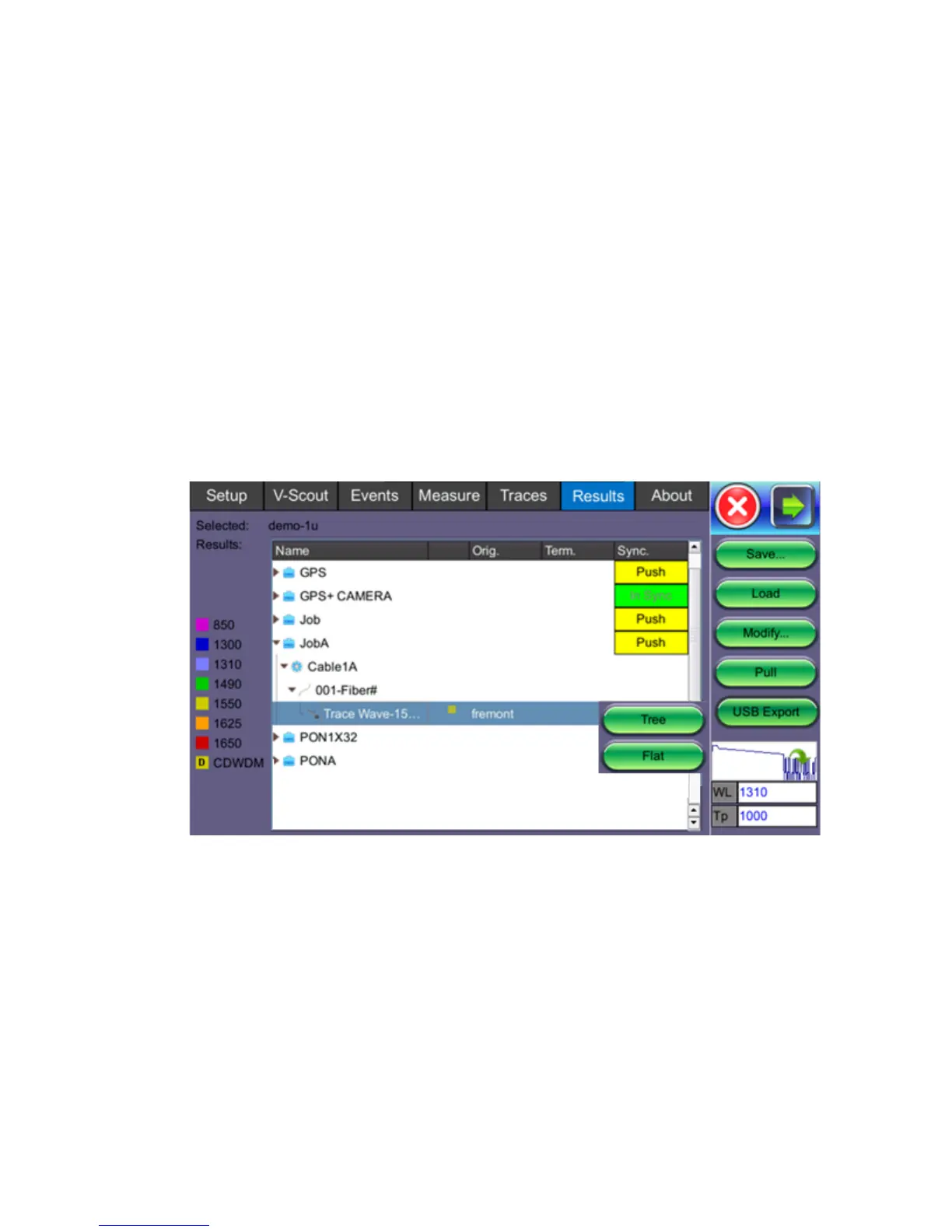
To view a saved result, select the Results tab to see the screen below. To push test results to
your Cloud account, just select the Push command for the folder that you wish to upload to the
Cloud.
Save: Saves file when autosave is disabled.
Load: Displays selected trace for viewing.
Modify: Renames or removes selected file.
Pull: When connected, pulls file from Fiberizer Cloud onto test set.
USB Export: Exports selected test results to USB stick using standard MyVeEX tree directory
format or a flat file when all files should be saved in a single folder.
Alternatively, you can access files and copy To USB stick via Utilities>Files>Saved. Each
trace will be saved in a separate file folder.



 To Next Page