OTDR Series e-Manual, D07-00-076P-RevC00 Page 78 of 107
7.2.3 Event Table
• Show Fiber Sections – Shows fiber section in event table.
• Distance Unit – Sets metric for distance between fiber sections in viewing window (km,
kft, feet, meter, miles).
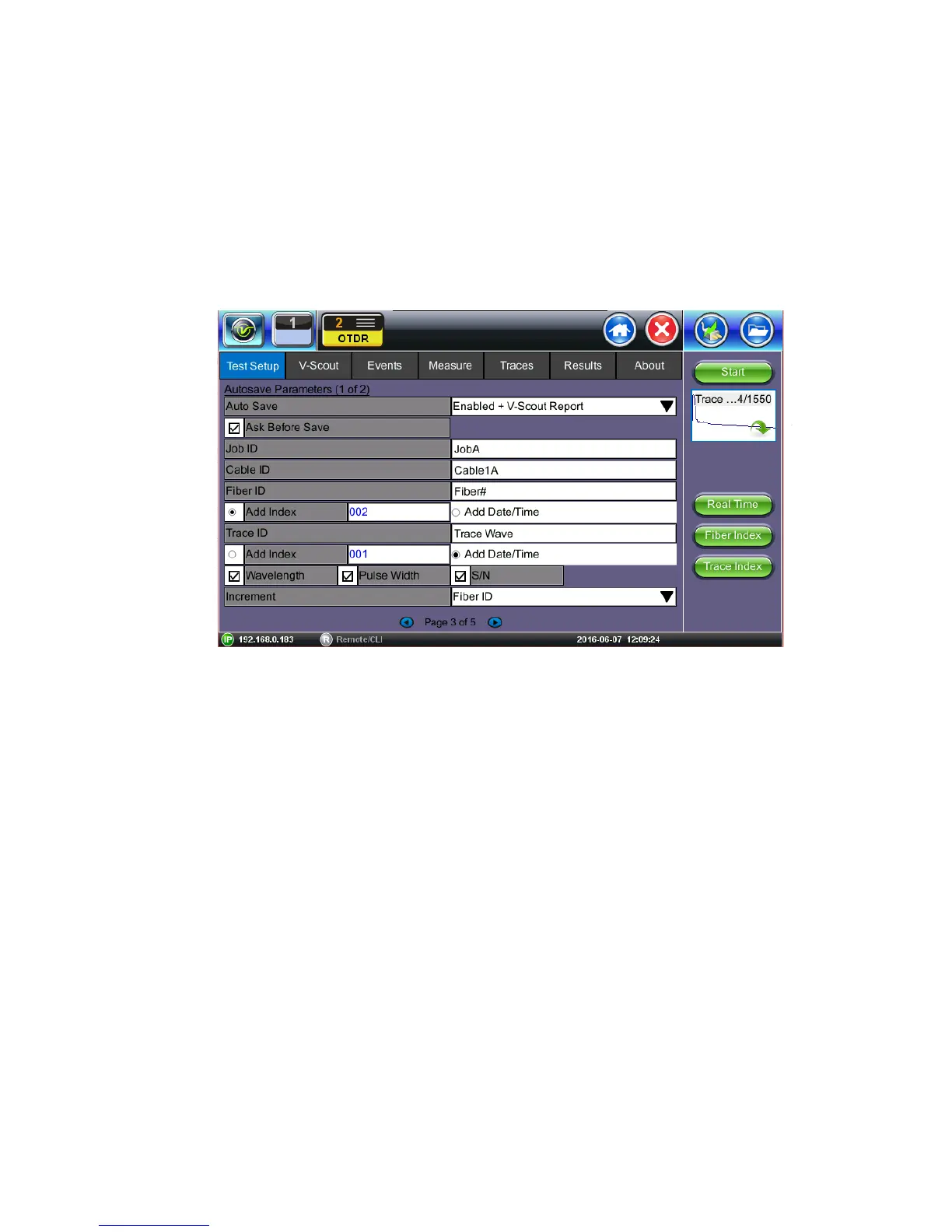
7.2.4 Autosave Parameters
• Auto Save: Select Disabled, Enabled, Enabled+Report or Enabled+V-Scout Report
• Ask Before Save: Check this if you want to be prompted to save after measurement is
completed
The following information can be pre-set to create a name and increment fiber or trace number
automatically (Page 3). The filename will begin with the Index value, Trace ID, Wavelength,
Pulse Width, and S/N, if checked.
• Job ID
• Cable ID
• Fiber I/D - Check Add Index if you wish to auto-increment or Check Add Date/Time
• Trace ID - Check Add Index if you wish to auto-increment or Check Add Date/Time
The filename will include details entered in this field automatically. The fiber count can
be incremented in Trace ID or Fiber ID.
• Wavelength: Include test wavelength used for each trace
• Pulse Width: Include pulse width used for test
• S/N: Include tester serial number
• Increment: Choose to increment Fiber ID or Trace ID



 To Next Page