34
UM150 User’s Manual
34
UM150 User’s Manual
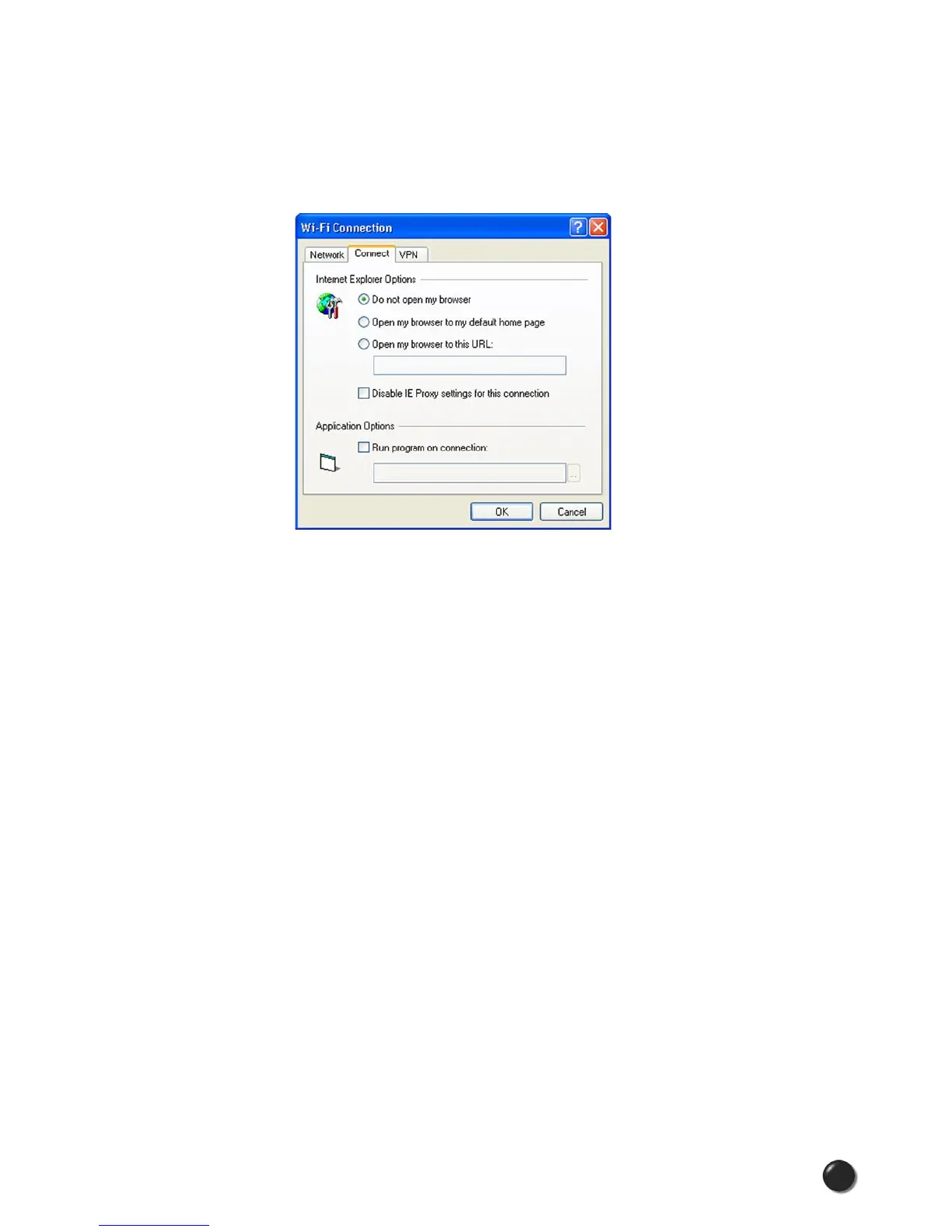
Connect Tab
The following options exist on the Connect tab (“Tools,” “Preferences,” “Wi-Fi”
tab, select “Add” or a network in the “Preferred Network” list, select “Edit,” then
“Connect”):
Do not open my browser: With this option selected, when you connect to a Wi-Fi
network, VZAccess Manager will not automatically launch your web browser.
Open my browser to my default home page: With this option selected, when you
connect to a Wi-Fi network VZAccess Manager will automatically launch your web
browser and your default home page will load.
Open my browser to this URL: With this option selected, when you connect to a
Wi-Fi network, VZAccess Manager will automatically launch your web browser but
do it in such a way that the URL you specify in the field will load instead of your
home page.
Disable IE Proxy settings for this connection: This option provides an automatic
method to turn off proxy settings when connecting to a Wi-Fi network. This would
typically be used if you normally use proxy settings at work to access the Internet
and you wanted to access the Internet directly via Wi-Fi without using VPN (Virtual
Private Networking) software.
Run program on connection: This allows automatically running a program when
you use VZAccess Manager to connect to a Wi-Fi network. Select the browse
button to browse to the desired application you want to run when you connect to
a Wi-Fi network using VZAccess Manager. The application will run for all Wi-Fi
connections made from VZAccess Manager.



 To Next Page