Vertiv™ | Liebert® AHU | User Manual 43
4 ICOM Embedded Unity Setup Guide
This guide assists you with enabling and configuring the iCOM controller for the Building Management System (BMS)
connectivity.
Note: This setup guide applies only to units with iCOM internal control boards with Dual-Ethernet ports.
4.1. Connecting to the Network
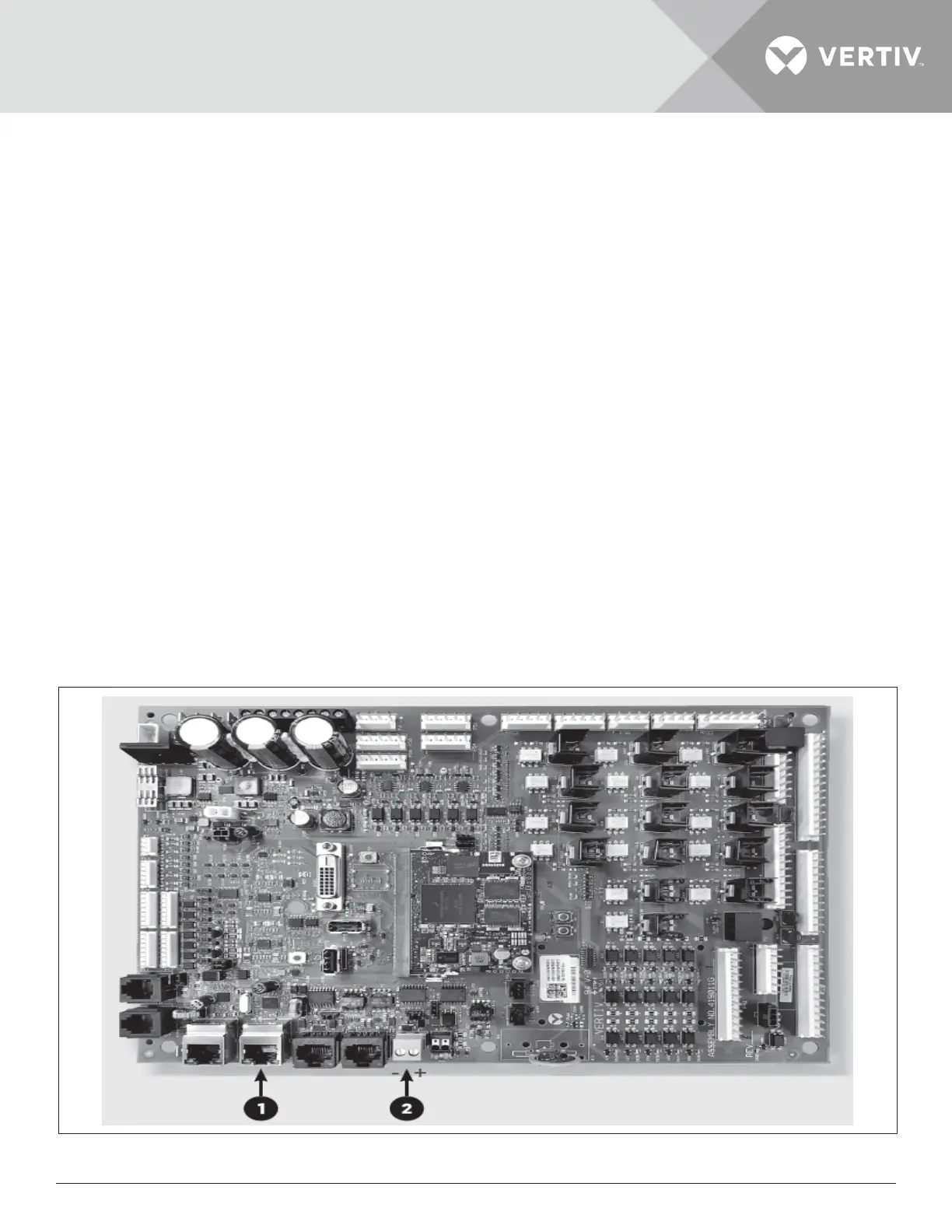
Inside the iCOM enclosure, connect an Ethernet cable to the P74 port on the iCOM internal control board.
4.2. Commissioning Host Communication Component
Locate the serial cable from the BMS and connect it to the 485 2-wire terminal connector via the TB3 on the iCOM internal
control board. Pin 1 is the positive terminal on the right of the connector.
4.3. Enabling Embedded Unity via the iCOM Display
By default, the built-in Unity functionality is disabled. To enable it, complete the following steps.
From the sidebar of the Service menu, navigate to BMS & Teamwork Setup - BMS Setup - IntelliSlot Card Settings.
From the Monitoring Protocol drop-down menu, scroll down and select Embedded if you are using only Embedded Unity or
select Embedded & IS V4 if you are using Embedded Unity and additional IntelliSlot capability or SiteLink connection.
Note1: Using Embedded & IS4 means an optional IntelliSlot assembly and IntelliSlot IS-Unity card is installed. Embedded
Unity will require a 485 expansion card if twisted pair protocols are used.
Click Save & Restart (Unit Only) to save your changes and restart the unit.
Note2: Changing the monitoring protocol requires a reboot of the iCOM controller. During this time, the unit will not
condition the space. After the iCOM controller has rebooted, it may take at least three more minutes for Embedded Unity
to fully reboot. If it doesn’t reboot, click Refresh from the BMS & Teamwork Setup-IS-Unity Setup page of the Service
menu.
Figure 4-1 Internal Control Board Connections







 To Next Page