Touchscreen Display30
3 Touchscreen Display
Liebert® iCOM oers the highest capability for unit control, communication, and monitoring of Liebert Thermal Management
Units. It is available as factory-installed on new units and assemblies.
3.1. Touchscreen Display and User Interface
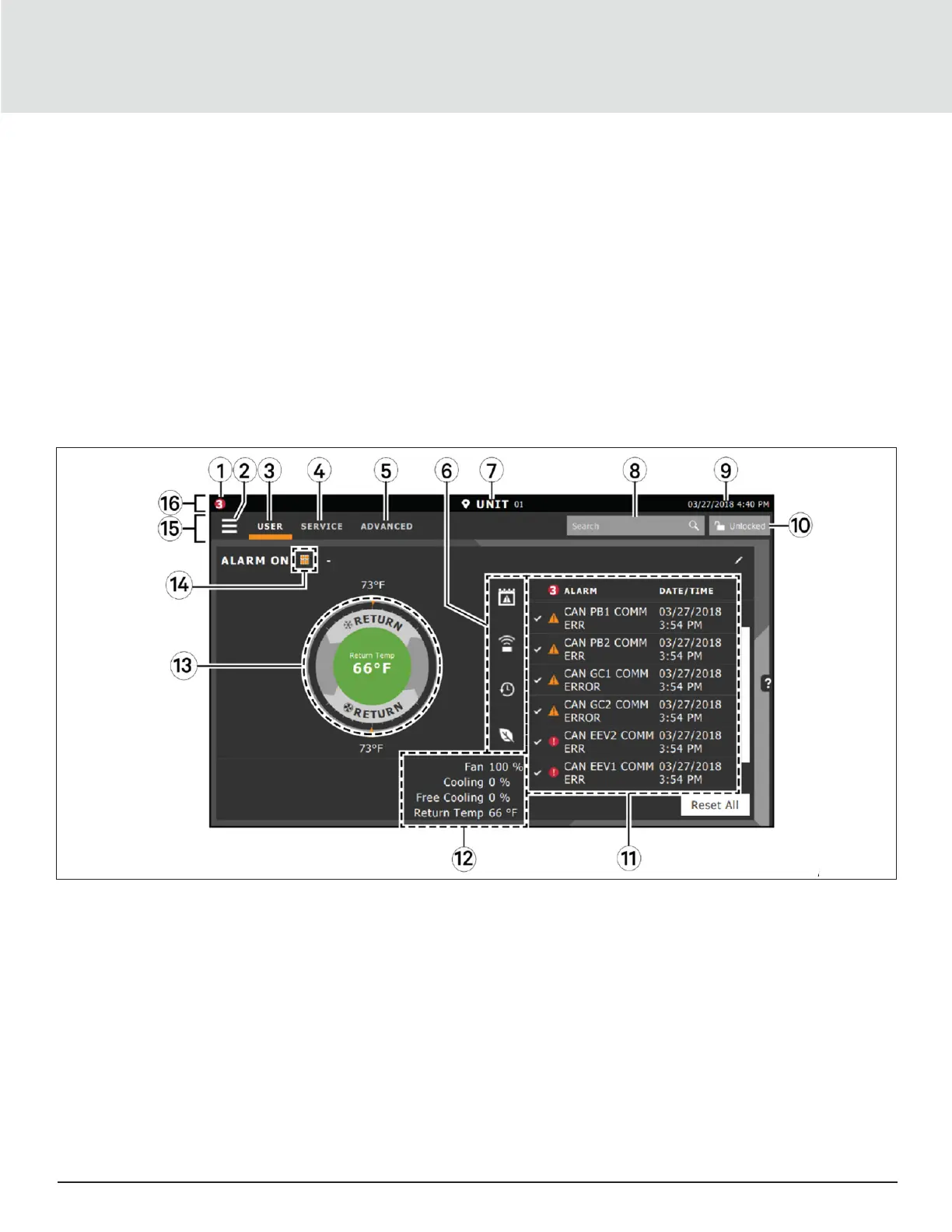
The Liebert iCOM touchscreen, user interface speed set up, installation, and simplified control of Liebert® AHU units literally
putting cooling-system monitoring and management at your fingertips.
• User and service menus are password-protected to prevent unauthorized changes in the cooling unit operation settings.
• The touchscreen is back-lit and auto-dims after a period of non-use, then turns o. Touch the screen to
re-illuminate the main screen.
• Liebert iCOM ships with default settings for the eicient and eective operation of most cooling units and it is easily
configured to meet any requirement.
• Liebert iCOM menus and displays are based on the options installed on the cooling units that it monitors and manages.
Figure 3-1 Liebert iCOM Main Display







 To Next Page