Chapter 16 Maintenance and Troubleshooting
Maintenance procedure
146 User Manual 76100000200 Rev. 001
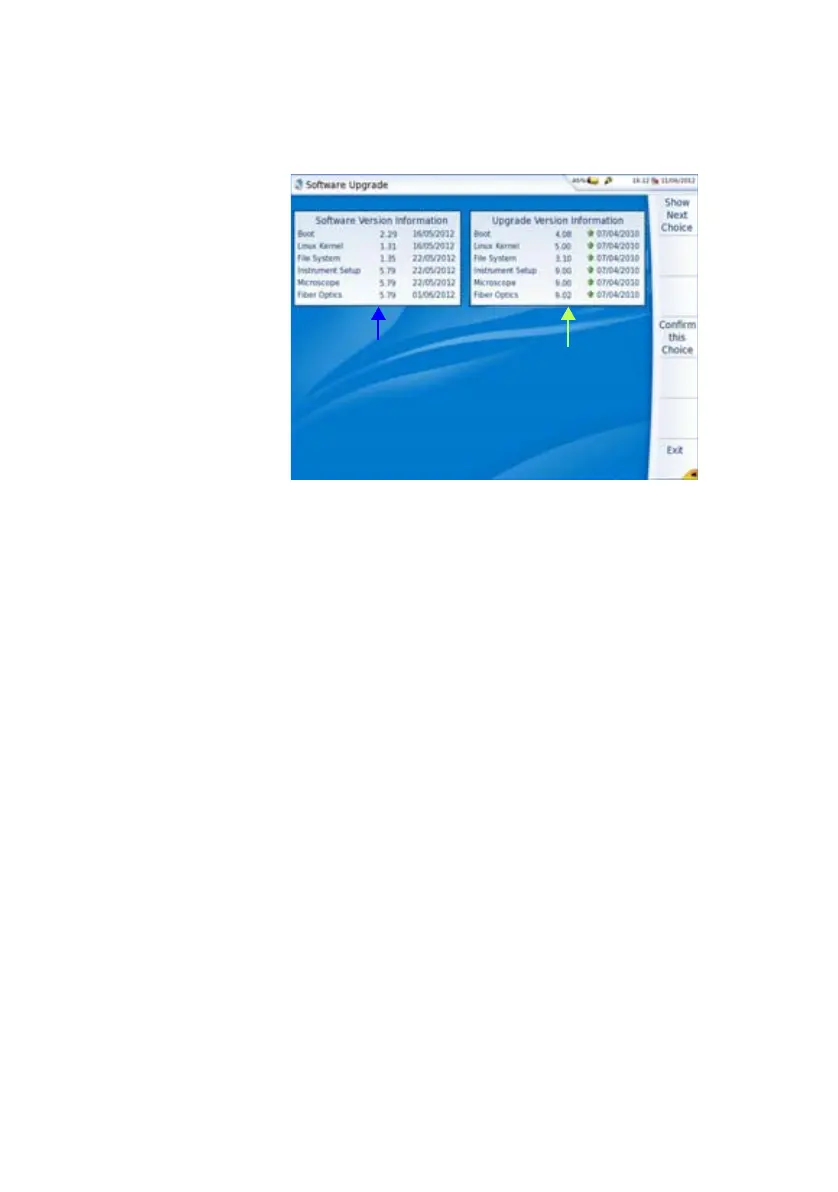
The list of the software versions available on the PC is displayed
next to the versions installed on the 6000A V2 Platform.
Installation from
another server
Before starting the software upgrade via Ethernet, make sure the IP
address of the PC server.
The update can be performed directly onto the equipment, using an http
address.
1 Connect the 6000A V2 Platform to a PC via an Ethernet link.
2 On the Home page, press System Settings key to open the
System Settings page.
3 In I/O Interfaces, on the line Ethernet, select Mode: Dynamic.
4 In the Upgrade Server box:
– On the line Address Type, select Server Name or IP Address.
– Enter the Server Name (if Server Name has been previously
selected) or the Server Address (if IP Address has been previ-
ously selected)
5 In the I/O Interfaces box:
– On the line Use proxy, select No, Manual or Auto wether a
proxy is used or not.
6 Press, in succession, Expert Tools > Upgrades > Software
Upgrade > Upgrade via Ethernet.
The message Verify IP address of PC server appears.
7 Click on Continue.
Fig. 94 List of software versions (current and new)
Software versions
installed on Platform
Software versions
available on selected
media for update








 To Next Page