Chapter 6 Scope
Launching a test of the connector and fiber end-face
44 User Manual 76100000200 Rev. 001
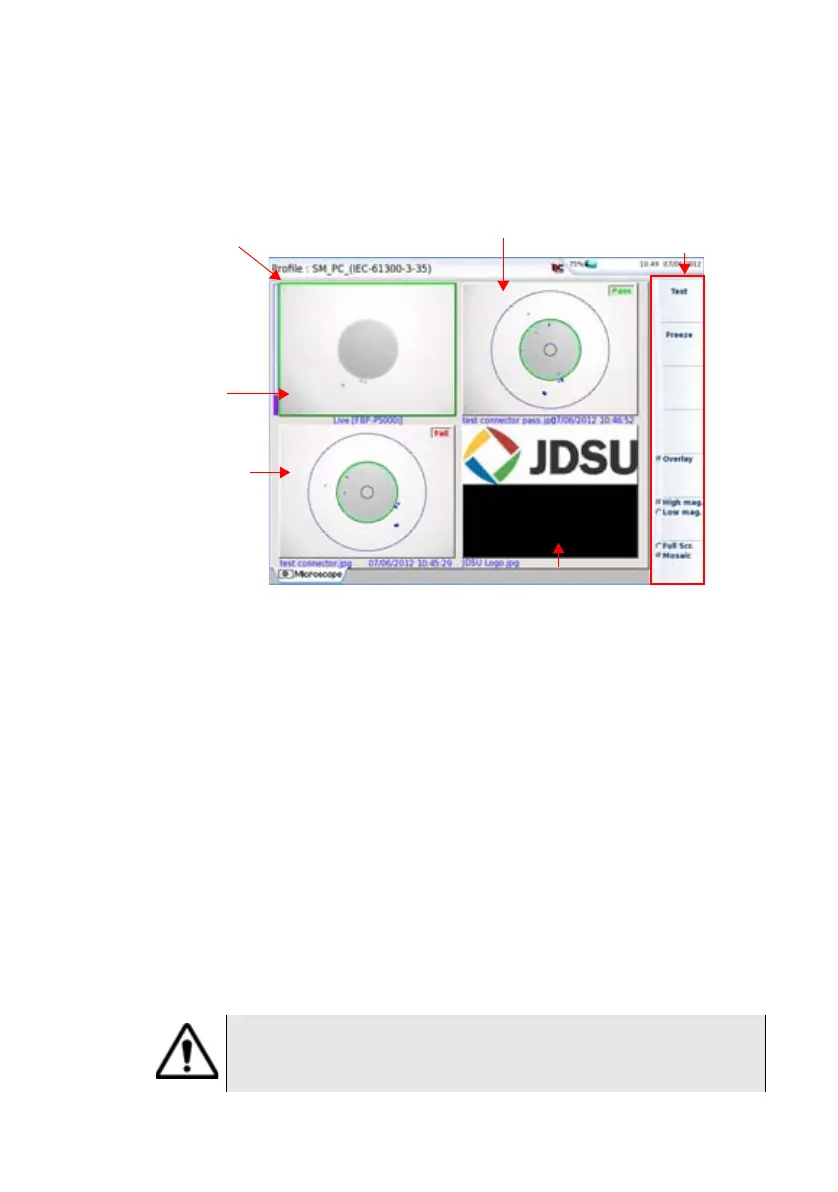
Mosaic Mode
It is possible to display only one picture in full screen (640 * 390 pixels)
or up to four pictures (320*180 pixels each, including the live camera
picture) in mosaic mode. Use the key Full scr./Mosaic to switch from
one mode to another.
– You may select one of the pictures by clicking on it.
The selected picture is framed in green.
The toolbar on the right varies according to which picture is selected
(camera, or static scope picture):
Picture selected: Live
Test Allows to launch a (new) test of the connector
(see
“Launching a test of the connector and fiber
end-face” on page 42
)
Freeze Allows to freeze the live image and to save it later
on the disk. Once this key is pressed, the freeze
image is automatically set on Position 2.
Overlay Allows to display/hide the limits of each zone and
the detected defaults on image from a scope test
result (see
“Overlay” on page 43).
Fig. 20 Mosaic mode
Position 1 :
Live camera
Position 2: Snapshot saved
on disk : connector cleaned
Position 3 :
Connector before
being cleaned
Position 4 : JPEG image
Selected picture
Menu keys when Live
picture is selected
If all positions were taken, the picture that was once at the fourth posi-
tion is unloaded from memory. Frozen pictures are lost, unless they
were saved on the internal memory.





 To Next Page