Chapter 3 Starting up
Switching the 6000A V2 Platform on and off
User Manual 76100000200 Rev. 001 15
– When the level becomes too low, the instrument emits a beep to
inform the user until it switches off automatically after saving the
current configuration and measurement.
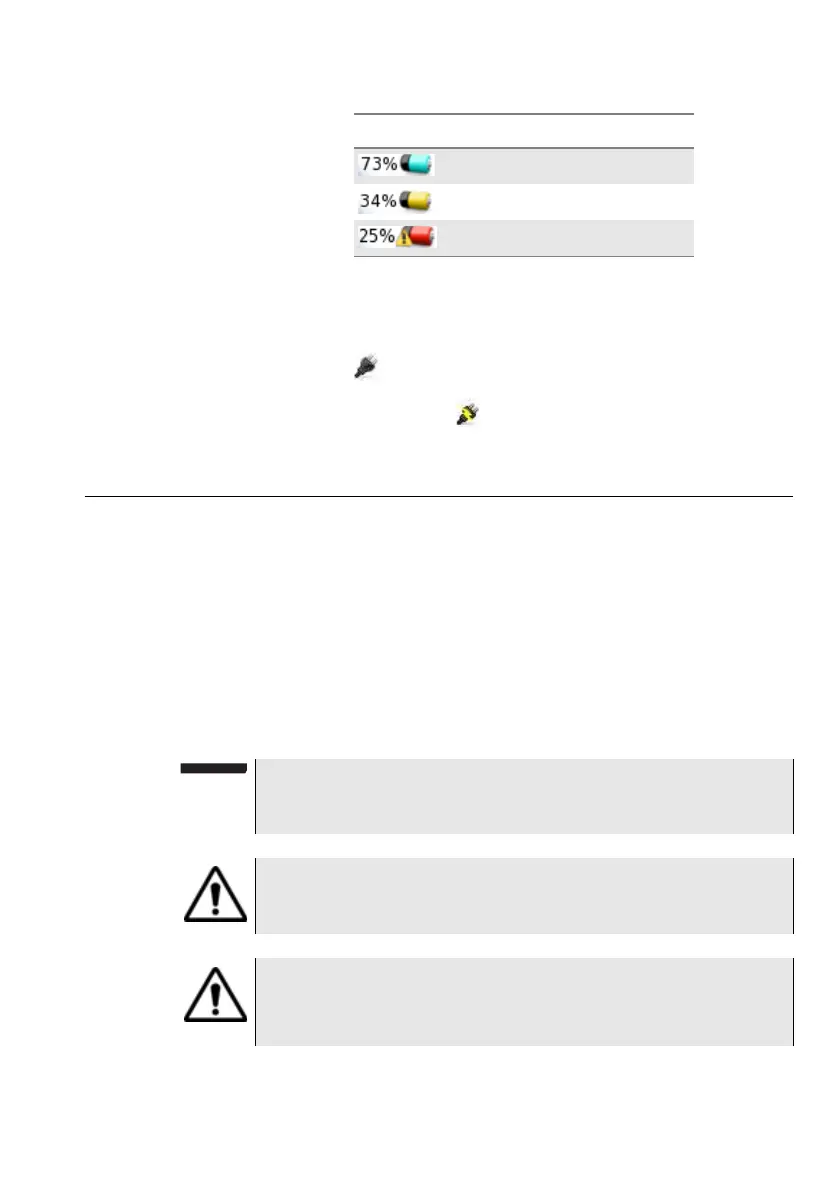
– The icon is displayed on the upper banner to indicate the Plat-
form is connected to mains and battery is fully charged (100%).
– If the icon is displayed , this mean the Platform is connected to
mains but battery charge is inferior to 100%.
Switching the 6000A V2 Platform on and off
Switching on
the 6000A V2
Platform
1 Press the ON/OFF key.
If the Platform is powered to mains, the battery will charge.
The On indicator pass from blinking to solid green.
The Viavi logo appears on the screen briefly, then an autotest is
carried out.
The equipment is ready to be used once all the applications are
installed.
From 70% to 40%
From 40% to 10%
From 10% to 0%
Icon Battery charge level
NOTE
It is possible to switch over from battery to mains operation, or vice
versa, without loss of data.
The module cannot be swapped when the unit is ON or AC
powered
In the event of an unexpected mains power cut, if there is no
battery, the current results and configuration will not be saved.
Next time the instrument is switched on, it will return to its initial
configuration.








 To Next Page