Chapter 7 Applications
Web browser
56 User Manual 76100000200 Rev. 001
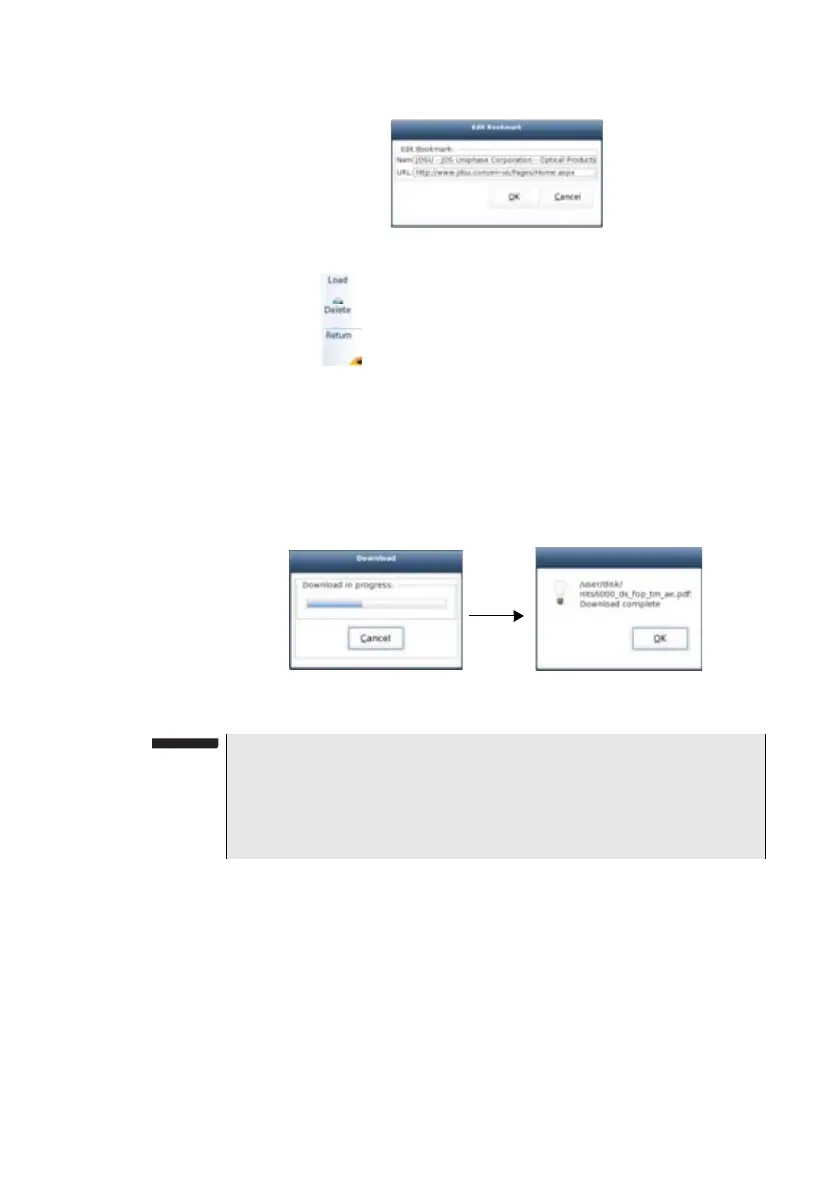
– Click on to open the page of the bookmark selected in the list
– Click on to delete the selected bookmark from the list
– Click on to exit the bookmark menu and go back to the Web
Browser page.
Opening a PDF
document
PDF documents may be opened and read within the Web browser.
1 When you click on a link toward a PDF file, a dialog box during
loading is displayed.
2 Once loading is completed, click on Ok to open the pdf file.
Leaving the
web browser
Depending on how long you want to leave the web browser and on your
connection mode, you may:
– Leave the web browser running and switch to another task. To do
this, click on the
HOME button.
Fig. 28 Bookmark edition
Fig. 29 Downloading a pdf file
NOTE
The web browser will open a PDF document, not a URL including a
PDF file.
The PDF is also automatically saved on the disk of the 6000A V2
Platform.








 To Next Page