Chapter 10 File management
Working with directories and files from the explorer
User Manual 76100000200 Rev. 001 77
Transferring
files to a PC
with the USB
cable
If some Results traces or other kinds of file need to be transferred to the
PC, this can be easily done using the USB cable delivered on standard
with the 6000A V2 Platform.
Establishing
connection 6000A
V2 Platform <-> PC
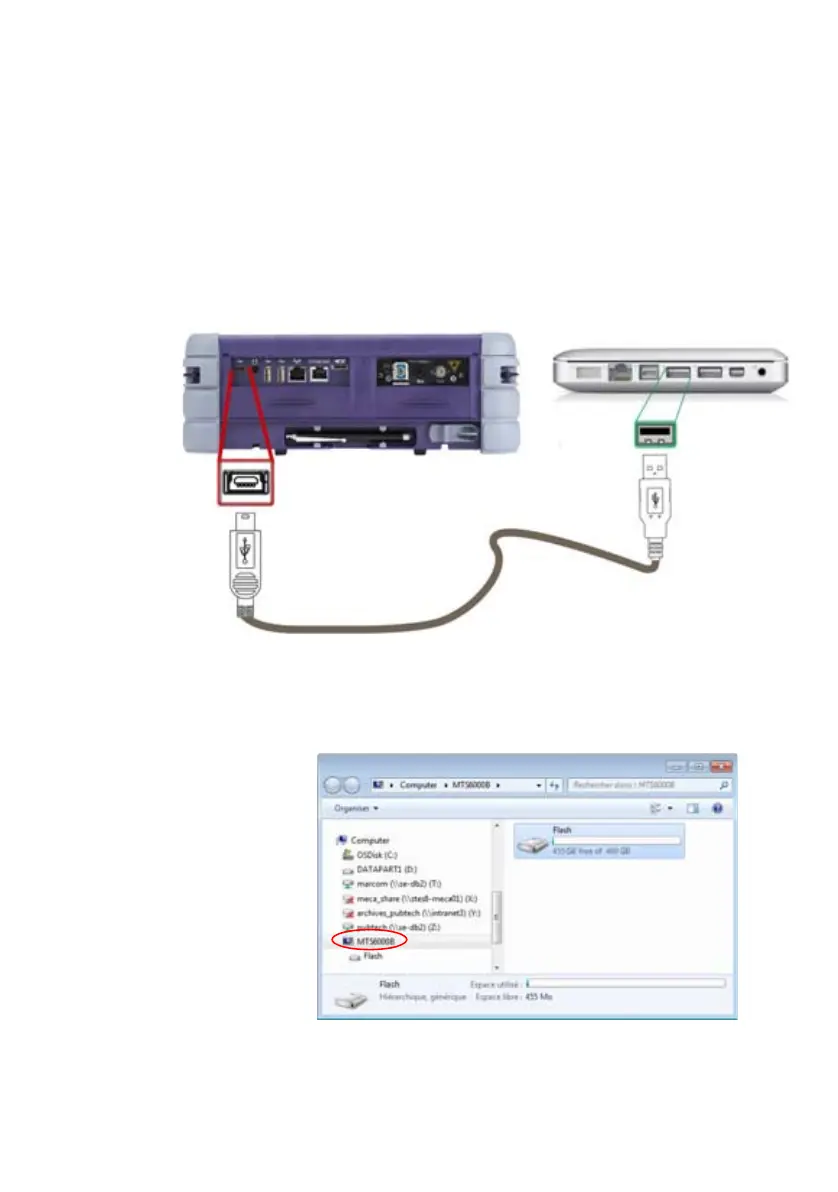
1 Connect the 6000A V2 Platform to a PC, plugging the USB cable on
the mini USB port of the Platform toward a USB port on the PC.
2 Once connection is established, a window opens automatically with
the Flash driver:
3 Double click on the Flash driver.
The disk content of the Platform opens onto the PC.
Fig. 43 Direct connection 6000A V2 Platform <-> PC
Mini USB Port on the
6000A V2 Platform
USB port on
the PC
U
S
B
c
a
b
l
e








 To Next Page