Chapter 10 File management
Working with directories and files from the explorer
User Manual 76100000200 Rev. 001 75
2 Select the storage media into which the directory must be created
3 If you want to create a sub-directory, select the directory into which it
must be created.
4 Press the right menu key Create Directory.
The edition keypad displays
5 Enter a name for this directory
6 Press Enter key to validate the new directory
Opening files
Once a file is selected, press Load, then Confirm Load menu keys.
File Types
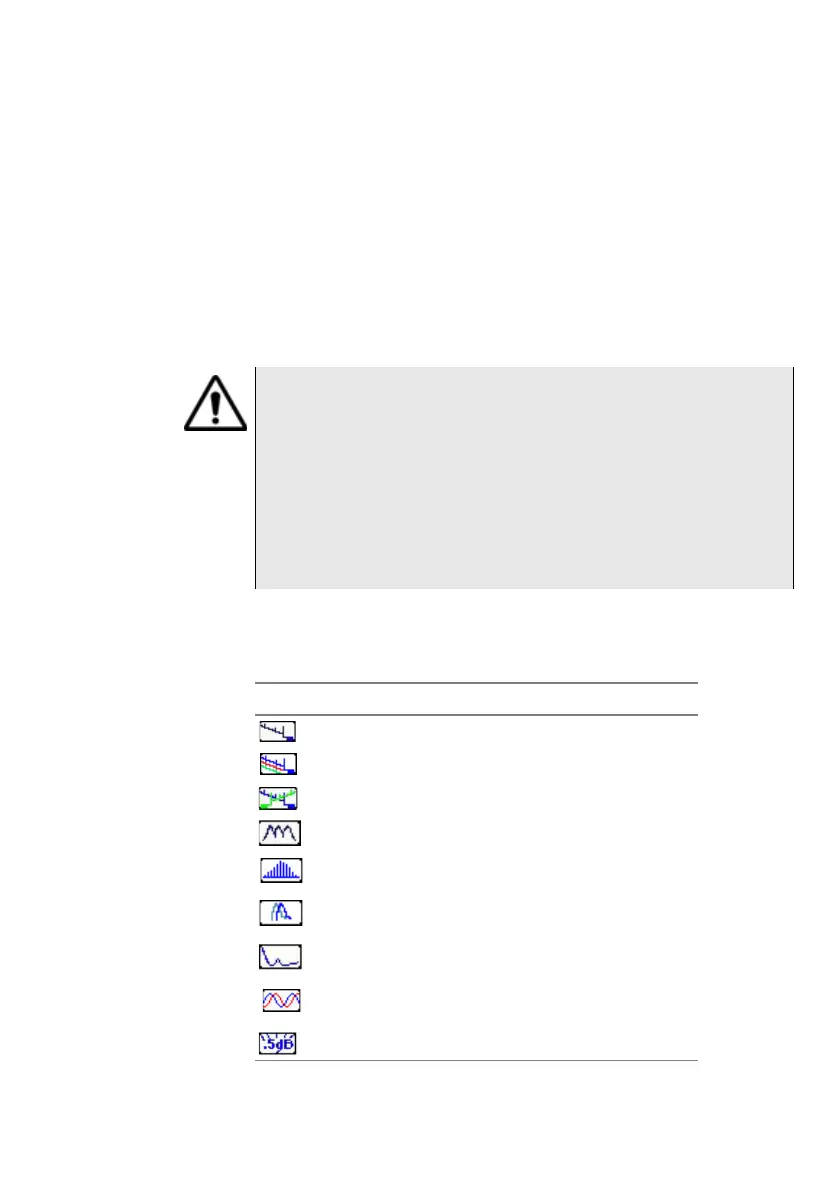
For files recognized by the 6000A V2 Platform, the types are symbolized
by icons. E.g.
Several FO files of the same type (example: all otdr) cannot be
opened at the same time using the Explorer function of the
Application page; only the last one selected will open.
It can be opened exclusively if the corresponding module is set
and activated and if File explorer is opened using the F
ILE button
of the Platform).
Other type of files (PDF, TXT...) must be open one by one.
If different types of files have been selected in the Explorer, only
the last one selected will open.
Icon Type of FO file
OTDR file (.SOR extension)
Multi OTDR file (.MSOR extension)
OEO file (.OEO extension)
OSA file (.OSA extension)
PMD file (.PMD extension)
CD OTDR file (.CD extension)
AP file (.AP extension
ODM file (.OCD extension)
Power Meter file (.LTS extension)








 To Next Page