Chapter 6 Scope
Launching a test of the connector and fiber end-face
User Manual 76100000200 Rev. 001 43
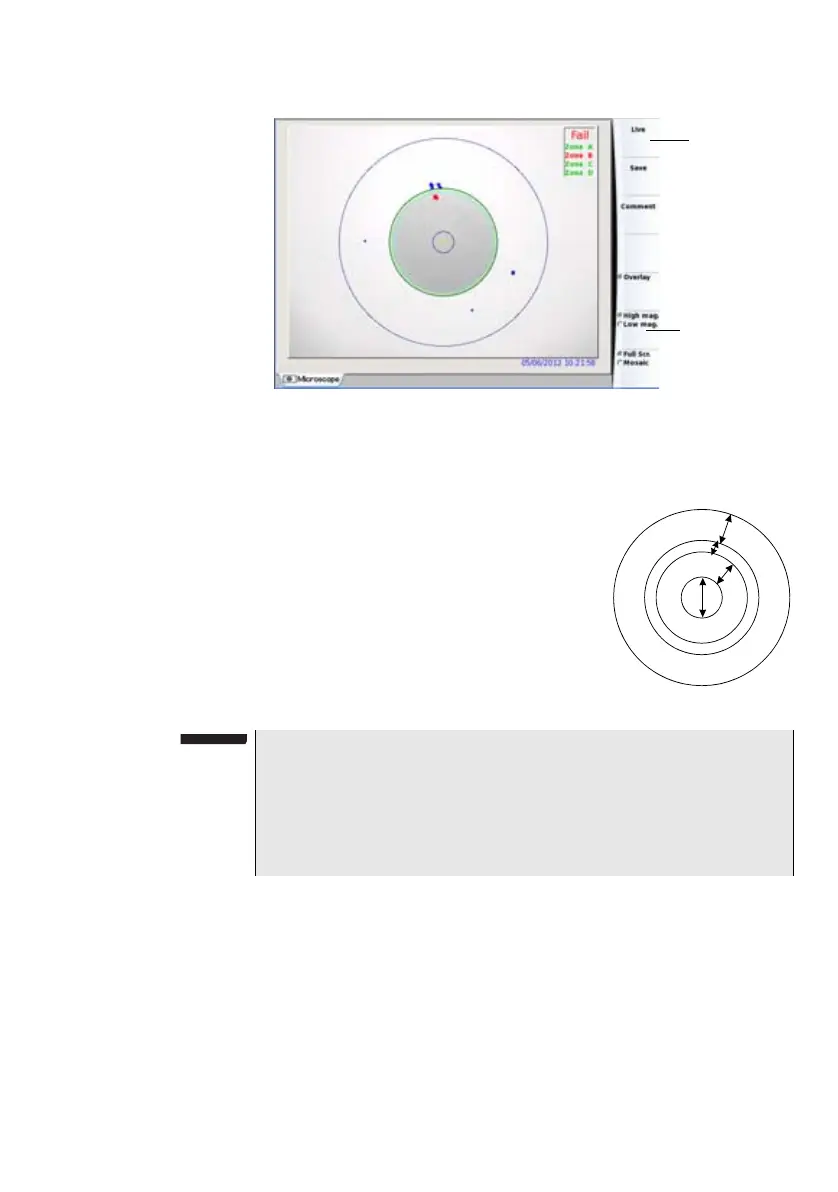
A summary of test results is displayed on the right, upper part of the
screen.
– Zone A: represents the Core zone: it is
the area surrounding the core
– Zone B: represents the Cladding zone. It
surrounds the majority of the fiber clad-
ding.
– Zone C: represents the Epoxy ring.
– Zone D: represents the Ferrule/Contact
zone: it identifies a portion of the ferrule
near and around the fiber
Overlay
The Overlay key allows, when selected, to display the limits of each zone
and to display with colors the defaults on the image.
When the key is unselected, the zones and defaults are not graphically
identified.
This function is also available in Mosaic Mode (see “Mosaic Mode” on
page 44).
Fig. 19 Test results
Test result in
High mag.
Summary of
Test results
NOTE
To return to a Live Camera image, press Live key; or press Full Scr./
Mosaic key to view both live image and test result.
In Mosaic mode (see "Mosaic Mode" page 44), the result of the test
only displays Pass or Fail information; the status of each zone is dis-
played only in
full screen mode.








 To Next Page