EasyManua.ls Logo

VICI DBS NM PLUS - Menu Structure and Navigation; Parameter Configuration

VICI DBS NM PLUS
41 pages
Print Icon
To Next Page IconTo Next Page
To Previous Page IconTo Previous Page
Loading...
26
NM & PG PLUS FID STATIONS
USER MANUAL
Version 1.03.0000
www.vicidbs.com
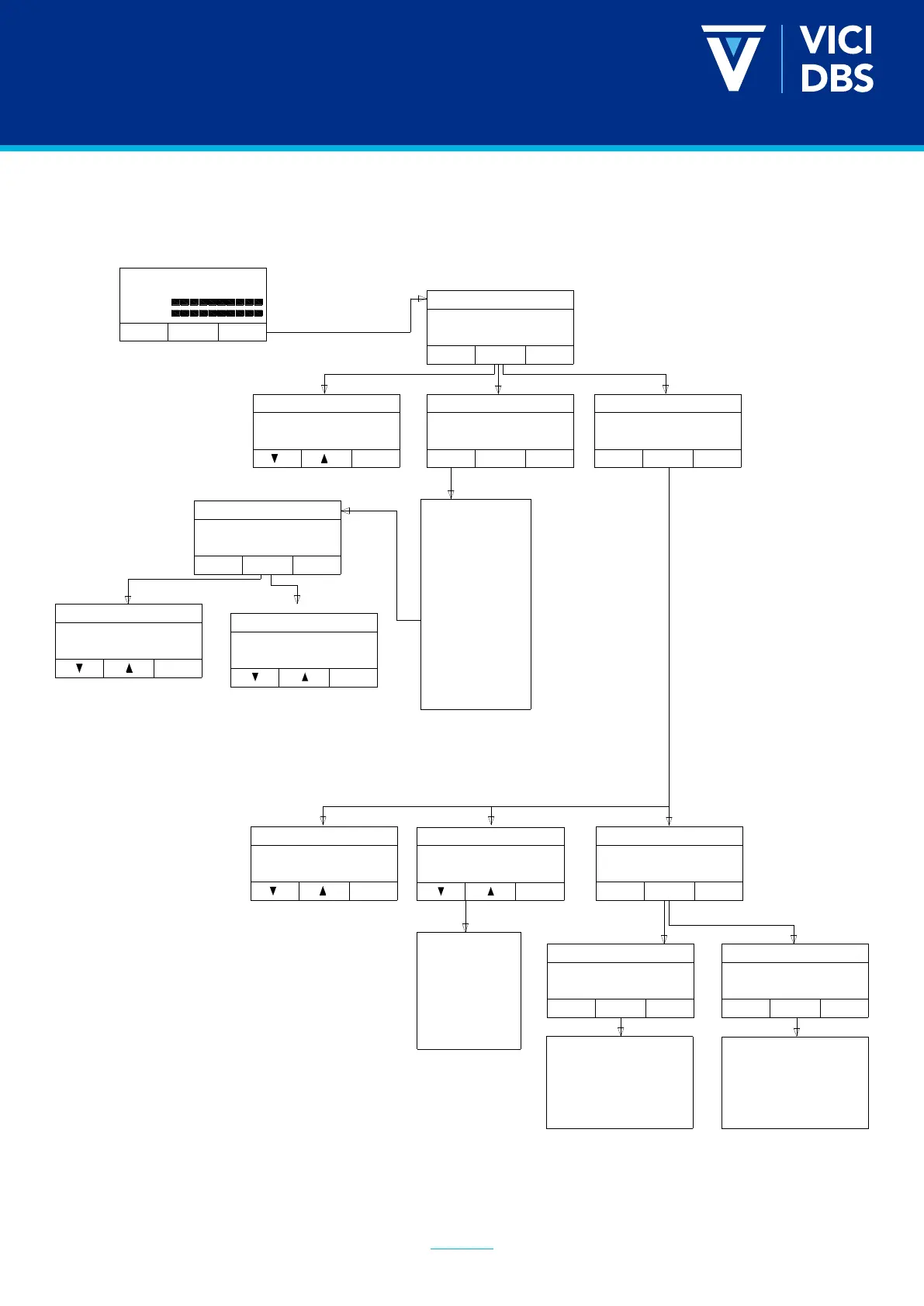
8.2. MENU STRUCTURE
The Menu following the tree structure shown in the gure below.
Start
Open
Menu
Flow
Water
Press act: 6.2 set: 6.2 Bar
Pressure Adjust
Exit
6.2 Bar
Configure
Exit
Utilities
Exit
Scroll
Scroll
Select
Alarm list
Diagnostics
Special functions
Set Clock
Low Pressure Error
Pressure rise
Set Clock
Low Pressure Error
Pressure rise
Pressure drop delay
Auto start
Beeper
Cascading mode
N. Gen H2 in cascading
ID number
Remote start /stop mode
Remote relay mode
Autorefill
Pre alarms in alarm list
Pressure units
Temp units
Volume units
Lock keyboard
Set default values
Exit
Alarm Number: 1
21.01.03 17:00
Low water
Alarm list
Exit
Diagnostics
Scroll
Special Functions
Select
Exit
Prod. Tot. : 10000 scm
Oper. time : 100 H
W. Quality : 2.5 uS
Int. Press. : 11 Bar
Cell Volt. : 3.6 V
Cell Curr. : 33 A
PS Temp: 40°C
Cell Vpeak: 3.8 V
PS Temp peak : 4C
Pump flow 0,5 l/min
Status: Normal Flow
System test
Exit
Exit
Scroll
Dryer Status
System Test
Hardware options
Scroll
Select
Internal Leak Test
External Leak Test
Flow Test
Exit
Pressure adjust
Configure
Utilities
Scroll
Select
Menu
Prod. Tot. : 10000 scm
Oper. time : 100 H
W. Quality: 2.5 uS
Select
Hardware options
Internal Leak Test
External Leak Test
Flow Test
Rinse Flow Test
Complete System Test
Autorefill
Exit
SelectScroll
Exit
No
Autorefill
Exit
60s
Select
Autorefill timeout
Select Valve Bloc Type
Release P. in Standby
Toggle Valve
Resert peak values
Reset Alarm List
Max. Internal Press.
Select Valve Bloc Type
Release P. in Standby
Toggle Valve
Autorefill
Autorefill Timeout

Related product manuals